
GlyphRun和光标的准确位置(WPF)
GlyphRun和光标的准确位置(WPF)
提问于 2018-06-12 13:30:12
我想在鼠标光标的位置画一个文本。因为我需要非常高的性能,所以我想使用GlyphRun。所有工作几乎都很好,但不幸的是,我的文本略低于光标。
有人能帮我修改这个方法以消除这个垂直移位的吗?


我的代码:
void MyDrawer_MouseMove(object sender, MouseEventArgs e)
{
    Test1();
}

void Test1()
{
    MyDrawer.DeleteVisual(Dv);
    MyDrawer.Cursor = Cursors.Cross;
    string text = "Hello Word";
    double size = 40;
    Dv = new DrawingVisual();
    using (var dc = Dv.RenderOpen())
    {
        Typeface typeface = new Typeface("Arial");
        if (typeface.TryGetGlyphTypeface(out GlyphTypeface glyphTypeface))
        {
            ushort[] glyphIndexes = new ushort[text.Length];
            double[] advanceWidths = new double[text.Length];

            for (int i = 0; i < text.Length; i++)
            {
                ushort glyphIndex = glyphTypeface.CharacterToGlyphMap[text[i]];
                glyphIndexes[i] = glyphIndex;
                double width = glyphTypeface.AdvanceWidths[glyphIndex] * size;
                advanceWidths[i] = width;
            }

            Point origin = Mouse.GetPosition(MyDrawer);
            //Move text belowe the cursor
            origin = new Point { X = origin.X, Y = origin.Y + (glyphTypeface.Baseline * size) };
            GlyphRun glyphRun = new GlyphRun(glyphTypeface, 0, false, size,
            glyphIndexes, origin, advanceWidths, null, null, null, null,
            null, null);

            dc.DrawGlyphRun(Brushes.Red, glyphRun);
            MyDrawer.AddVisual(Dv);
        }
    }
}
当然,这只是一个测试,实际上它不会影响游标,但是所指示的点和文本将比本例中的要多得多。
回答 2
Stack Overflow用户
发布于 2020-09-22 11:18:50
为了寻找同样的问题,我遇到了这个问题。
字形内容(GlyphRun )被包装在一个黑匣子里.
黑匣子顶上有一点垫子.
就像这样:字形长跑的锻制技巧

// To get the box size
var blackBoxHeight = glyphTypeface.Height * fontSize;

// To get the actual character height
var characterHeight = glyphTypeface.Baseline * fontSize;

// To get the padding inside the black box
var blackBoxPadding = blackBoxHeight - characterHeight;

// set the point to draw a little bit up (skip the padding)
origin.Y -= blackBoxPadding;

// Create the glyph
var run = new GlyphRun
            (
                glyphTypeface: glyphTypeface,
                bidiLevel: 0,
                isSideways: false,
                renderingEmSize: fontSize,
                pixelsPerDip: 1.0f,
                glyphIndices: indices,
                baselineOrigin: origin, /* The point containing the padding offset */
                advanceWidths: widths,
                glyphOffsets: null,
                characters: null,
                deviceFontName: null,
                clusterMap: null,
                caretStops: null,
                language: null
);Stack Overflow用户
发布于 2022-11-09 08:54:13
另一个答案缺乏一些细节。实际上没有魔法或者没有道理的拍子。图显示glyphTypeface高度参数与显示的GlyphRun之间的关系。
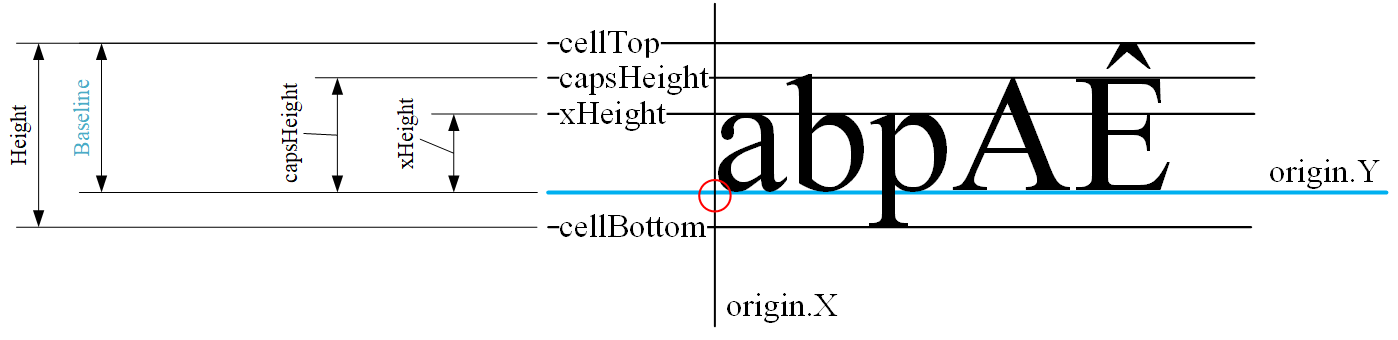
根据GlyphRun原点Y计算相应的直线垂直位置的代码如下所示:
    var baseLine = origin.Y;
    var boxTop = baseLine - glyphTypeface.Baseline * FontSize;
    var boxBottom = boxTop + glyphTypeface.Height * FontSize;
    var capsHeight = baseLine - glyphTypeface.CapsHeight * FontSize;
var lowHeight = baseLine - glyphTypeface.XHeight * FontSize;页面原文内容由Stack Overflow提供。腾讯云小微IT领域专用引擎提供翻译支持
原文链接:
https://stackoverflow.com/questions/50818492
复制相关文章
相似问题
腾讯云开发者

Copyright © 2013 - 2026 Tencent Cloud. All Rights Reserved. 腾讯云 版权所有
深圳市腾讯计算机系统有限公司 ICP备案/许可证号:粤B2-20090059  粤公网安备44030502008569号
腾讯云计算(北京)有限责任公司 京ICP证150476号 | 京ICP备11018762号