
访问Nginx背后的码头枢纽
我试图通过nginx代理访问Docker Hub。
下面是我的nginx代理配置。
 server {
        listen       800 ssl;
        ssl on;
        server_name nginx2 ;
        client_max_body_size 0;
        ssl_protocols             SSLv3 SSLv2 TLSv1 TLSv1.1 TLSv1.2 TLSv1.3;
        ssl_certificate            ssl/cert.pem;
        ssl_certificate_key        ssl/cert.key;
        location / {
                proxy_pass https://{dockerhub_host};
                proxy_ssl_server_name on;
                proxy_set_header Host $http_host;   # Required for Docker client sake
                        proxy_set_header X-Forwarded-Host $http_host;
                proxy_set_header X-Real-IP $remote_addr;
                proxy_set_header X-Forwarded-For $proxy_add_x_forwarded_for;
                proxy_set_header X-Scheme $scheme;
        }
}我已经尝试过registry-1.docker.io和hub.docker.com来代替配置中的{dockerhub_host}。
现在,我尝试使用以下命令登录到Docker。
docker login localhost:800引发以下错误:
守护进程的错误响应:尝试登录到
http://localhost:800/v2/ failed with status: 400 Bad Request
下面是nginx代理的日志:
proxy_1  | 2018/06/12 22:24:42 [error] 5#5: *1 peer closed connection in SSL handshake while SSL handshaking to upstream, client: 172.21.0.1, server: nginx2, request: "GET /v2/ HTTP/1.1", upstream: "https://34.232.188.57:80/v2/", host: "localhost:800"
proxy_1  | 2018/06/12 22:24:42 [warn] 5#5: *1 upstream server temporarily disabled while SSL handshaking to upstream, client: 172.21.0.1, server: nginx2, request: "GET /v2/ HTTP/1.1", upstream: "https://34.232.188.57:80/v2/", host: "localhost:800"
proxy_1  | 2018/06/12 22:24:42 [error] 5#5: *1 peer closed connection in SSL handshake while SSL handshaking to upstream, client: 172.21.0.1, server: nginx2, request: "GET /v2/ HTTP/1.1", upstream: "https://52.3.45.201:80/v2/", host: "localhost:800"
proxy_1  | 2018/06/12 22:24:42 [warn] 5#5: *1 upstream server temporarily disabled while SSL handshaking to upstream, client: 172.21.0.1, server: nginx2, request: "GET /v2/ HTTP/1.1", upstream: "https://52.3.45.201:80/v2/", host: "localhost:800"
proxy_1  | 2018/06/12 22:24:42 [error] 5#5: *1 peer closed connection in SSL handshake while SSL handshaking to upstream, client: 172.21.0.1, server: nginx2, request: "GET /v2/ HTTP/1.1", upstream: "https://54.209.102.157:80/v2/", host: "localhost:800"
proxy_1  | 2018/06/12 22:24:42 [warn] 5#5: *1 upstream server temporarily disabled while SSL handshaking to upstream, client: 172.21.0.1, server: nginx2, request: "GET /v2/ HTTP/1.1", upstream: "https://54.209.102.157:80/v2/", host: "localhost:800"
proxy_1  | 172.21.0.1 - - [12/Jun/2018:22:24:42 +0000] "GET /v2/ HTTP/1.1" 502 173 "-" "docker/18.03.1-ce go/go1.9.5 git-commit/9ee9f40 kernel/4.9.87-linuxkit-aufs os/linux arch/amd64 UpstreamClient(Docker-Client/18.03.1-ce \x5C(darwin\x5C))" "-"
proxy_1  | 2018/06/12 22:24:42 [error] 5#5: *5 no live upstreams while connecting to upstream, client: 172.21.0.1, server: nginx2, request: "GET /v2/ HTTP/1.1", upstream: "https://docker_host/v2/", host: "localhost:800"
proxy_1  | 172.21.0.1 - - [12/Jun/2018:22:24:42 +0000] "GET /v2/ HTTP/1.1" 502 173 "-" "docker/18.03.1-ce go/go1.9.5 git-commit/9ee9f40 kernel/4.9.87-linuxkit-aufs os/linux arch/amd64 UpstreamClient(Docker-Client/18.03.1-ce \x5C(darwin\x5C))" "-"
proxy_1  | 172.21.0.1 - - [12/Jun/2018:22:24:42 +0000] "GET /v2/ HTTP/1.1" 400 271 "-" "docker/18.03.1-ce go/go1.9.5 git-commit/9ee9f40 kernel/4.9.87-linuxkit-aufs os/linux arch/amd64 UpstreamClient(Docker-Client/18.03.1-ce \x5C(darwin\x5C))" "-"
proxy_1  | 172.21.0.1 - - [12/Jun/2018:22:24:42 +0000] "GET /v2/ HTTP/1.1" 400 271 "-" "docker/18.03.1-ce go/go1.9.5 git-commit/9ee9f40 kernel/4.9.87-linuxkit-aufs os/linux arch/amd64 UpstreamClient(Docker-Client/18.03.1-ce \x5C(darwin\x5C))" "-"
起初,我认为当我访问端口80时,会引发错误。所以,我已经将端口设置为443,
>proxy_pass https://hub.docker.com:443

>proxy_pass https://registry-1.docker.io:443
现在尝试登录命令。我仍然看到同样的错误。以下是nginx代理的日志:
proxy_1  | 172.21.0.1 - - [12/Jun/2018:22:33:09 +0000] "GET /v2/ HTTP/1.1" 503 119 "-" "docker/18.03.1-ce go/go1.9.5 git-commit/9ee9f40 kernel/4.9.87-linuxkit-aufs os/linux arch/amd64 UpstreamClient(Docker-Client/18.03.1-ce \x5C(darwin\x5C))" "-"
proxy_1  | 172.21.0.1 - - [12/Jun/2018:22:33:09 +0000] "GET /v2/ HTTP/1.1" 503 119 "-" "docker/18.03.1-ce go/go1.9.5 git-commit/9ee9f40 kernel/4.9.87-linuxkit-aufs os/linux arch/amd64 UpstreamClient(Docker-Client/18.03.1-ce \x5C(darwin\x5C))" "-"
proxy_1  | 172.21.0.1 - - [12/Jun/2018:22:33:09 +0000] "GET /v2/ HTTP/1.1" 400 271 "-" "docker/18.03.1-ce go/go1.9.5 git-commit/9ee9f40 kernel/4.9.87-linuxkit-aufs os/linux arch/amd64 UpstreamClient(Docker-Client/18.03.1-ce \x5C(darwin\x5C))" "-"
proxy_1  | 172.21.0.1 - - [12/Jun/2018:22:33:09 +0000] "GET /v2/ HTTP/1.1" 400 271 "-" "docker/18.03.1-ce go/go1.9.5 git-commit/9ee9f40 kernel/4.9.87-linuxkit-aufs os/linux arch/amd64 UpstreamClient(Docker-Client/18.03.1-ce \x5C(darwin\x5C))" "-"
docker version的输出
Client:
 Version:      18.03.1-ce
 API version:  1.37
 Go version:   go1.9.5
 Git commit:   9ee9f40
 Built:        Thu Apr 26 07:13:02 2018
 OS/Arch:      darwin/amd64
 Experimental: false
 Orchestrator: swarm

Server:
 Engine:
  Version:      18.03.1-ce
  API version:  1.37 (minimum version 1.12)
  Go version:   go1.9.5
  Git commit:   9ee9f40
  Built:        Thu Apr 26 07:22:38 2018
  OS/Arch:      linux/amd64
  Experimental: true
docker info的输出
Containers: 2
 Running: 2
 Paused: 0
 Stopped: 0
Images: 44
Server Version: 18.03.1-ce
Storage Driver: overlay2
 Backing Filesystem: extfs
 Supports d_type: true
 Native Overlay Diff: true
Logging Driver: json-file
Cgroup Driver: cgroupfs
Plugins:
 Volume: local
 Network: bridge host ipvlan macvlan null overlay
 Log: awslogs fluentd gcplogs gelf journald json-file logentries splunk syslog
Swarm: inactive
Runtimes: runc
Default Runtime: runc
Init Binary: docker-init
containerd version: 773c489c9c1b21a6d78b5c538cd395416ec50f88
runc version: 4fc53a81fb7c994640722ac585fa9ca548971871
init version: 949e6fa
Security Options:
 seccomp
  Profile: default
Kernel Version: 4.9.87-linuxkit-aufs
Operating System: Docker for Mac
OSType: linux
Architecture: x86_64
CPUs: 2
Total Memory: 1.952GiB
Name: linuxkit-025000000001
ID: OCVQ:XRBF:3H7P:PB3A:YQUH:FU2O:6BVB:BMHR:G7HX:UK63:SDKU:NPVI
Docker Root Dir: /var/lib/docker
Debug Mode (client): false
Debug Mode (server): true
 File Descriptors: 39
 Goroutines: 63
 System Time: 2018-06-13T23:16:57.569645612Z
 EventsListeners: 3
HTTP Proxy: docker.for.mac.http.internal:3128
HTTPS Proxy: docker.for.mac.http.internal:3129
Registry: https://index.docker.io/v1/
Labels:
Experimental: true
Insecure Registries:
 127.0.0.0/8
Live Restore Enabled: false
更新
在塔伦解决方案的帮助下,我得到了登录的帮助。现在,我试图将图片拉/推到hub.docker.com站点,但没有运气。
> docker push localhost:800/nadella/hello-world

Error:

The push refers to repository [localhost:800/nadella/helloworld]
2b8cbd0846c5: Pushing [==================================================>]  3.584kB
unauthorized: authentication required
日志:
proxy_1  | 172.21.0.1 - - [14/Jun/2018:04:57:26 +0000] "POST /v2/nadella/helloworld/blobs/uploads/ HTTP/1.1" 202 0 "-" "docker/18.03.1-ce go/go1.9.5 git-commit/9ee9f40 kernel/4.9.87-linuxkit-aufs os/linux arch/amd64 UpstreamClient(Docker-Client/18.03.1-ce \x5C(darwin\x5C))" "-"
proxy_1  | 172.21.0.1 - - [14/Jun/2018:05:00:09 +0000] "GET /v2/ HTTP/1.1" 401 87 "-" "docker/18.03.1-ce go/go1.9.5 git-commit/9ee9f40 kernel/4.9.87-linuxkit-aufs os/linux arch/amd64 UpstreamClient(Docker-Client/18.03.1-ce \x5C(darwin\x5C))" "-"
proxy_1  | 172.21.0.1 - - [14/Jun/2018:05:00:10 +0000] "HEAD /v2/nadella/helloworld/blobs/sha256:9bb5a5d4561a5511fa7f80718617e67cf2ed2e6cdcd02e31be111a8d0ac4d6b7 HTTP/1.1" 404 0 "-" "docker/18.03.1-ce go/go1.9.5 git-commit/9ee9f40 kernel/4.9.87-linuxkit-aufs os/linux arch/amd64 UpstreamClient(Docker-Client/18.03.1-ce \x5C(darwin\x5C))" "-"
proxy_1  | 172.21.0.1 - - [14/Jun/2018:05:00:11 +0000] "POST /v2/nadella/helloworld/blobs/uploads/?from=helloworld&mount=sha256%3A9bb5a5d4561a5511fa7f80718617e67cf2ed2e6cdcd02e31be111a8d0ac4d6b7 HTTP/1.1" 401 307 "-" "docker/18.03.1-ce go/go1.9.5 git-commit/9ee9f40 kernel/4.9.87-linuxkit-aufs os/linux arch/amd64 UpstreamClient(Docker-Client/18.03.1-ce \x5C(darwin\x5C))" "-"
proxy_1 | 172.21.0.1 - - [14/Jun/2018:05:00:11 +0000] "POST /v2/nadella/helloworld/blobs/uploads/ HTTP/1.1" 202 0 "-" "docker/18.03.1-ce go/go1.9.5 git-commit/9ee9f40 kernel/4.9.87-linuxkit-aufs os/linux arch/amd64 UpstreamClient(Docker-Client/18.03.1-ce \x5C(darwin\x5C))" "-"我看了~/.docker/config.json
{
        "auths": {
                "localhost:800": {}
        },
        "HttpHeaders": {
                "User-Agent": "Docker-Client/18.03.1-ce (darwin)"
        },
        "credsStore": "osxkeychain"
}我甚至在配置文件中添加了"https://index.docker.io/v1/":{}并进行了检查。但没起作用。
回答 1
Stack Overflow用户
发布于 2018-06-14 04:27:30
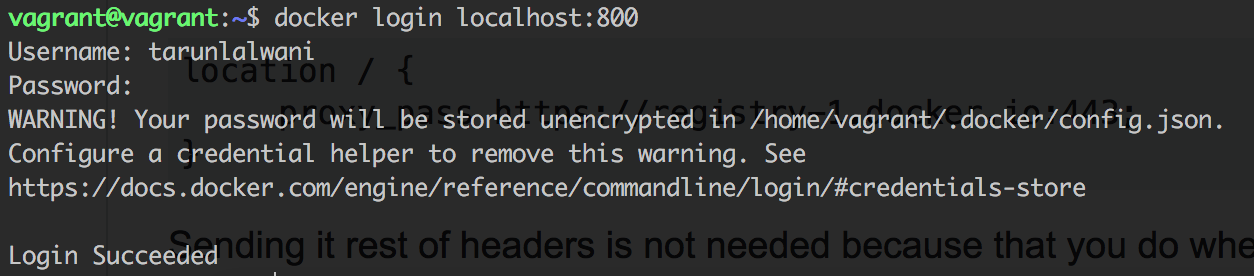
你唯一需要的就是下面
location / {
     proxy_pass https://registry-1.docker.io:443;
}
不需要将其余的头发送给它,因为当它是您自己的服务时,您就会这样做。然后它就起作用了
更新1
您还需要使用下面的配置将授权头传递给请求。
location / {
   client_max_body_size 1024M;
   proxy_pass https://registry-1.docker.io:443;
   proxy_set_header Authorization $http_authorization;
   proxy_pass_header  Authorization;
   proxy_redirect https://registry-1.docker.io $scheme://$http_host;
}
一旦你这样做了,它就像一种魅力。


https://stackoverflow.com/questions/50806356
复制相似问题
腾讯云开发者

Copyright © 2013 - 2026 Tencent Cloud. All Rights Reserved. 腾讯云 版权所有
深圳市腾讯计算机系统有限公司 ICP备案/许可证号:粤B2-20090059  粤公网安备44030502008569号
腾讯云计算(北京)有限责任公司 京ICP证150476号 | 京ICP备11018762号