
如何使用控制台应用程序中的实体框架从数据库中填充html字段?
我创建了一个html文件,我将使用该文件生成一个使用SelectPDF的PDF表单。此HTML有文本字段,复选框需要填充/检查我的MySQL数据库中的数据。我想使用c#与我的数据库进行通信,所以我使用的是实体框架。这个想法是让控制台应用程序运行,从数据库获取信息,填充html文件中的字段,然后程序从其中生成一个PDF。到目前为止,HTML到PDF部分按预期工作。
我不知道的是,如何将数据从数据库中的表传递到简单的HTML文件,因为我没有使用Razor pages/ASPX文件。
我怎样才能用实体框架模型来实现呢?
目前,我正在使用一个包含5个表的小型数据库进行测试--真正的数据库有20+表。



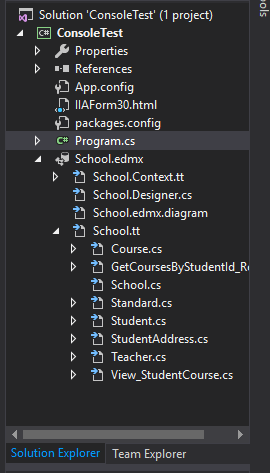
Program.cs代码:
//assign html file to string, add directory location of file.
string HtmlString = (@"C:\Users\UserName\Documents\Visual Studio 2017\ConsoleTest\ConsoleTest\IIAForm30.html");

    // instantiate a html to pdf converter object
    HtmlToPdf converter = new HtmlToPdf();

/*********************************************************
 *                                                       *
 *                                                       *
 *                      PDF Settings                     *
 *                                                       *
 *                                                       *
 * *******************************************************/

//set PDF page size
//supports:(A0 to A10),(B0 to B5),(ArchA to ArchE),(Letter, HalfLetter, Letter11x17, Note, Flsa, Ledger)
converter.Options.PdfPageSize = PdfPageSize.A4;

//set PDF page orientation
//Supports Landscape and Portrait
converter.Options.PdfPageOrientation = PdfPageOrientation.Portrait;


//ShrinkOnly: the html content is resized only if the content width is
//larger than the destination space (pdf page or rectangle) width.
converter.Options.AutoFitWidth = HtmlToPdfPageFitMode.ShrinkOnly;

// NoAdjustment: the html content is not resized vertically in any way to fit the available space.
//If the content is larger, it will be cut and not all of it will be displayed in the generated pdf file.
converter.Options.AutoFitHeight = HtmlToPdfPageFitMode.NoAdjustment;

// header settings
converter.Options.DisplayHeader = true;
converter.Header.DisplayOnFirstPage = false;
converter.Header.DisplayOnOddPages = true;
converter.Header.DisplayOnEvenPages = true;
converter.Header.Height = 20;

//Page Layout
//SinglePage: Displays one page at a time when open.
converter.Options.ViewerPreferences.PageLayout = PdfViewerPageLayout.SinglePage;

//converts html to pdf.
PdfDocument doc1 = converter.ConvertUrl(HtmlString);
PdfDocument doc2 = converter.ConvertUrl(HtmlString);
PdfDocument doc3 = converter.ConvertUrl(HtmlString);

// save pdf document
doc1.Save("Sample1.pdf");
doc2.Save("Sample2.pdf");
doc3.Save("Sample3.pdf");

// create a new pdf document
PdfDocument doc = new PdfDocument();

// add the pages of these documents to the new document
doc.Append(doc1);
doc.Append(doc2);
doc.Append(doc3);

// save pdf document
doc.Save("MergedDoc.pdf");

// close pdf document
doc.Close();

// close the original pdf documents
doc1.Close();
doc2.Close();
doc3.Close();

//original pdf files are discarded/deleted
File.Delete("Sample1.pdf");
File.Delete("Sample2.pdf");
File.Delete("Sample3.pdf");
用于上下文的HTML片段(仅使用纯文本占据数据库日期的位置):
<table class="tg-3" style="undefined;table-layout: fixed; width: 100%">
	<colgroup>
		<col style="width: 130px">
		<col style="width: 120px">
		<col style="width: 120px">
		<col style="width: 110px">
		<col style="width: 100px">
		<col style="width: 100px">
		<col style="width: 150px">
	</colgroup>
	<tr>
		<td class="tg-576q" colspan="7" style="border-top: none;">I. Inspector Information</td>
	</tr>
	<tr>
		<td class="tg-r0wx" style="border-bottom: none;">Date of Inspection</td>
		<td class="tg-es7u" style="border-bottom: none;border-right: none;">Inspected by:</td>
		<td class="tg-9vem" rowspan="3" style="border-right: none;border-left: none;border-right: none;">John Doe</td>
		<td class="tg-r0wx" style="border-bottom: none; border-right: none;border-left: none;"></td>
		<td class="tg-9vem" rowspan="3" style="border-left: none; border-right: none;">Inspector</td>
		<td class="tg-es7u" style="border-left: none;border-right: none;border-bottom: none;"></td>
		<td class="tg-9vem" rowspan="3" style="border-left: none;">(777)777-7777</td>
	</tr>
	<tr>
		<td class="tg-9vem" rowspan="1" style="border-top: none; border-right-style: solid;border-bottom: none; text-align: right">2018-02-03</td>
		<td class="tg-es7u" rowspan="2" style="border-right: none;border-top: none; border-left-style: solid;">Name:</td>
		<td class="tg-es7u" rowspan="2" style="border-top: none; border-right: none; border-left: none;">Title:</td>
		<td class="tg-es7u" rowspan="2" style="border-left: none; border-top: none; border-right: none;">Phone Number:</td>
	</tr>
	<tr>
		<td rowspan="1" style="border-top: none"></td>
	</tr>
	<tr>
		<td class="tg-r0wx" colspan="3" style="border-bottom: none;">Inspection Company</td>
		<td class="tg-es7u" colspan="1" rowspan="3" style="border-right: none;">Inspector Signature:</td>
		<td class="tg-n603" colspan="3" rowspan="3" style="border-left: none;"><img src="signatureStock.PNG" width="180" height="50"></td>
	</tr>
	<tr>
		<td class="tg-tnbn" colspan="3" rowspan="1" style="border-top: none;">John Doe Company</td>
	</tr>
</table>
回答 1
Stack Overflow用户
发布于 2018-06-05 16:47:38
欢迎。我建议你看看图书馆:
https://github.com/Antaris/RazorEngine
这是一种能够从模板生成HTML的方法,也是传递模型的方法。它与用于ASP.NET MVC的Razor库非常相似,但不需要在web项目中使用。
我将用本地模板替换硬编码的HTML路径,使用实体框架从DB获取数据,将其作为模型传递到模板中,然后将模板输出呈现为PDF格式。瞧。
https://stackoverflow.com/questions/50705059
复制相似问题
腾讯云开发者

Copyright © 2013 - 2026 Tencent Cloud. All Rights Reserved. 腾讯云 版权所有
深圳市腾讯计算机系统有限公司 ICP备案/许可证号:粤B2-20090059  粤公网安备44030502008569号
腾讯云计算(北京)有限责任公司 京ICP证150476号 | 京ICP备11018762号