
如何管理与动画ggplot2 2-图并行处理?
我正试图用ggplot2和magick来构建一个动画芭蕾,它正在“每天一天”的基础上成长。不幸的是,我的数据集中有成千上万个条目(几年来每天的日期和不同的类别),这使得处理非常慢。因此,我使用snow包来加快处理时间。但是,当我在集群中拆分数据并调用ggplot()时遇到了麻烦。
magick需要分割动画的每个日期的数据,而snow则需要对每个集群进行并行处理。因此,我得到了列表列表,这会导致在clusterApply()中调用clusterApply()时出现问题。列表的结构当然取决于我要拆分数据的顺序(参见示例代码中的版本1和2),但还没有版本导致成功。我认为在使用data$date时对list元素的访问不起作用,因为列表中现在有更多的级别。
所以,我的问题是:通过这种方式使用并行处理可以通过ggplot2构建一个动画图吗?
下面是可视化我的问题的示例代码(我试图尽可能地构造它):
########################################################################
# setup
########################################################################
library(parallel)
library(snow)
library(ggplot2)
library(magick)

# creating some sample data for one year
# 4 categories; each category has a specific value per day
set.seed(1)
x <- data.frame(
  rep(as.Date((Sys.Date()-364):Sys.Date(), origin="1970-01-01"),4),
  c(rep("cat01",length.out=365),
    rep("cat02",length.out=365),
    rep("cat03",length.out=365),
    rep("cat04",length.out=365)),
  sample(0:50,365*4, replace=TRUE)
)
colnames(x) <- c("date", "category", "value")
x$category <- factor(x$category)

# creating a cumulative measure making the graphs appear "growing"
x$cumsum <- NA
for(i in levels(x$category)){
  x$cumsum[x$category == i] <- cumsum(x$value[x$category == i])
}
x <- x[order(x$date),]

# number of cores
cores <- detectCores()

# clustering
cl <- makeCluster(cores, type="SOCK")

# adding a grouping-variable to the data for each cluster
x$group <- rep(1:cores, length.out = nrow(x))

########################################################################
# splitting the data
########################################################################
# V1: worker first, plotting second
# splitting data for the worker
datasplit01 <- split(x, x$group)

# splitting data for plotting
datalist01 <- clusterApply(cl, datasplit01, function(x){split(x, x$date)})

########################################################################
# V2: plotting first, worker second
# splitting data for plotting
datasplit02 <- split(x, x$date)

# splitting data for the worker
datalist02 <- clusterApply(cl, datasplit02, function(x){split(x, x$group)})

########################################################################
# conventional plotting
########################################################################
# plotting the whole data works fine
ggplot(x)+
  geom_bar(aes(category, value), stat = "identity")

########################################################################
# conventional animation with ggplot2
########################################################################
# animation per date works, but pretty slowly

# opening magick-device
img <- image_graph(1000, 700, res = 96)

# plotting
  # replace the second line with first line if the code is too slow and if
  # you like to get an impression of what the plot should look like
# out <- lapply(datasplit02[1:50], function(data){   # line 1: downscaled dataset
out <- lapply(datasplit02, function(data){           # line 2: full dataset
  plot <- ggplot(data)+
    geom_bar(aes(category, cumsum), stat = "identity")+
    # holding breaks and limits constant per plot
    scale_y_continuous(expand = c(0,0),
                       breaks = seq(0,max(x$cumsum)+500,500),
                       limits = c(0,max(x$cumsum)+500))+
    ggtitle(data$date)
  print(plot)
})
dev.off()

# animation
animation <- image_animate(img, fps = 5)
animation

########################################################################
# parallel process plotting
########################################################################
# animation per date in parallel processing does not work, probably
# due to ggplot not working with a list of lists

# opening magick-device
img <- image_graph(1000, 700, res = 96)

# plotting
out <- clusterApply(cl, datalist01, function(data){
  plot <- ggplot(data)+
    geom_bar(aes(category, cumsum), stat = "identity")+
    # holding breaks and limits constant per plot
    scale_y_continuous(expand = c(0,0),
                       breaks = seq(0,max(x$cumsum)+500,500),
                       limits = c(0,max(x$cumsum)+500))+
    ggtitle(data$date)
  print(plot)
})
dev.off()

# animation
animation <- image_animate(img, fps = 5)
animation
谢谢你的建议!
更新:使用降雪,代码要短得多,我没有得到相同的错误,但设备仍然没有产生一个情节。
########################################################################
# snowfall version
########################################################################
library(parallel)
library(snowfall)
library(ggplot2)
library(magick)

# creating some sample data for one year
# 4 categories; each category has a specific value per day
set.seed(1)
x <- data.frame(
  rep(as.Date((Sys.Date()-364):Sys.Date(), origin="1970-01-01"),4),
  c(rep("cat01",length.out=365),
    rep("cat02",length.out=365),
    rep("cat03",length.out=365),
    rep("cat04",length.out=365)),
  sample(0:50,365*4, replace=TRUE)
)
colnames(x) <- c("date", "category", "value")
x$category <- factor(x$category)

# creating a cumulative measure making the graphs appear "growing"
x$cumsum <- NA
for(i in levels(x$category)){
  x$cumsum[x$category == i] <- cumsum(x$value[x$category == i])
}
x <- x[order(x$date),]

# number of cores
cores <- detectCores()

# clustering
sfInit(parallel = TRUE, cpus = cores, type = "SOCK")

# splitting data for plotting
datalist <- split(x, x$date)

# making everything accessible in the cluster
sfExportAll()
sfLibrary(ggplot2)
sfLibrary(magick)

# opening magick-device
img <- image_graph(1000, 700, res = 96)

# plotting
out <- sfLapply(datalist, function(data){
  plot <- ggplot(data)+
    geom_bar(aes(category, cumsum), stat = "identity")+
    # holding breaks and limits constant per plot
    scale_y_continuous(expand = c(0,0),
                       breaks = seq(0,max(x$cumsum)+500,500),
                       limits = c(0,max(x$cumsum)+500))+
    ggtitle(data$date)
plot
})
dev.off()

# animation
animation <- image_animate(img, fps = 5)
animation
在使用时
img <- image_graph(1000, 700, res = 96)
out
dev.off()
animation <- image_animate(img, fps = 5)
animation情节就产生了。但是,调用out非常慢,这就是为什么我必须避免使用此选项才能使其工作。
回答 2
Stack Overflow用户
发布于 2018-06-05 14:47:16
所以,我的解决方案:
ncores周期中的拆分日期- 获取每个时间段的图表,并将其保存为GIF。
- 读取所有GIF并将它们合并
########################################################################
# setup
########################################################################

# creating some sample data for one year
# 4 categories; each category has a specific value per day
set.seed(1)
x <- data.frame(
  rep(as.Date((Sys.Date()-364):Sys.Date(), origin="1970-01-01"),4),
  c(rep("cat01",length.out=365),
    rep("cat02",length.out=365),
    rep("cat03",length.out=365),
    rep("cat04",length.out=365)),
  sample(0:50,365*4, replace=TRUE)
)
colnames(x) <- c("date", "category", "value")

# creating a cumulative measure making the graphs appear "growing"
library(dplyr)
x <- x %>%
  as_tibble() %>%
  arrange(date) %>%
  mutate(date = as.character(date)) %>%
  group_by(category) %>%
  mutate(cumsum = cumsum(value))

y_max <- max(x$cumsum) + 500

library(doParallel)

all_dates <- unique(x$date)
ncores <- detectCores() - 1
ind_cluster <- sort(rep_len(1:ncores, length(all_dates)))
date_cluster <- split(all_dates, ind_cluster)
registerDoParallel(cl <- makeCluster(ncores))

tmp <- tempfile()

files <- foreach(ic = 1:ncores, .packages = c("tidyverse", "magick")) %dopar% {

  img <- image_graph(1000, 700, res = 96)

  x %>%
    filter(date %in% date_cluster[[ic]]) %>%
    group_by(date) %>%
    do(
      plot = ggplot(.) +
        geom_col(aes(category, cumsum)) +
        scale_y_continuous(expand = c(0, 0),
                           breaks = seq(0, y_max, 500),
                           limits = c(0, y_max))
    ) %>%
  pmap(function(date, plot) {
    print(plot + ggtitle(date))
    NULL
  })

  dev.off()

  image_write(image_animate(img, fps = 5), paste0(tmp, ic, ".gif"))
}
stopCluster(cl)

test <- do.call(c, lapply(files, magick::image_read))
testStack Overflow用户
发布于 2018-11-06 13:48:10
我会做
library(tidyverse)
library(gganimate)
x %>%
  as.tibble() %>%
  arrange(date) %>%
  group_by(category) %>%
  mutate(Sum=cumsum(value)) %>%
  ggplot(aes(category, Sum, fill = category)) +
  geom_col(position = 'identity') +
  ggtitle("{frame_time}") +
  transition_time(date) +
  ease_aes('linear')
anim_save("GIF.gif")
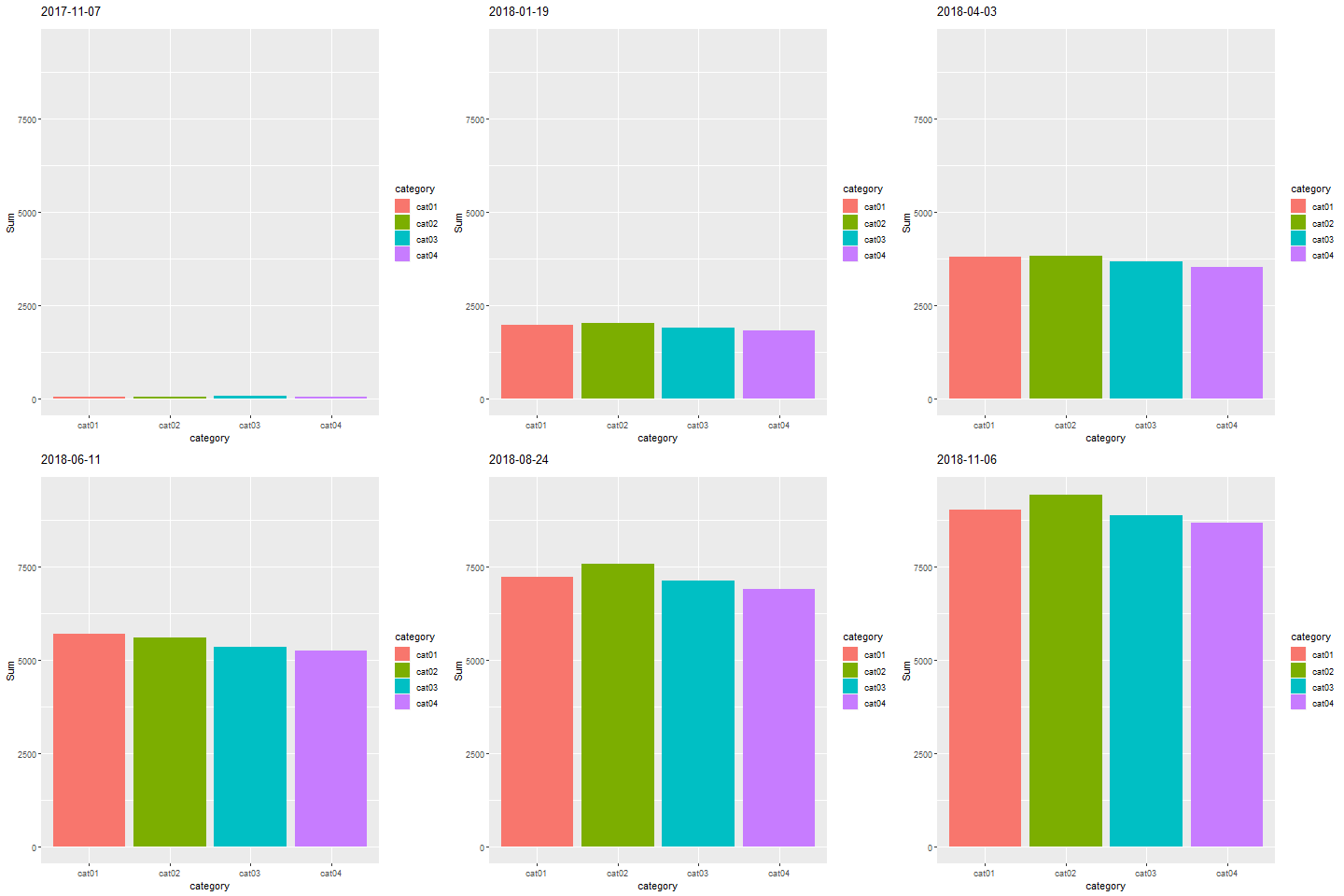
如果数据太多,我建议将过渡时间增加到几个月,而不是几天。
https://stackoverflow.com/questions/50697548
复制相似问题
腾讯云开发者

Copyright © 2013 - 2026 Tencent Cloud. All Rights Reserved. 腾讯云 版权所有
深圳市腾讯计算机系统有限公司 ICP备案/许可证号:粤B2-20090059  粤公网安备44030502008569号
腾讯云计算(北京)有限责任公司 京ICP证150476号 | 京ICP备11018762号