
Qt:动画QPixmap
答案代码位于这里(https://stackoverflow.com/a/50550471/4962676):
https://github.com/eyllanesc/stackoverflow/tree/master/50550089
答案比下面的代码更简单--上面的代码使用QPropertyAnimation,而不是像下面这样使用QThread的for循环--这节省了代码中的大量空间,而且效率更高。
原问题如下:
我正在用Qt编写一个应用程序,我在关闭应用程序和线程时遇到了问题。
基本上,应用程序窗口会关闭,但是进程仍然处于后台,永远不会关闭。
我的主标题(只是包含了类,因为有很多包含):
class ChatUI : public QWidget
{
    Q_OBJECT

    public:
        explicit ChatUI(QWidget *parent = 0);
        ~ChatUI();

    private:
        // The UI itself
        Ui::ChatUI * ui;

        // Current appliation startup directory
        QString applicationStartupDir = QDir::currentPath() + "/";

        // Typing indicator stuff
        QFrame * typingIndicator = nullptr;
        QImage circleImage;
        ThreadController * typingIndicatorThread = new ThreadController(false);
        bool currentlyFadingTypingIndicator = false;

        // The calm before the storm
        bool closing = false;

        void showTypingIndicator();
        void hideTypingIndicator();
    signals:
        void WidgetClosed();

    protected:
        void closeEvent(QCloseEvent*);
};
我的控制器(头):
#ifndef THREADCONTROLLER_H
#define THREADCONTROLLER_H

#include <QObject>
#include <QThread>
#include <QImage>
#include <QFrame>

#include "typingindicatorthread.h"

class ThreadController : public QObject
{
    Q_OBJECT
    QThread * workerThread = nullptr;
    TypingIndicatorThread * worker = nullptr;
signals:
    void startWork(QFrame*, QImage);
    //void killThread();
public slots:
    void killThread();
public:
    ThreadController(bool);
};

#endif // THREADCONTROLLER_H
我的控制器(消息来源):
#include "threadcontroller.h"
#include <QDebug>

ThreadController::ThreadController(bool asd)
{
    if (asd == true){
        workerThread = new QThread();

        worker = new TypingIndicatorThread;
        worker->moveToThread(workerThread);
        workerThread->start();

        connect(this, &ThreadController::startWork, worker, &TypingIndicatorThread::startWorker);
    } else {
        workerThread = new QThread();
        workerThread->quit();
        workerThread->wait();

        delete workerThread;
    }
}

void ThreadController::killThread() {
    emit worker->killSignal();

    workerThread->quit();
    workerThread->wait();
}
我的线程(标题):
#ifndef TYPINGINDICATORTHREAD_H
#define TYPINGINDICATORTHREAD_H

#include <QObject>
#include <QLabel>
#include <QPixmap>
#include <QImage>
#include <QEventLoop>
#include <QTimer>
#include <QMetaObject>
#include <QPropertyAnimation>

class TypingIndicatorThread : public QObject
{
    Q_OBJECT
public:
    ~TypingIndicatorThread();
private:
    bool kill = false;
public slots:
    void startWorker(QFrame*, QImage);
    void killSignal();
};

#endif // TYPINGINDICATORTHREAD_H
我的帖子(来源):
#include "typingindicatorthread.h"
#include <QDebug>

inline void delay(int millisecondsWait)
{
    QEventLoop loop;
    QTimer t;
    t.connect(&t, &QTimer::timeout, &loop, &QEventLoop::quit);
    t.start(millisecondsWait);
    loop.exec();
}

void TypingIndicatorThread::startWorker(QFrame * typingIndicator, QImage circleImage) {
    int max = 30;
    int min = 5;
    int waitTime = 5;

    QMetaObject::invokeMethod(typingIndicator, [=]() {
        QLabel * circle1 = new QLabel(typingIndicator);
        circle1->setGeometry(0,0, 50, 50);
        circle1->setAlignment(Qt::AlignCenter);
        circle1->show();

        QLabel * circle2 = new QLabel(typingIndicator);
        circle2->setGeometry(40,0, 50, 50);
        circle2->setAlignment(Qt::AlignCenter);
        circle2->show();

        QLabel * circle3 = new QLabel(typingIndicator);
        circle3->setGeometry(80,0, 50, 50);
        circle3->setAlignment(Qt::AlignCenter);
        circle3->show();

        forever {
            if (kill) {
                qDebug() << "Killing thread";

                return;
            }

            // Circle1
            for (int i=min; i < max; i++) {
                delay(waitTime);

                QPixmap circlePixmap = QPixmap::fromImage(circleImage).scaled(QSize(i, i), Qt::KeepAspectRatio, Qt::SmoothTransformation);

                circle1->setPixmap(circlePixmap);
            }

            for (int i=max; i > min; i--) {
                delay(waitTime);

                QPixmap circlePixmap = QPixmap::fromImage(circleImage).scaled(QSize(i, i), Qt::KeepAspectRatio, Qt::SmoothTransformation);

                circle1->setPixmap(circlePixmap);
            }

            // Circle2
            for (int i=min; i < max; i++) {
                delay(waitTime);

                QPixmap circlePixmap = QPixmap::fromImage(circleImage).scaled(QSize(i, i), Qt::KeepAspectRatio, Qt::SmoothTransformation);

                circle2->setPixmap(circlePixmap);
            }

            for (int i=max; i > min; i--) {
                delay(waitTime);

                QPixmap circlePixmap = QPixmap::fromImage(circleImage).scaled(QSize(i, i), Qt::KeepAspectRatio, Qt::SmoothTransformation);

                circle2->setPixmap(circlePixmap);
            }

            // Circle3
            for (int i=min; i < max; i++) {
                delay(waitTime);

                QPixmap circlePixmap = QPixmap::fromImage(circleImage).scaled(QSize(i, i), Qt::KeepAspectRatio, Qt::SmoothTransformation);

                circle3->setPixmap(circlePixmap);
            }

            for (int i=max; i > min; i--) {
                delay(waitTime);

                QPixmap circlePixmap = QPixmap::fromImage(circleImage).scaled(QSize(i, i), Qt::KeepAspectRatio, Qt::SmoothTransformation);

                circle3->setPixmap(circlePixmap);
            }
        }
    });
}

void TypingIndicatorThread::killSignal() {
    qDebug() << "oh no we are going to the shadow realm";

    kill = true;
}

TypingIndicatorThread::~TypingIndicatorThread() {
    emit killSignal();
}
我之所以在我的动画中使用混乱的循环是因为我尽可能多地研究动画图像,但是没有什么可以在QML之外制作动画,而且应用程序是用c++制作的。
如果可能的话,使用QPropertyAnimation作为替代方案是很棒的,但是我似乎不能在更新它显示的大小的同时,动画化气泡(圆圈)的大小。
我很抱歉,如果这是大量的代码,我只是想提供尽可能多的上下文(这是相关的),以帮助解决这个问题。
回答 1
Stack Overflow用户
发布于 2018-05-27 08:46:26
没有必要使用QThread来制作动画,因为这个Qt提供了类QPropertyAnimation,如果您希望动画是连续的,则必须使用QSequentialAnimationGroup。
在QLabel的情况下,必须将scaledContents设置为true,以便QPixmap与QLabel的大小相同。
#include <QApplication>
#include <QFrame>
#include <QLabel>
#include <QSequentialAnimationGroup>
#include <QPropertyAnimation>

int main(int argc, char *argv[])
{
    QApplication a(argc, argv);
    QFrame frame;
    frame.resize(320, 240);
    QSequentialAnimationGroup group;
    group.setLoopCount(-1);
    int minSize = 5;
    int maxSize = 30;
    int labelSize = 50;;
    for(const QPoint & pos: {QPoint(0, 0), QPoint(0, 40), QPoint(0, 80)}){
        QRect startVal = QRect(pos + (QPoint(labelSize, labelSize) + QPoint(-minSize, -minSize))/2 , QSize(minSize, minSize));
        QRect endVal = QRect(pos + (QPoint(labelSize, labelSize) + QPoint(-maxSize, -maxSize))/2 , QSize(maxSize, maxSize));
        QLabel *label = new QLabel(&frame);
        label->setGeometry(startVal);
        label->setPixmap(QPixmap(":/circle.png"));
        label->setScaledContents(true);
        label->setAlignment(Qt::AlignCenter);
        QPropertyAnimation *animation = new QPropertyAnimation(label, "geometry");
        animation->setStartValue(startVal);
        animation->setKeyValueAt(.5, endVal);
        animation->setEndValue(startVal);
        animation->setDuration(1000);
        group.addAnimation(animation);
    }
    group.start();
    frame.show();
    return a.exec();
}您可以在以下链接中找到完整的代码
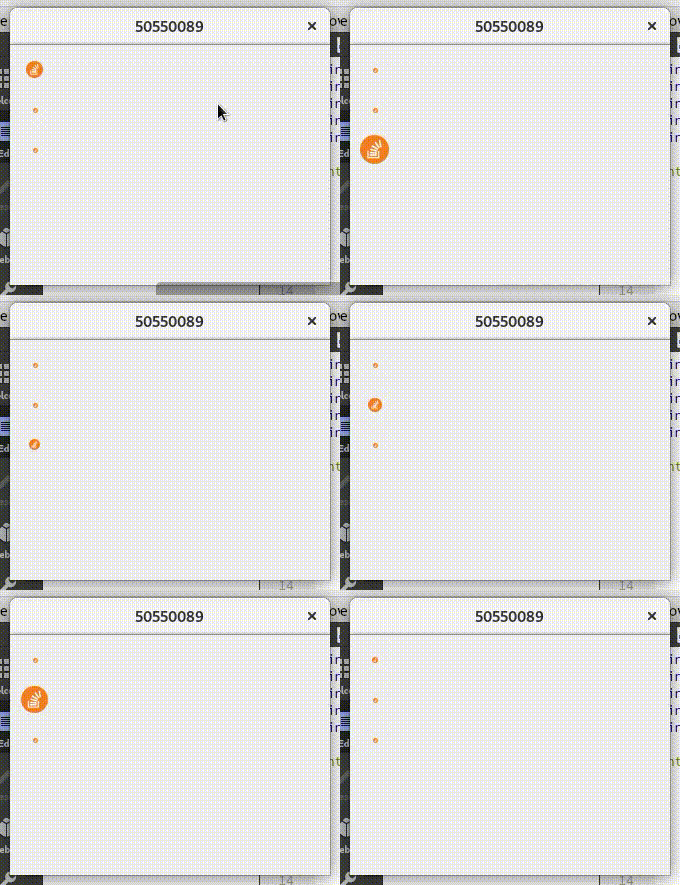
https://stackoverflow.com/questions/50550089
复制相似问题
腾讯云开发者

Copyright © 2013 - 2026 Tencent Cloud. All Rights Reserved. 腾讯云 版权所有
深圳市腾讯计算机系统有限公司 ICP备案/许可证号:粤B2-20090059  粤公网安备44030502008569号
腾讯云计算(北京)有限责任公司 京ICP证150476号 | 京ICP备11018762号