
如何在HBox中使用BorderPane对齐方式对齐BorderPane?
我正在尝试的是对齐HBox按钮,使其在对话框的底部居中。我想在fxml.However中这样做,BorderPane对齐是在label中工作的。这是我这边的代码,我认为BorderPane.alignment="BOTTOM_CENTER“必须工作,即使标签是底部的。
类文件:
package application;

import java.io.IOException;

import javafx.application.Application;
import javafx.fxml.FXMLLoader;
import javafx.scene.Parent;
import javafx.scene.Scene;
import javafx.stage.Stage;

public class HBoxDialog extends Application {

@Override
public void start(Stage primaryStage) {
    try {
        Parent root = FXMLLoader.load(getClass().getResource("HBoxDialog.fxml"));
        primaryStage.setScene(new Scene(root, 500, 100));
        primaryStage.show();
    } catch (IOException e) {
        e.printStackTrace();
    }
}

public static void main(String[] args) {
    launch(args);
}
}
FXML文件:
<?xml version="1.0" encoding="UTF-8"?>
<?import javafx.scene.layout.HBox?>
<?import javafx.scene.control.Button?>
<?import javafx.scene.control.Label?>
<?import javafx.geometry.Insets?>
<?import javafx.scene.text.Font?>
<?import javafx.scene.layout.BorderPane?>
<BorderPane xmlns:fx="http://javafx.com/fxml/1">

<top>
    <Label text="this is dialogbox" BorderPane.alignment="TOP_CENTER"/>
    <font>
        <Font size="35"/>
    </font>
</top>

<bottom>
    <HBox spacing="10">
        <Button text="Okay" prefWidth="90" BorderPane.alignment="BOTTOM_CENTER"/>
        <Button text="Cancel" prefWidth="90" BorderPane.alignment="BOTTOM_CENTER"/>
        <Button text="Help" prefWidth="90" BorderPane.alignment="BASELINE_RIGHT"/>
    </HBox>
</bottom>
</BorderPane>回答 1
Stack Overflow用户
发布于 2018-05-23 15:39:08
BorderPane.alignment静态属性仅适用于父节点为BorderPane的节点。在FXML文件中定义的Button有一个HBox作为父文件,因此在按钮上设置BorderPane.alignment属性不会产生任何效果。
只需使用HBox的alignment属性(该属性将HBox的子节点定位在其边界内),就可以通过在HBox中对按钮进行对齐来达到预期的效果:
<?xml version="1.0" encoding="UTF-8"?>
<?import javafx.scene.layout.HBox?>
<?import javafx.scene.control.Button?>
<?import javafx.scene.control.Label?>
<?import javafx.geometry.Insets?>
<?import javafx.scene.text.Font?>
<?import javafx.scene.layout.BorderPane?>
<BorderPane xmlns:fx="http://javafx.com/fxml/1">

    <top>
        <Label text="this is dialogbox"
            BorderPane.alignment="TOP_CENTER" />
        <font>
            <Font size="35" />
        </font>
    </top>

    <bottom>
        <HBox spacing="10" alignment="CENTER">
            <Button text="Okay" prefWidth="90" />
            <Button text="Cancel" prefWidth="90" />
            <Button text="Help" prefWidth="90" />
        </HBox>
    </bottom>
</BorderPane>
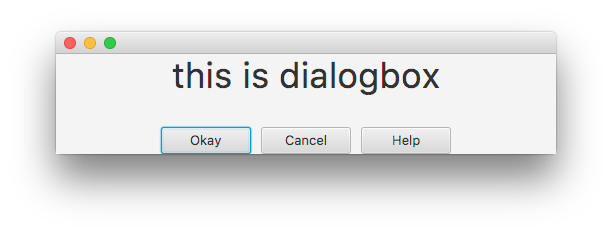
这给了我们
Label需要BorderPane.alignment="CENTER"但HBox需要alignment="CENTER"的原因是因为它们具有不同的可调整大小范围,特别是它们的最大宽度不同。默认情况下,标签的最大宽度是它的首选宽度,而HBox的最大宽度是无限的。您可以通过在它们上设置背景色来看到这一点:
    <Label text="this is dialogbox"
        BorderPane.alignment="TOP_CENTER"
        style="-fx-background-color: aquamarine;"/>

    <!-- ... -->

    <HBox spacing="10" alignment="CENTER"
      style="-fx-background-color: lightskyblue;">
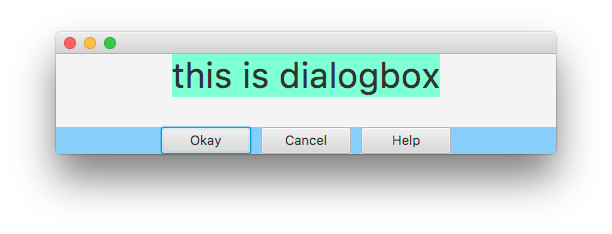
alignment属性将节点的内容定位在其范围内。由于标签在其边界内没有要定位文本的额外空间,因此默认设置的alignment属性不会产生任何效果。另一方面,标签的宽度小于边框窗格的顶部区域,因此在该区域中有放置它的空间。BorderPane.alignment="CENTER"属性将整个标签放在边框窗格的顶部区域的中心。
相反,HBox本身已经填充边框窗格底部区域的整个宽度。因此,在该区域内没有额外的空间来对齐它,因此对于HBox,设置BorderPane.alignment="CENTER"不会有任何效果。另一方面,HBox本身的空间大于按钮所需的空间,因此可以使用HBox的alignment="CENTER"属性在HBox本身中对齐按钮(HBox的内容)。
如果需要,可以更改最大宽度以实现相同的效果。例如:
<?xml version="1.0" encoding="UTF-8"?>
<?import java.lang.Double?>
<?import javafx.scene.layout.HBox?>
<?import javafx.scene.control.Button?>
<?import javafx.scene.control.Label?>
<?import javafx.geometry.Insets?>
<?import javafx.scene.text.Font?>
<?import javafx.scene.layout.BorderPane?>
<BorderPane xmlns:fx="http://javafx.com/fxml/1">

    <top>
        <Label text="this is dialogbox"
            alignment="CENTER"
            style="-fx-background-color: aquamarine;">

            <maxWidth>
             <Double fx:constant="MAX_VALUE"/>
            </maxWidth>

        </Label>
        <font>
            <Font size="35" />
        </font>
    </top>

    <bottom>
        <HBox spacing="10" alignment="CENTER"
          style="-fx-background-color: lightskyblue;">
            <Button text="Okay" prefWidth="90" />
            <Button text="Cancel" prefWidth="90" />
            <Button text="Help" prefWidth="90" />
        </HBox>
    </bottom>
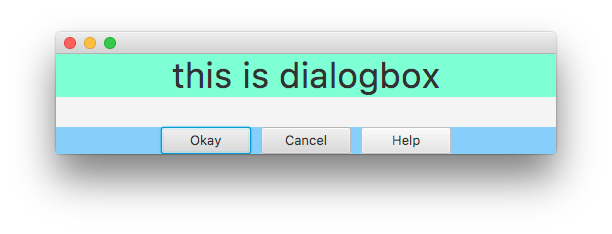
</BorderPane>允许标签增长(就像HBox的默认值一样),所以现在它的alignment属性达到了预期的效果:
或
<?xml version="1.0" encoding="UTF-8"?>
<?import javafx.scene.layout.HBox?>
<?import javafx.scene.control.Button?>
<?import javafx.scene.control.Label?>
<?import javafx.geometry.Insets?>
<?import javafx.scene.text.Font?>
<?import javafx.scene.layout.BorderPane?>
<?import javafx.scene.layout.Region?>
<BorderPane xmlns:fx="http://javafx.com/fxml/1">

    <top>
        <Label text="this is dialogbox"
            BorderPane.alignment="CENTER"
            style="-fx-background-color: aquamarine;" />
        <font>
            <Font size="35" />
        </font>
    </top>

    <bottom>
        <HBox spacing="10" BorderPane.alignment="CENTER"
          style="-fx-background-color: lightskyblue;">

          <maxWidth>
              <Region fx:constant="USE_PREF_SIZE" />
          </maxWidth>

            <Button text="Okay" prefWidth="90" />
            <Button text="Cancel" prefWidth="90" />
            <Button text="Help" prefWidth="90" />
        </HBox>
    </bottom>
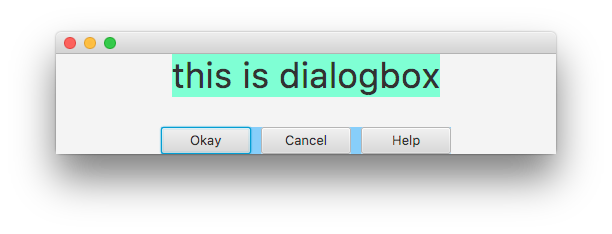
</BorderPane>使HBox的行为像按钮一样,所以现在它的BorderPane.alignment提供了所需的效果:
https://stackoverflow.com/questions/50491197
复制相似问题
腾讯云开发者

Copyright © 2013 - 2026 Tencent Cloud. All Rights Reserved. 腾讯云 版权所有
深圳市腾讯计算机系统有限公司 ICP备案/许可证号:粤B2-20090059  粤公网安备44030502008569号
腾讯云计算(北京)有限责任公司 京ICP证150476号 | 京ICP备11018762号