
如何清理电力系统中的定位数据
如何清理电力系统中的定位数据
提问于 2018-05-23 13:45:21
我现在有两张桌子。我有一张桌子,上面列出了这样的地点:
萨格勒布(克罗地亚) 美国华盛顿州西雅图 纽约市,纽约 哈萨克斯坦、阿拉木图
我还有一个200k个城市的总体清单,看起来是这样的:
萨格勒布-克罗地亚 西雅图美国 美国纽约市 阿拉木图-哈萨克斯坦
我想要的输出是向第一个表中添加一个新列,如下所示:
萨格勒布(克罗地亚) 美国华盛顿州西雅图 纽约市,纽约 哈萨克斯坦,阿拉木图
这是从一个实时源更新的,我无法从它控制数据质量,所以任何解决方案都必须是动态的。
任何想法都值得赞赏!
回答 2
Stack Overflow用户
回答已采纳
发布于 2018-05-23 15:27:33
一种可能的方法是向第一个表中添加一个自定义列,该表搜索第二个表City列中出现的任何城市。
 = Table.AddColumn(#"Changed Type", "City",
       (L) => List.Select(Cities[City], each Text.Contains(L[Location], _)))
这给出了一个匹配城市的列表。展开该列表以获得以下内容:
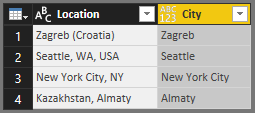
然后,您可以与Cities表合并(在每个表中的City列上进行匹配),以拉出Country列。
以下是我来自高级编辑器的查询全文:
let
    Source = Table.FromRows(Json.Document(Binary.Decompress(Binary.FromText("i45WikpML0pNUtBwLspPLMlM1FSK1YlWCk5NLCnJSdVRCHfUUQgNdgQL+qWWK0TmF2UrOGeWVOoo+EWCRb0TqxKzM4pLEvN0FBxzchNLKpViYwE=", BinaryEncoding.Base64), Compression.Deflate)), let _t = ((type text) meta [Serialized.Text = true]) in type table [Location = _t]),
    #"Changed Type" = Table.TransformColumnTypes(Source,{{"Location", type text}}),
    #"Added Custom" = Table.AddColumn(#"Changed Type", "City", (L) => List.Select(Cities[City], each Text.Contains(L[Location], _))),
    #"Expanded City" = Table.ExpandListColumn(#"Added Custom", "City"),
    #"Merged Queries" = Table.NestedJoin(#"Expanded City",{"City"},Cities,{"City"},"Cities",JoinKind.LeftOuter),
    #"Expanded Cities" = Table.ExpandTableColumn(#"Merged Queries", "Cities", {"Country"}, {"Country"})
in
#"Expanded Cities"Stack Overflow用户
发布于 2018-05-23 15:42:21
将第一个表命名为"location",包括名为"location“的1列。将第二个表命名为“城市”,包括两个名为“城市”和“国家”的列。守则是:
let
    location = Excel.CurrentWorkbook(){[Name="location"]}[Content],
    city = Excel.CurrentWorkbook(){[Name="city"]}[Content],
    result = Table.AddColumn(location,"city",each Table.SelectRows(city,(x)=>Text.Contains([location],x[city]))[country]{0})
in
result页面原文内容由Stack Overflow提供。腾讯云小微IT领域专用引擎提供翻译支持
原文链接:
https://stackoverflow.com/questions/50490047
复制相关文章
相似问题
腾讯云开发者

Copyright © 2013 - 2026 Tencent Cloud. All Rights Reserved. 腾讯云 版权所有
深圳市腾讯计算机系统有限公司 ICP备案/许可证号:粤B2-20090059  粤公网安备44030502008569号
腾讯云计算(北京)有限责任公司 京ICP证150476号 | 京ICP备11018762号