
SliverAppBar与TabBar
SliverAppBar与TabBar
提问于 2018-05-20 10:30:46
如何将TabBar添加到SliverAppBar中?到目前为止,当我向bottom添加SliverAppBar时,title被固定在这些选项卡上,而我希望它高于这些选项卡。
有什么想法吗?
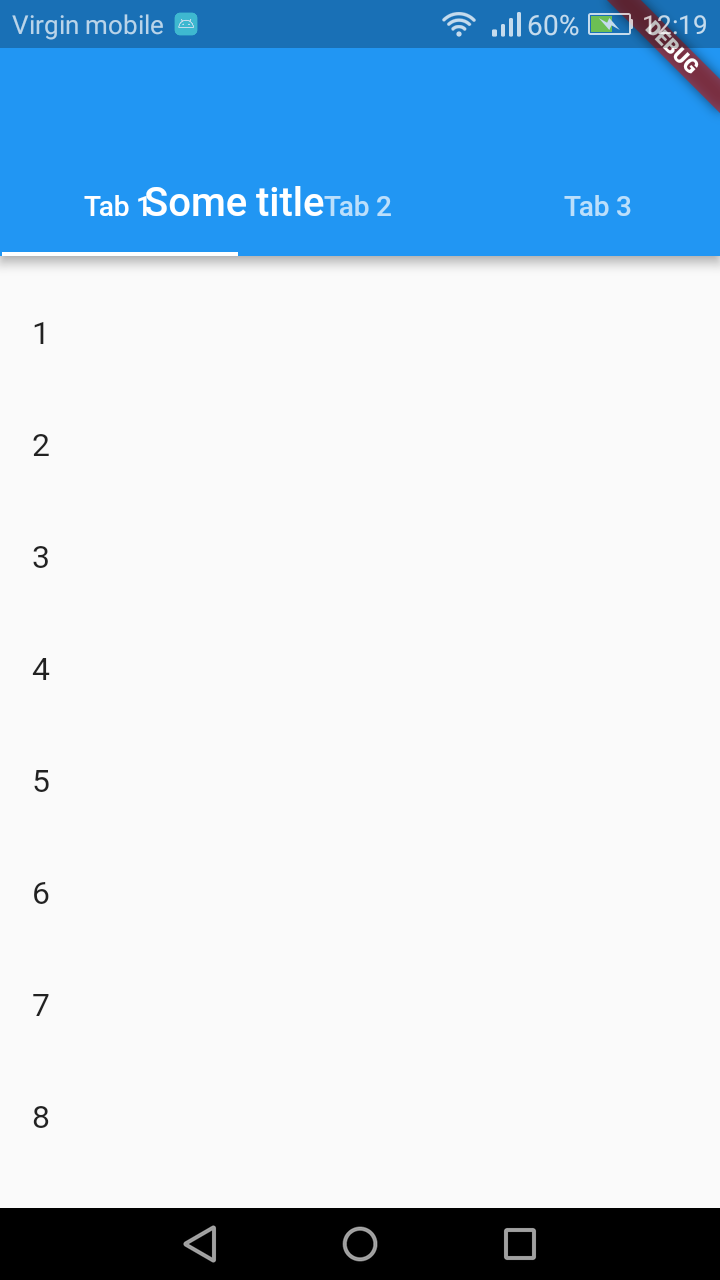
我的代码:
class _MyHomePageState extends State<MyHomePage> with SingleTickerProviderStateMixin{
  TabController controller;


  @override
  void initState() {
    super.initState();
    controller = new TabController(length: 3, vsync: this);
  }

  @override
  Widget build(BuildContext context) {
    return new Scaffold(
      body: new CustomScrollView(
        slivers: <Widget>[
          new SliverAppBar(
            pinned: true,
            flexibleSpace: new FlexibleSpaceBar(
              title: new Text("Some title"),
            ),
            expandedHeight: 160.0,
            bottom: new TabBar(tabs: [
              new Tab(text: 'Tab 1'),
              new Tab(text: 'Tab 2'),
              new Tab(text: 'Tab 3'),
            ],
            controller: controller,
            ),
          ),
          new SliverList(
            delegate: new SliverChildBuilderDelegate(
              (context, idx) {
                return new ListTile(
                  title: new Text("$idx"),
                );
              },
              childCount: 20,
            ),
          ),
        ],
      ),
    );
  }
}回答 4
Stack Overflow用户
发布于 2018-06-14 08:44:50
FlexibleSpaceBar被堆放在工具栏和制表栏后面。https://docs.flutter.io/flutter/material/SliverAppBar/flexibleSpace.html
您应该将标题放在SilverAppBar:title而不是flexibleSpace中。
在代码中替换
flexibleSpace: new FlexibleSpaceBar(
                      title: new Text("Some title"),
               ),
使用
title: new Text("Some title"),Stack Overflow用户
发布于 2019-12-02 14:51:46
您可以使用titlePadding填充:
              SliverAppBar(
                  pinned: true,
                  expandedHeight: 250,
                  primary: true,
                  forceElevated: true,
                  flexibleSpace: FlexibleSpaceBar(
                    titlePadding: EdgeInsets.only(bottom: 62),
                    title: Text(data.name),
                    centerTitle: true,
                    background: data.logo != null
                        ? Padding(
                            padding: const EdgeInsets.only(bottom: 46),
                            child: Container(
                              color: Colors.black,
                            ),
                          )
                        : null,
                  ),
                  bottom: TabBar(
                    tabs: [
                      Tab(text: "Tab1"),
                      Tab(text: "Tab2"),
                      Tab(text: "Tab3"),
                      Tab(text: "Tab4"),
                    ],
                  ),
),Stack Overflow用户
发布于 2020-09-10 14:10:12
class Menu extends StatelessWidget {
  @override
  Widget build(BuildContext context) {
    return DefaultTabController(
      length: 2,
      child: SafeArea(
        child: Scaffold(
          body: Consumer<MenuBlock>(
              builder: (context, appController, child) {
            return CustomScrollView(
              slivers: <Widget>[
                SliverAppBar(
                  floating: true,
                  pinned: false,
                  snap: true,
                  forceElevated: true,
                  elevation: 1,
                  expandedHeight: 50.0,
                  title: Text('TITLE'),
                  actions: <Widget>[
                    IconButton(
                      icon: const Icon(Icons.add_circle),
                      tooltip: 'Add new entry',
                      onPressed: () {/* ... */},
                    ),
                  ],
                  bottom: TabBar(
                    tabs: [
                      Tab(text: "TAB1"),
                      Tab(text: "TAB2"),
                    ],
                  ),
                ),
                SliverList(
                  delegate: SliverChildListDelegate(
                    <Widget>[
                      Container(
                        // or SizedBox, etc.
                        height: 4200,
                        child: TabBarView(
                          children: [

                        ),
                      ),
                    ],
                  ),
                ),
              ],
            );
          }),
        ),
      ),
    );
  }
}页面原文内容由Stack Overflow提供。腾讯云小微IT领域专用引擎提供翻译支持
原文链接:
https://stackoverflow.com/questions/50433885
复制相关文章
相似问题
腾讯云开发者

Copyright © 2013 - 2026 Tencent Cloud. All Rights Reserved. 腾讯云 版权所有
深圳市腾讯计算机系统有限公司 ICP备案/许可证号:粤B2-20090059  粤公网安备44030502008569号
腾讯云计算(北京)有限责任公司 京ICP证150476号 | 京ICP备11018762号