
如401未经授权的NGINX 3CX
我想在我的网站上使用3CX网络客户端的iframe。这个iframe在火狐和Internet上运行得很好,但在Chrome上不起作用( iframe出现了,但我无法登录)。当我转到Chrome的控制台时,错误是:
“重新加载源失败:服务器响应的状态为401 (未自动化)”。
当我进入“网络”选项卡时,xhr文件为红色,以下是文件头错误的捕获:
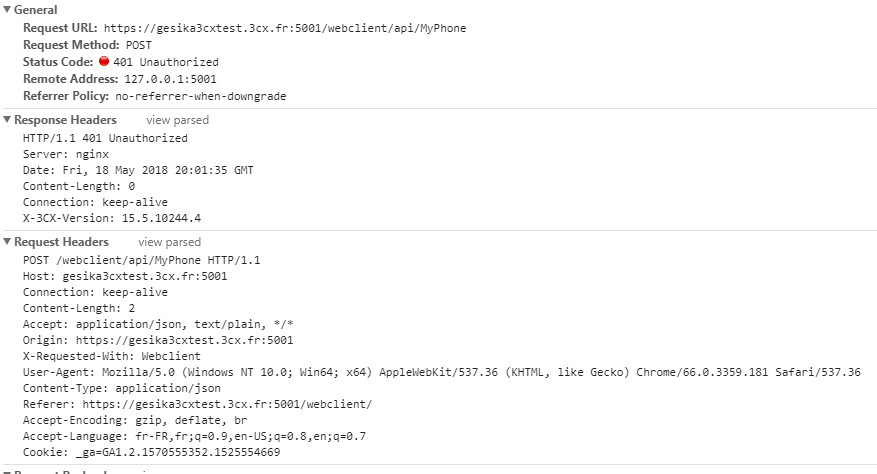
我拥有这个3CX服务器的所有文件。如您所见,3CX使用Nginx,这是Nginx的配置文件:
#user  nobody;
worker_processes  auto;

#error_log  logs/error.log;
#error_log  logs/error.log  notice;
#error_log  logs/error.log  info;

#pid        logs/nginx.pid;


events {
    worker_connections  10240;
}


http {
    map $http_upgrade $connection_upgrade {
        default upgrade;
        '' $http_connection;
    }

    include       mime.types;
    default_type  application/octet-stream;
	#limit_req_zone $binary_remote_addr zone=perip:50m rate=1000r/s;

    #log_format  main  '$remote_addr - $remote_user [$time_local] "$request" '
    #                  '$status $body_bytes_sent "$http_referer" '
    #                  '"$http_user_agent" "$http_x_forwarded_for"';

    #access_log  logs/access.log  main;

    sendfile        on;
    #tcp_nopush     on;

    #keepalive_timeout  0;
    keepalive_timeout  65;

    #gzip  on;


    server {
        add_header X-Frame-Options "SAMEORIGIN";
        listen 5000;
        listen [::]:5000;
        server_name gesika.3cx.fr;
        server_tokens off;

        access_log off;
        error_log nul crit;

        allow 192.168.0.0/16;
        allow 172.16.0.0/12;
        allow 10.0.0.0/8;
        allow 127.0.0.1;
        allow ::0/0;
        deny all;

        client_max_body_size 300m;

        location /user_images {
            expires 1y;
            add_header Pragma public;
            add_header Cache-Control "public";
            root "C:/ProgramData/3CX/Data/Http/wwwroot";
        }

        location ~ /webclient/.*\.(js|css|woff|woff2|json|mp3)$ {
            expires 1y;
            add_header Pragma public;
            add_header Cache-Control "public";
            root "C:/ProgramData/3CX/Data/Http/wwwroot";
        }

        location ~ index\.html {
            add_header Cache-Control "no-cache, no-store, must-revalidate";
            add_header Pragma no-cache;
            expires 0;
            root "C:/ProgramData/3CX/Data/Http/wwwroot";
        }

        location / {
            index index.html;
            root C:/ProgramData/3CX/Data/Http/wwwroot;
            try_files $uri $uri/ @proxy;
        }

        location /MyPhone {
            alias C:/ProgramData/3CX/Instance1/Data/Http/Interface/MyPhone;
            try_files $uri $uri/ @proxy;
        }

        location @proxy {
            proxy_set_header    Upgrade $http_upgrade;
            proxy_set_header    Connection $connection_upgrade;
            proxy_set_header    Host $host;
            proxy_set_header    X-Real-IP   $remote_addr;
            proxy_set_header    X-Forwarded-For $proxy_add_x_forwarded_for;
            proxy_pass  http://127.0.0.1:5004;
            proxy_buffering off;
        }

        location /management/Reports {
            alias "C:/ProgramData/3CX/Instance1/Data/Http/Reports";
        }

    }


    server {
        add_header X-Frame-Options "SAMEORIGIN";
        listen       5001 ssl;
        listen [::]:5001 ssl;
        server_name  gesika.3cx.fr;
        server_tokens off;

        access_log off;
        error_log nul crit;

        ssl_dhparam Instance1/dhparam.pem;
        ssl_session_cache shared:SSL:60m;
        ssl_session_timeout 1d;
        ssl_stapling on;
        ssl_stapling_verify on;
        add_header Strict-Transport-Security max-age=15768000;

        ssl_certificate      Instance1/gesika.3cx.fr-crt.pem;
        ssl_certificate_key  Instance1/gesika.3cx.fr-key.pem;

        ssl_ciphers  'ECDHE-RSA-AES128-GCM-SHA256:ECDHE-ECDSA-AES128-GCM-SHA256:ECDHE-RSA-AES256-GCM-SHA384:ECDHE-ECDSA-AES256-GCM-SHA384:DHE-RSA-AES128-GCM-SHA256:DHE-DSS-AES128-GCM-SHA256:kEDH+AESGCM:ECDHE-RSA-AES128-SHA256:ECDHE-ECDSA-AES128-SHA256:ECDHE-RSA-AES128-SHA:ECDHE-ECDSA-AES128-SHA:ECDHE-RSA-AES256-SHA384:ECDHE-ECDSA-AES256-SHA384:ECDHE-RSA-AES256-SHA:ECDHE-ECDSA-AES256-SHA:DHE-RSA-AES128-SHA256:DHE-RSA-AES128-SHA:DHE-DSS-AES128-SHA256:DHE-RSA-AES256-SHA256:DHE-DSS-AES256-SHA:DHE-RSA-AES256-SHA:AES128-GCM-SHA256:AES256-GCM-SHA384:AES128-SHA256:AES256-SHA256:AES128-SHA:AES256-SHA:AES:CAMELLIA:!DES-CBC3-SHA:!aNULL:!eNULL:!EXPORT:!DES:!RC4:!MD5:!PSK:!aECDH:!EDH-DSS-DES-CBC3-SHA:!EDH-RSA-DES-CBC3-SHA:!KRB5-DES-CBC3-SHA:!ECDHE-RSA-DES-CBC3-SHA:!ECDHE-ECDSA-DES-CBC3-SHA';

        ssl_prefer_server_ciphers  on;

        client_max_body_size 300m;

        location /user_images {
            expires 1y;
            add_header Pragma public;
            add_header Cache-Control "public";
            root "C:/ProgramData/3CX/Data/Http/wwwroot";
        }

        location ~ /webclient/.*\.(js|css|woff|woff2|json|mp3)$ {
            expires 1y;
            add_header Pragma public;
            add_header Cache-Control "public";
            root "C:/ProgramData/3CX/Data/Http/wwwroot";
        }

        location ~ index\.html {
            add_header Cache-Control "no-cache, no-store, must-revalidate";
            add_header Pragma no-cache;
            expires 0;
            root "C:/ProgramData/3CX/Data/Http/wwwroot";
        }

        location / {
            index index.html;
            root "C:/ProgramData/3CX/Data/Http/wwwroot";
            try_files $uri $uri/ @proxy;
        }

        location /MyPhone {
            alias "C:/ProgramData/3CX/Instance1/Data/Http/Interface/MyPhone";
            try_files $uri $uri/ @proxy;
        }

        location @proxy {
            proxy_set_header    Upgrade $http_upgrade;
            proxy_set_header    Connection $connection_upgrade;
            proxy_set_header    Host $host;
            proxy_set_header    X-Real-IP   $remote_addr;
            proxy_set_header    X-Forwarded-For $proxy_add_x_forwarded_for;
            proxy_pass  http://127.0.0.1:5004;
            proxy_buffering off;
        }

        location /management/Reports {
            alias "C:/ProgramData/3CX/Instance1/Data/Http/Reports";
        }

    }

}
如您所见,有add_header X-Frame-Options "SAMEORIGIN";。我已经删除了这一行。我也尝试用这个add_header X-Frame-Options "ALLOW-FROM *";替换它,但是它仍然不能工作。我没有忘记重新装载我的服务器。
我试图在配置文件中添加以下内容:
location ~* \.(eot|ttf|woff|woff2)$ {
    add_header Access-Control-Allow-Origin *;
}
当我在3CXServer的同一个域中创建一个页面时,我的iframe可以在Chrome上工作。因此,问题都是关于跨域起源(CORS)。
谢谢任何能帮我解决这个问题的人。
回答 1
Stack Overflow用户
发布于 2019-04-19 07:01:54
更改3 3cx nginx conf文件夹中的共享头文件设置,您几乎没有像x帧这样的参数,并且有些祖先设置要么放置您的网站域,要么删除它们,以便允许所有用户访问。
https://stackoverflow.com/questions/50418778
复制相似问题
腾讯云开发者

Copyright © 2013 - 2026 Tencent Cloud. All Rights Reserved. 腾讯云 版权所有
深圳市腾讯计算机系统有限公司 ICP备案/许可证号:粤B2-20090059  粤公网安备44030502008569号
腾讯云计算(北京)有限责任公司 京ICP证150476号 | 京ICP备11018762号