
数据清理功能
我的Excel电子表格中有这个VBA模块,它试图清理日期数据,其中包含了将文本与日期信息组合在一起的各种问题。以下是我的主要加载功能:
Public lstrow As Long, strDate As Variant, stredate As Variant
Sub importbuild()
lstrow = Worksheets("Data").Range("G" & Rows.Count).End(xlUp).Row

Function DateOnlyLoad(col As String, col2 As String, colcode As String)

Dim i As Long, j As Long, k As Long

j = Worksheets("CI").Range("A" & Rows.Count).End(xlUp).Row + 1
k = Worksheets("Error").Range("A" & Rows.Count).End(xlUp).Row + 1

For i = 2 To lstrow

strDate = spacedate(Worksheets("Data").Range(col & i).Value)
stredate = spacedate(Worksheets("Data").Range(col2 & i).Value)

If (Len(strDate) = 0 And (col2 = "NA" Or Len(stredate) = 0)) Or InStr(1,
UCase(Worksheets("Data").Range(col & i).Value), "EXP") > 0 Then
 GoTo EmptyRange

Else

Worksheets("CI").Range("A" & j & ":C" & j).Value =
 Worksheets("Data").Range("F" & i & ":H" & i).Value
Worksheets("CI").Range("D" & j).Value = colcode
Worksheets("CI").Range("E" & j).Value = datecleanup(strDate)
'Worksheets("CI").Range("L" & j).Value = dateclean(strDate)
Worksheets("CI").Range("F" & j).Value = strDate

If col2 <> "NA" Then
    If IsEmpty(stredate) = False Then
        Worksheets("CI").Range("F" & j).Value = datecleanup(stredate)
    End If
End If
j = j + 1

End If

EmptyRange:

Next i

End Function
数据清理功能:
Function datecleanup(inputdate As Variant) As Variant

If Len(inputdate) = 0 Then
 inputdate = "01/01/1901"
Else
  If Len(inputdate) = 4 Then
    inputdate = "01/01/" & inputdate
  Else
    If InStr(1, inputdate, ".") Then
        inputdate = Replace(inputdate, ".", "/")
    End If

 End If
End If

datecleanup = Split(inputdate, Chr(32))(0)
示例输出:
 Column A   Column B      Column C     Column D    Column E    Column F
  125156    Wills, C     11/8/1960     MMR1         MUMPS       MUMPS TITER 02/26/2008 POSITIVE
  291264    Balti, L     09/10/1981    MMR1        (blank)      Measles - 11/10/71 Rubella
  943729    Barnes, B    10/10/1965    MMR1         MUMPS       MUMPS TITER 10/08/2008 POSITIVE
分隔将日期与后续文本分开,这很好,但是如果在日期之前出现文本,则输出包含文本的第一部分。我只想从字符串中获取日期(如果存在的话)并显示它,而不管它在字符串中的位置。下面是示例结果:E列是拆分逻辑的输出,F列是从其他工作表计算的整个字符串。
以上示例中的期望输出:(E列有正确的提取日期)
Column A   Column B      Column C     Column D    Column E        Column F
  125156    Wills, C     11/8/1960     MMR1       02/26/2008      MUMPS TITER 02/26/2008 POSITIVE
  291264    Balti, L     09/10/1981    MMR1       11/10/71        Measles - 11/10/71 Rubella
943729 Barnes, B 10/10/1965 MMR1 10/08/2008 MUMPS TITER 10/08/2008 POSITIVE我还可以在我的数据清理函数中添加什么来进一步完善这个功能呢?提前感谢!
回答 1
Stack Overflow用户
发布于 2018-05-18 20:39:10
避免使用regex (如评论中所建议的方式)通常是个好主意,但只需要一分钱、一磅:
1使用regex mm/dd/yyyy
(0[1-9]|1[012])[- \/.](0[1-9]|[12][0-9]|3[01])[- \/.](19|20)[0-9]{2}该模式来自ipr101的answer,并为验证mm/dd/yyyy的实际日期提出了一个很好的正则表达式。我已经调整到正确地转义了几个字符。
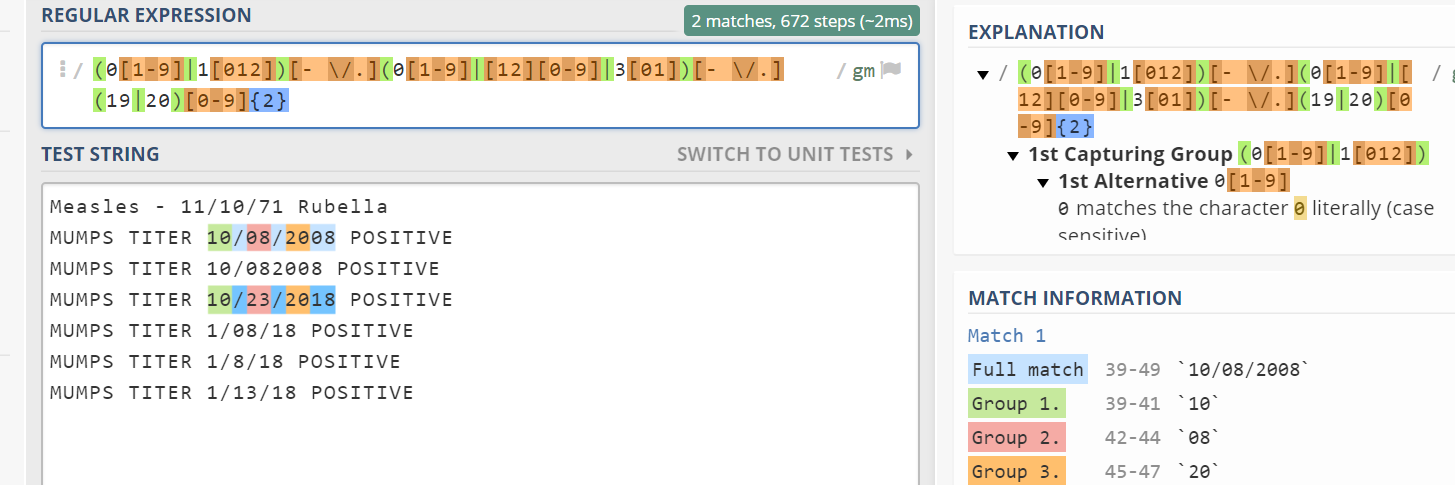
您需要调整,如果可以是较少的数字或不同的格式。下面列举了一些例子。
您可以将下面的函数用作:
Worksheets("CI").Range("F" & j).Value = RemoveChars(datecleanup(stredate))示例测试:
Option Explicit

Public Sub test()
    Debug.Print RemoveChars("Measles - 11/10/1971 Rubella")
End Sub

Public Function RemoveChars(ByVal inputString As String) As String

    Dim regex As Object, tempString As String
    Set regex = CreateObject("VBScript.RegExp")

    With regex
        .Global = True
        .MultiLine = True
        .IgnoreCase = False
        .Pattern = "(0[1-9]|1[012])[- /.](0[1-9]|[12][0-9]|3[01])[- /.](19|20)[0-9]{2}"
    End With

    If regex.test(inputString) Then
        RemoveChars = regex.Execute(inputString)(0)
    Else
        RemoveChars = inputString
    End If

End Function
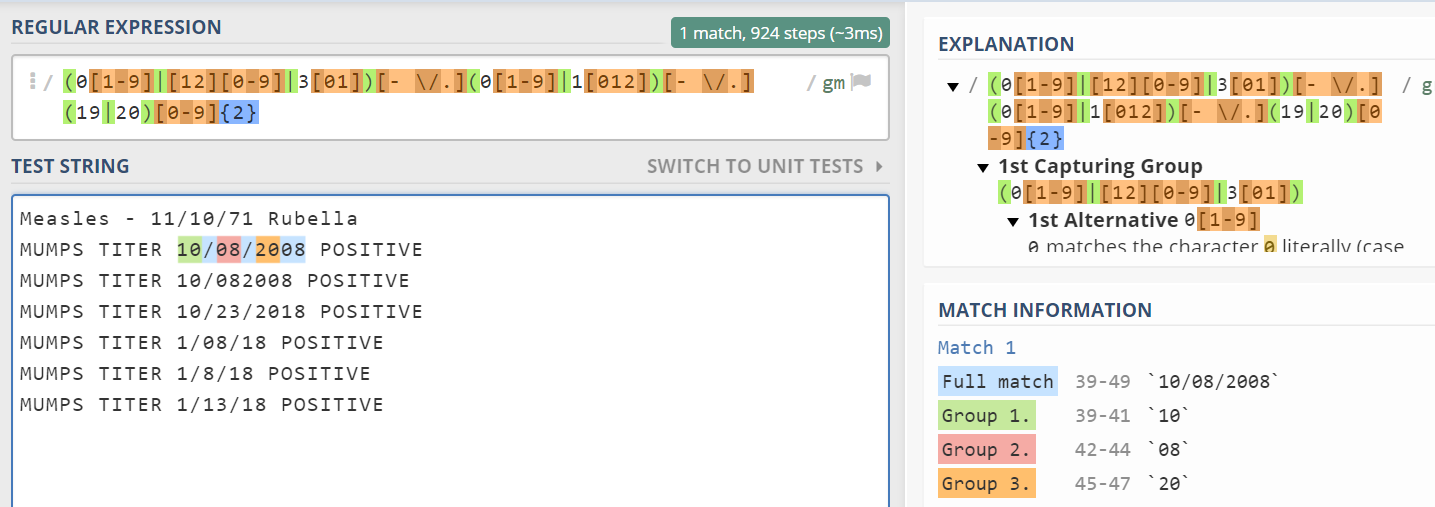
2用于dd/mm/yyyy:
(0[1-9]|[12][0-9]|3[01])[- \/.](0[1-9]|1[012])[- \/.](19|20)[0-9]{2}
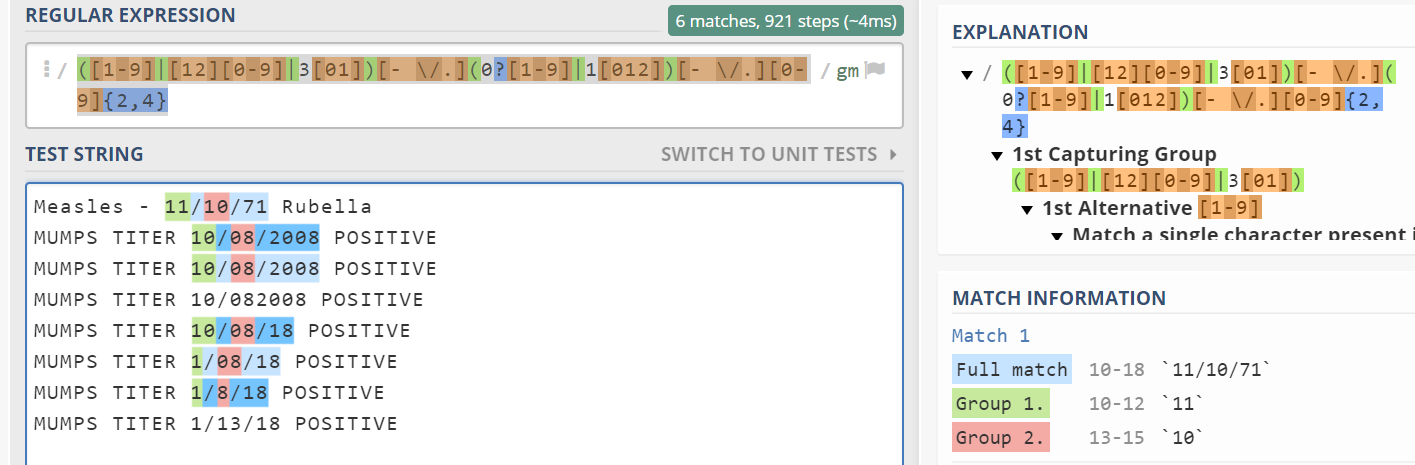
3如属单日或单月(月前一天),请使用:
([1-9]|[12][0-9]|3[01])[- \/.](0?[1-9]|1[012])[- \/.][0-9]{2,4}
你明白了吧。
注意:
您总是可以使用一些通用的东西,比如(\d{1,2}\/){2}\d{2,4},然后用ISDATE(返回值)验证函数返回字符串。
https://stackoverflow.com/questions/50418742
复制相似问题
腾讯云开发者

Copyright © 2013 - 2026 Tencent Cloud. All Rights Reserved. 腾讯云 版权所有
深圳市腾讯计算机系统有限公司 ICP备案/许可证号:粤B2-20090059  粤公网安备44030502008569号
腾讯云计算(北京)有限责任公司 京ICP证150476号 | 京ICP备11018762号