
使用Gulp将引导材料Scss转换为CSS提供Import
在运行gulp任务样式后,我得到以下错误:
Error in plugin "sass"
Message:
    static\node_modules\bootstrap-material-design\scss\_variables.scss
Error: File to import not found or unreadable: ~bootstrap/scss/functions.
on line 56 of static/node_modules/bootstrap-material-design/scss/_variables.scss
        from line 2 of static/node_modules/bootstrap-material- design/scss/_core.scss
        from line 3 of static/node_modules/bootstrap-material- design/scss/bootstrap-material-design.scss
@import "~bootstrap/scss/functions"; // from bootstrap node_module
 ^
我已经检查过文件应该在哪里看了。所以我不知道是怎么回事。这是我的项目结构:
Project/
  gulpfile.js
  package.json
  package-lock.json
  node_modules/
    bootstrap/
    bootstrap-material-design/
    gulp-sass/
    gulp/
  static/
    node_modules/
        bootstrap/
           scss/
             _functions.scss
        bootstrap-material-design/
           scss/

        gulp-sass/
        gulp/
。
//gulpfile.js
var gulp = require('gulp');
var sass = require('gulp-sass');

//style paths
var sassFiles = 'static/node_modules/bootstrap-material-design/scss/**/*.scss',
    cssDest = 'static/node_modules/bootstrap-material-design/dist/css/';

gulp.task('default', function () {
    console.log('GULP GULP GULP')
});

gulp.task('styles', function () {
    gulp.src(sassFiles)
        .pipe(sass().on('error', sass.logError))
        .pipe(gulp.dest(cssDest));
});

gulp.task('watch', function () {
    gulp.watch(sassFiles, ['styles']);
});
部分package.json
  "dependencies": {
    "bootstrap": "^4.1.1",
    "bootstrap-material-design": "^4.1.1",
      },
  "devDependencies": {
    "gulp": "^3.9.1",
    "gulp-ng-annotate": "^2.1.0",
    "gulp-uglify": "^3.0.0"
  }
编辑
当我硬编码到函数的路径(在引导程序_variables.scss中)时,它工作了,并跳到了它找不到的下一个导入。
Error in plugin "sass"
Message:
    static\node_modules\bootstrap-material-design\scss\_variables.scss
Error: File to import not found or unreadable: ~bootstrap/scss/variables.
        on line 57 of static/node_modules/bootstrap-material- design/scss/_variables.scss
        from line 2 of static/node_modules/bootstrap-material- design/scss/_core.scss
        from line 3 of static/node_modules/bootstrap-material- design/scss/bootstrap-material-design.scss
 @import "~bootstrap/scss/variables"; // from bootstrap node_module
  ^
variables.scss
56: @import "C:/Users/PC/Documents/Git/Project/static/node_modules/bootstrap/scss/functions"; // from bootstrap node_module在我看来,这种硬编码并不是真正的解决方案。不知道为什么它不能从盒子里出来。是不是被人认不出来了?
原始variables.scss
56: @import "~bootstrap/scss/functions"; // from bootstrap node_module回答 1
Stack Overflow用户
发布于 2018-05-17 17:59:30
由于gulp-sass包尚未安装,所以您只需执行npm install --save-dev gulp-sass,并确保在存在package.json的文件夹中运行此命令。
更新
重要您应该只有一个node_modules文件夹,它应该在您的Project文件夹中,而不是在static文件夹中。
如果您有一个以上的node_modules,如果您在static中运行,它将在那里注入您的依赖项,这对于您的情况是不需要的。
因此,请确保只有一个node_modules直接进入您的Project
然后,我建议您卸载已安装的包并安装引导程序和其他所需的包。
npm install --save bootstrap
npm install --save material-design
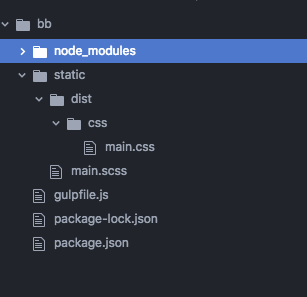
那么你的结构就会是这样
Project/
  gulpfile.js
  package.json
  package-lock.json
  node_modules/
    bootstrap/
    bootstrap-material-design/
    gulp-sass/
    gulp/
  static/
proejctFiles.scss确定如何管理static文件夹中的文件
然后在您的gulpfile.js中,您必须编辑这个路径
//style paths
var sassFiles = 'static/node_modules/bootstrap-material-design/scss/**/*.scss',
    cssDest = 'static/node_modules/bootstrap-material-design/dist/css/';
应该是
//style paths
var sassFiles = './static/main.scss',
cssDest = 'static/dist/css/';在main.scss内部,我像这样导入引导程序
@import "./node_modules/bootstrap/scss/bootstrap";当它上升时,安装引导材料设计有一个问题。
然后一切都会像这样被整理得很好
https://stackoverflow.com/questions/50397794
复制相似问题
腾讯云开发者

Copyright © 2013 - 2026 Tencent Cloud. All Rights Reserved. 腾讯云 版权所有
深圳市腾讯计算机系统有限公司 ICP备案/许可证号:粤B2-20090059  粤公网安备44030502008569号
腾讯云计算(北京)有限责任公司 京ICP证150476号 | 京ICP备11018762号