
在透明图像或div中放大背景图像
在透明图像或div中放大背景图像
提问于 2018-05-17 13:02:59
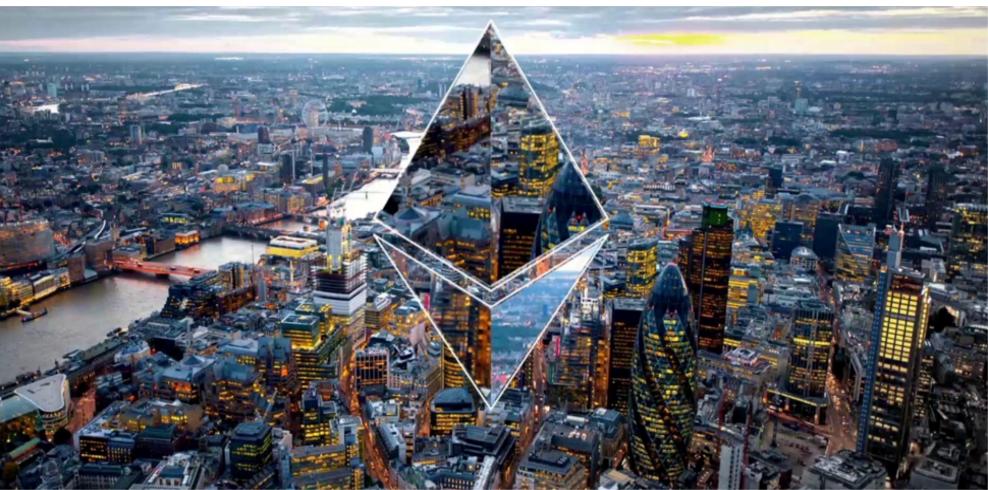
一旦你看到图像,这个问题就很容易理解了。我想复制这个图像,而不诉诸图像编辑软件,我知道有可能模糊背景图像,并想知道它是否有可能做同样的缩放。我也愿意使用画布/JavaScript
回答 2
Stack Overflow用户
回答已采纳
发布于 2018-05-17 13:25:41
下面是一个使用clip-path的想法
.box {
  height:300px;
  width:600px;
  background:var(--i) center/100% auto no-repeat;
  position:relative;
}
.box:before {
  content:"";
  position:absolute;
  top:0;
  left:0;
  right:0;
  bottom:0;
  background:var(--i) center/200% auto no-repeat;
 clip-path: polygon(50% 20%, 70% 50%, 50% 80%, 30% 50%);
}<div class="box" style="--i:url(https://picsum.photos/2000/1000?image=1069)">
</div>
Stack Overflow用户
发布于 2018-05-17 13:33:49
您可以创建一个具有相同背景图像的div元素并将其放大。
所以从一张图片开始:
img = document.getElementById(imgID);您可以创建一个“玻璃”div并将其放在图像上:
glass = document.createElement("DIV");
img.parentElement.insertBefore(glass, img);
然后使用相同的图像作为背景:
glass.style.backgroundImage = "url('" + img.src + "')";
glass.style.backgroundRepeat = "no-repeat";
根据你的需要放大它:
glass.style.backgroundSize = (img.width * zoom) + "px " + (img.height * zoom) + "px";为了创建所需的形状,可以使用此站点剪贴机。
这里是一个完整的例子:
function magnify(imgID, zoom) {
  var img, glass, w, h, bw;
  img = document.getElementById(imgID);
  /*create magnifier glass:*/
  glass = document.createElement("DIV");
  glass.setAttribute("class", "img-magnifier-glass");
  /*insert magnifier glass:*/
  img.parentElement.insertBefore(glass, img);
  /*set background properties for the magnifier glass:*/
  glass.style.backgroundImage = "url('" + img.src + "')";
  glass.style.backgroundRepeat = "no-repeat";
  glass.style.backgroundSize = (img.width * zoom) + "px " + (img.height * zoom) + "px";
  bw = 3;
  w = glass.offsetWidth / 2;
  h = glass.offsetHeight / 2;
}

magnify("myimage", 3);* {box-sizing: border-box;}
.img-magnifier-container {
position:relative;
}
.img-magnifier-glass {
position: absolute;
width: 50px;
height: 100px;
top: 50px;
left: 125px;
clip-path: polygon(50% 0%, 100% 50%, 50% 100%, 0% 50%);
}<div class="img-magnifier-container">
<img id="myimage" src="https://www.w3schools.com/howto/img_fjords.jpg" width="300" height="200">
</div>
希望它能帮到你,再见。
页面原文内容由Stack Overflow提供。腾讯云小微IT领域专用引擎提供翻译支持
原文链接:
https://stackoverflow.com/questions/50392189
复制相关文章
相似问题
腾讯云开发者

Copyright © 2013 - 2026 Tencent Cloud. All Rights Reserved. 腾讯云 版权所有
深圳市腾讯计算机系统有限公司 ICP备案/许可证号:粤B2-20090059  粤公网安备44030502008569号
腾讯云计算(北京)有限责任公司 京ICP证150476号 | 京ICP备11018762号