
在列表组中的同一行上对齐文本和图像
在列表组中的同一行上对齐文本和图像
提问于 2018-05-17 06:19:11
大家好,所以我正在制作一个网站作为一个项目,在其中一个部分,我正在放置一个列表组与项目的名称,并在右边,该项目的形象。我已经使用了Pingendo,但是文本与图像不对齐。
这是我有自动取款机的代码:
<div class="container">
<div class="row">
  <div class="col-sm-2"> </div>
  <div class="col-sm-8">
    <!-- Page Content -->
    <div class="container">
      <div class="row text-center text-lg-left">
        <div class="col-md-12">
          <div class="list-group my-3">
            <a href="#" class="list-group-item list-group-item-action flex-column align-items-start">
              <div class="w-100">
                <h4 class="mb-1 text-center">Arduino Uno</h4>
              </div>
              <img class="d-block float-right img-thumbnail img-fluid" src="https://pingendo.com/assets/photos/wireframe/photo-1.jpg" width="150" height="150" > </a>
            </a>

            <a href="#" class="list-group-item list-group-item-action flex-column align-items-start">
              <div class="w-100">
                <h5 class="mb-1 text-center">Breadboard</h5>
              </div>
              <img class="d-block float-right img-thumbnail img-fluid" src="https://pingendo.com/assets/photos/wireframe/photo-1.jpg" width="60" height="60" > </a>
            </a>

            <a href="#" class="list-group-item list-group-item-action flex-column align-items-start">
              <div class="w-100">
                <h5 class="mb-1 text-center">Product</h5>
              </div>
              <img class="d-block float-right img-thumbnail img-fluid" src="https://pingendo.com/assets/photos/wireframe/photo-1.jpg" width="60" height="60" > </a>
            </a>
          </div>
这是它在网站上的样子:
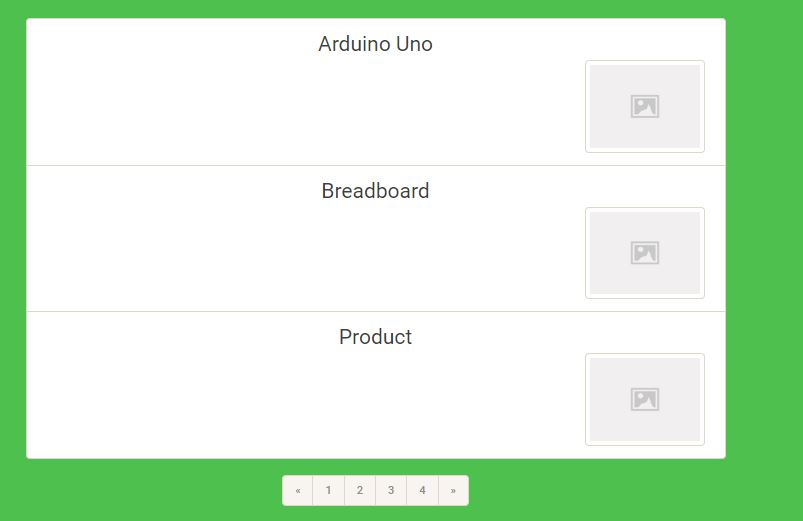
基本上,我要做的是把文本和图像放在同一条线上,这样我就不会在顶部和下面的图像上看到文本。
提前谢谢。
回答 1
Stack Overflow用户
回答已采纳
发布于 2018-05-17 06:25:33
从.list-group-item中删除‘.flex列’类,并添加'.d-flex‘。
还可以从代码中删除重复关闭的
a标记。
<link rel="stylesheet" href="https://maxcdn.bootstrapcdn.com/bootstrap/4.0.0/css/bootstrap.min.css" integrity="sha384-Gn5384xqQ1aoWXA+058RXPxPg6fy4IWvTNh0E263XmFcJlSAwiGgFAW/dAiS6JXm" crossorigin="anonymous">
<div class="container">
<div class="row">
  <div class="col-sm-2"> </div>
  <div class="col-sm-8">
    <!-- Page Content -->
    <div class="container">
      <div class="row text-center text-lg-left">
        <div class="col-md-12">
          <div class="list-group my-3">
            <a href="#" class="list-group-item list-group-item-action d-flex   align-items-start">
              <div class="w-100">
                <h4 class="mb-1 text-center">Arduino Uno</h4>
              </div>
              <img class="d-block float-right img-thumbnail img-fluid" src="https://pingendo.com/assets/photos/wireframe/photo-1.jpg" width="60" height="60" > </a>


            <a href="#" class="list-group-item list-group-item-action d-flex    align-items-start">
              <div class="w-100">
                <h5 class="mb-1 text-center">Breadboard</h5>
              </div>
              <img class="d-block float-right img-thumbnail img-fluid" src="https://pingendo.com/assets/photos/wireframe/photo-1.jpg" width="60" height="60" > </a>


            <a href="#" class="list-group-item list-group-item-action d-flex  align-items-start">
              <div class="w-100">
                <h5 class="mb-1 text-center">Product</h5>
              </div>
              <img class="d-block float-right img-thumbnail img-fluid" src="https://pingendo.com/assets/photos/wireframe/photo-1.jpg" width="60" height="60" > </a>

          </div>
如果你想把文字和图像放在中间
<link rel="stylesheet" href="https://maxcdn.bootstrapcdn.com/bootstrap/4.0.0/css/bootstrap.min.css" integrity="sha384-Gn5384xqQ1aoWXA+058RXPxPg6fy4IWvTNh0E263XmFcJlSAwiGgFAW/dAiS6JXm" crossorigin="anonymous">
<div class="container">
<div class="row">
  <div class="col-sm-2"> </div>
  <div class="col-sm-8">
    <!-- Page Content -->
    <div class="container">
      <div class="row text-center text-lg-left">
        <div class="col-md-12">
          <div class="list-group my-3">
            <a href="#" class="list-group-item list-group-item-action d-flex   align-items-center">
              <div class="w-100">
                <h4 class="mb-0 text-center">Arduino Uno</h4>
              </div>
              <img class="d-block float-right img-thumbnail img-fluid" src="https://pingendo.com/assets/photos/wireframe/photo-1.jpg" width="60" height="60" > </a>


            <a href="#" class="list-group-item list-group-item-action d-flex align-items-center">
              <div class="w-100">
                <h5 class="mb-0 text-center">Breadboard</h5>
              </div>
              <img class="d-block float-right img-thumbnail img-fluid" src="https://pingendo.com/assets/photos/wireframe/photo-1.jpg" width="60" height="60" > </a>


            <a href="#" class="list-group-item list-group-item-action d-flex  align-items-center">
              <div class="w-100">
                <h5 class="mb-0 text-center">Product</h5>
              </div>
              <img class="d-block float-right img-thumbnail img-fluid" src="https://pingendo.com/assets/photos/wireframe/photo-1.jpg" width="60" height="60" > </a>

          </div>
页面原文内容由Stack Overflow提供。腾讯云小微IT领域专用引擎提供翻译支持
原文链接:
https://stackoverflow.com/questions/50384573
复制相关文章
相似问题
腾讯云开发者

Copyright © 2013 - 2026 Tencent Cloud. All Rights Reserved. 腾讯云 版权所有
深圳市腾讯计算机系统有限公司 ICP备案/许可证号:粤B2-20090059  粤公网安备44030502008569号
腾讯云计算(北京)有限责任公司 京ICP证150476号 | 京ICP备11018762号