
如何在gLTF中加载three.js
我正在尝试使用gLTF上传一个three.js文件,但它并不适用于我。我犯了一些错误,我修正了做一些研究,但我仍然有一个黑色的屏幕。其中一个修复方法是将其添加到我的chrome目标目录中。
‘path to your chrome installation\chrome.exe --allow-file-access-from-files’ 这解决了我的问题,但是当我打开控制台的时候,我还是得到了这个
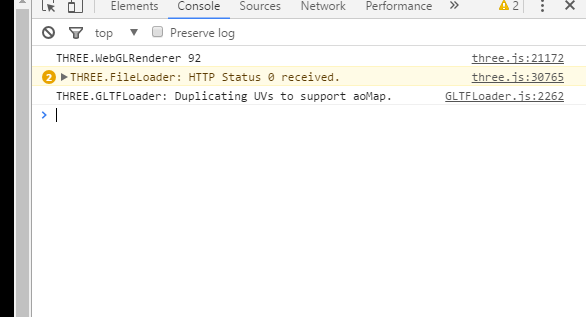
有人能帮我吗?我只是想用DamagedHelmet.gltf在屏幕上显示“three.js”文件
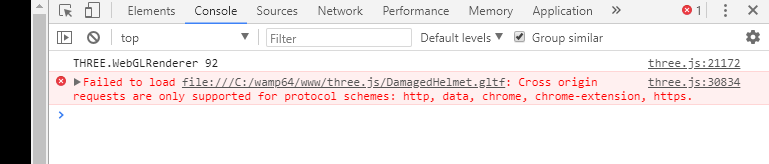
有时错误会回来,这就是它的样子。
守则:
<html>
<head>
    <meta http-equiv="content-type" content="text/html; charset=utf-8" />
    <title>Three.js Crash Course</title>
        <style>
            body {
                margin: 0;
            }

            canvas {
                width: 100%;
                height: 100%;
            }
        </style>
    </head>
    <body>
        <script src="js/three.js"></script>
        <script src="js/OrbitControls.js"></script>
        <script src="js/GLTFLoader.js"></script>
        <script>
            // To display anything we need three things: scene, camera, renderer.

            var scene = new THREE.Scene();
            var camera = new THREE.PerspectiveCamera(75/*POV*/, window.innerWidth / window.innerHeight/*aspect ratio so it takes on the size of the screen*/, 0.1, 1000);

            var renderer = new THREE.WebGLRenderer();//API for rendering/processing 2D and 3D to browsers
            renderer.setSize(window.innerWidth, innerHeight); // Size you want it to render which is size of screen/area
            document.body.appendChild(renderer.domElement); // Add the renderer to the HTML document/canvas

            controls = new THREE.OrbitControls(camera, renderer.domElement);
            //-------create shape you need geometry, material/apperance and cube

            var loader = new THREE.GLTFLoader();

            loader.load(
                // Resource URL
                'models/gltf/duck/gLTF/duck.gltf',
                // Called when the resource is loaded
                 function ( gltf ) {

                     scene.add( gltf.scene );
                     camera.position.z = 5;
                     gltf.animations; // Array<THREE.AnimationClip>
                     gltf.scene; // THREE.Scene
                     gltf.scenes; // Array<THREE.Scene>
                     gltf.cameras; // Array<THREE.Camera>
                     gltf.asset; // Object
                 },

                 // Called when loading is in progresses
                 function ( xhr ) {
                     console.log( ( xhr.loaded / xhr.total * 100 ) + '% loaded' );

                 },

                 // Called when loading has errors
                 function ( error ) {
                     console.log( 'An error happened' );
                 }
             );

            var animate = function() {
                requestAnimationFrame(animate);
                // cube.rotation.x += 0.01;
                // cube.rotation.y += 0.01;
                renderer.render(scene, camera);
            }

            animate();
        </script>
    </body>
</html>回答 1
Stack Overflow用户
发布于 2018-05-17 02:11:26
直接取自three.js手册:
https://threejs.org/docs/#manual/introduction/How-to-run-things-locally
如何在本地运行
如果您只使用过程几何图形而不加载任何纹理,那么网页应该可以直接从文件系统中运行,只需在文件管理器中双击HTML文件,它就会出现在浏览器中(您将在地址栏中看到file:///yourFile.html )。
如果从外部文件加载模型或纹理,则从外部文件加载内容,由于浏览器的相同来源策略安全限制,如果出现安全异常,从文件系统加载将失败。
解决这一问题的方法有两种:
- 更改浏览器中本地文件的安全性。这使您可以以以下方式访问页面:
file:///yourFile.html - 从本地web服务器运行文件。这使您可以以以下方式访问页面:
http://localhost/yourFile.html
如果您使用选项1,请注意,如果您使用相同的浏览器进行常规的网页浏览,您可能会发现自己存在一些漏洞。您可能希望创建一个单独的浏览器配置文件/快捷方式,仅用于本地开发才是安全的。让我们依次讨论每一种选择。
https://stackoverflow.com/questions/50382203
复制相似问题
腾讯云开发者

Copyright © 2013 - 2026 Tencent Cloud. All Rights Reserved. 腾讯云 版权所有
深圳市腾讯计算机系统有限公司 ICP备案/许可证号:粤B2-20090059  粤公网安备44030502008569号
腾讯云计算(北京)有限责任公司 京ICP证150476号 | 京ICP备11018762号