
如何使用@shoutem/ui DropDownMenu设置多重选择?
如何使用@shoutem/ui DropDownMenu设置多重选择?
提问于 2018-05-12 08:53:42
我使用DropDownMenu,并从官方的doumcn https://shoutem.github.io/docs/ui-toolkit/components/dropdown-menu中获取一个参考
我想设置两个DropDownMenu --第一个是区域,第二个是城市,如果用户选择East这样的区域,第二个DropDownMenu应该设置E1、E2值。
这是我的代码:
import React, { Component } from 'react';
import { View } from 'react-native';
import { DropDownMenu, Text } from '@shoutem/ui';

class TestConfirm extends Component {

    constructor(props) {
        super(props);
        this.state = {
          zone: [
            {
              id: 0,
              brand: "North",
              models:
                {
                  model: "Audi R8",
                  image: {
                    url: "https://shoutem.github.io/img/ui-toolkit/dropdownmenu/Audi-R8.jpg"
                  },
                  description: "North Description"
                },
                children: [{
                    name: "N1",
                    id: 10,
                  },{
                    name: "N2",
                    id: 17,
                  }]
              },
            {
              id: 1,
              brand: "West",
              models: {
                model: "Chiron",
                image: {
                  url: "https://shoutem.github.io/img/ui-toolkit/dropdownmenu/Chiron.jpg"
                },
                description: "West Description"
              },
              children: [{
                name: "W1",
                id: 10,
              },{
                name: "W2",
                id: 17,
              }]
            },
            {
              id: 2,
              brand: "East",
              models: {
                model: "Dodge Viper",
                image: {
                  url: "https://shoutem.github.io/img/ui-toolkit/dropdownmenu/Dodge-Viper.jpg"
                },
                description: "East Description"
              },
              children: [{
                name: "E1",
                id: 10,
              },{
                name: "E2",
                id: 17,
              }]
            },
          ],
        }
      }

  render() {
    const selectedZone = this.state.selectedZone || this.state.zone[0];
    console.log('selectedZone =>');
    console.log(selectedZone);
    console.log('selectedZone.children =>');
    console.log(selectedZone.children);
    return (
      <Screen>
        <DropDownMenu
            styleName="horizontal"
            options={this.state.zone}
            selectedOption={selectedZone ? selectedZone : this.state.zone[0]}
            onOptionSelected={(zone) => this.setState({ selectedZone: zone })}
            titleProperty="brand"
            valueProperty="cars.model"
        />
        <Text styleName="md-gutter-horizontal">
            {selectedZone ?
            selectedZone.models.description :
            this.state.zone[0].models.description}
        </Text>

       <DropDownMenu
            styleName="horizontal"
            options={selectedZone.children}
            selectedOption={selectedZone ? selectedZone : this.state.zone[0].children}
            onOptionSelected={(city) => this.setState({ selectedZone: city })}
            titleProperty="name"
            valueProperty="cars.model"
        />
      </Screen>
    );
  }
}

export default TestConfirm;
这是我的屏幕,看起来如下:
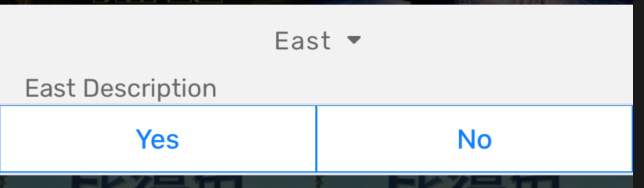
如果我选择East,它将显示错误
Invalid `selectedOption` {"id":2,"brand":"East","models":{"model":"Dodge Viper","image":{"url":"https://shoutem.github.io/img/ui-toolkit/dropdownmenu/Dodge-Viper.jpg"},"description":"East Description"},"children":[{"name":"E1","id":10},{"name":"E2","id":17}]}, DropDownMenu `selectedOption` must be a member of `options`.Check that you are using the same reference in both `options` and `selectedOption`.我检查一下我的console.log会是这样的:
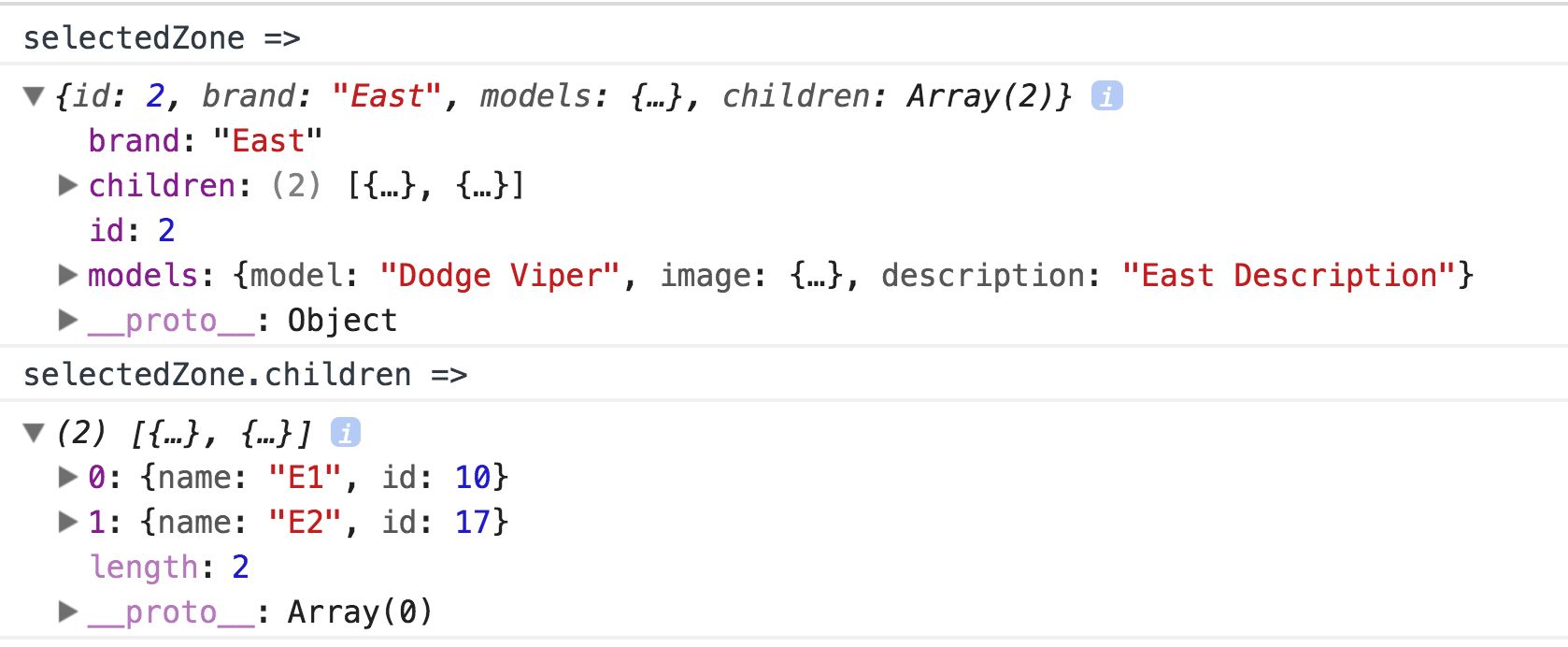
名字下面的键children就是我想把它放到第二个DropDownMenu中的东西。
我不知道下一步该怎么做。任何帮助都将不胜感激。
提前谢谢。
回答 1
Stack Overflow用户
回答已采纳
发布于 2018-05-12 09:09:02
selectedOption属性用于DropDownMenu组件需要一个对象,但this.state.zone[0].children是一个数组。您可以将其更改为this.state.zone[0].children[0]以解决问题。
另外,当您更改城市下拉列表时,您将更新状态中的区域值。这会引起窃听器。尝试通过在状态中设置不同的值并检查城市下拉列表中的值来修复它。
样本
render() {
    const { zone, selectedZone, selectedCity } = this.state
    return (
      <Screen>
        <DropDownMenu
            styleName="horizontal"
            options={zone}
            selectedOption={selectedZone || zone[0]}
            onOptionSelected={(zone) =>
              this.setState({ selectedZone: zone, selectedCity: zone.children[0] } )
            }
            titleProperty="brand"
            valueProperty="cars.model"
        />
        <Text styleName="md-gutter-horizontal">
            {selectedZone ?
            selectedZone.models.description :
            this.state.zone[0].models.description}
        </Text>
       <DropDownMenu
            styleName="horizontal"
            options={selectedZone ? selectedZone.children : zone[0].children } // check if zone selected or set the defaul zone children
            selectedOption={selectedCity || zone[0].children[0] } // set the selected city or default zone city children
            onOptionSelected={(city) => this.setState({ selectedCity: city })} // set the city on change
            titleProperty="name"
            valueProperty="cars.model"
        />
      </Screen>
    );
}页面原文内容由Stack Overflow提供。腾讯云小微IT领域专用引擎提供翻译支持
原文链接:
https://stackoverflow.com/questions/50304474
复制相关文章
相似问题
腾讯云开发者

Copyright © 2013 - 2026 Tencent Cloud. All Rights Reserved. 腾讯云 版权所有
深圳市腾讯计算机系统有限公司 ICP备案/许可证号:粤B2-20090059  粤公网安备44030502008569号
腾讯云计算(北京)有限责任公司 京ICP证150476号 | 京ICP备11018762号