
将产品"on“替换为Woocommerce中的自定义字段值
首先,谢谢大家收看这个问题。我已经搜索并经历了许多类似的问题,但是我没有找到一个完美的解决方案。
我建立了一个使用wordpress/woocommerce的网站,但是我们的大多数产品都有一个固定的准备时间,因此所有的东西都处于“回购-允许”状态。我不想在每个产品页面上显示“”,而是想看看是否可以在每个产品中创建一个自定义字段,并替换“”文本来显示该自定义字段。
目前,我一直在使用以下代码来更改每个产品的文本,但是,并不是所有的产品都处于特定的提前期。
add_filter( 'woocommerce_get_availability', 'backorder_text', 10, 2);
function backorder_text($available) {
 return str_replace('Available on backorder', 'Approx lead time: 2-4 working weeks', $available);
}
我理解我需要在每个产品中设置一个定制字段,但我不完全确定如何将每个产品的特定自定义字段链接到该php代码(确切地说,它是否实际可行)。
任何帮助都将是美妙的--即使它告诉我它不能完成!
回答 3
Stack Overflow用户
发布于 2018-05-10 23:38:33
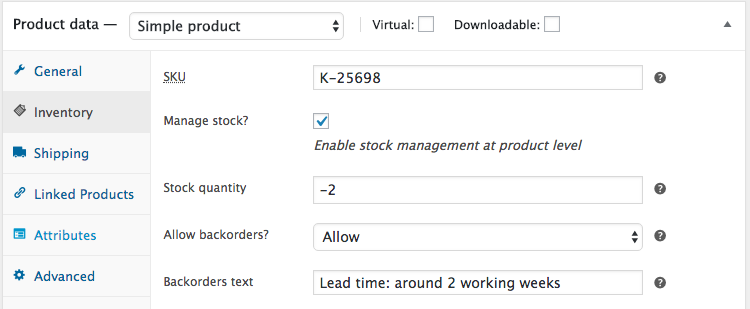
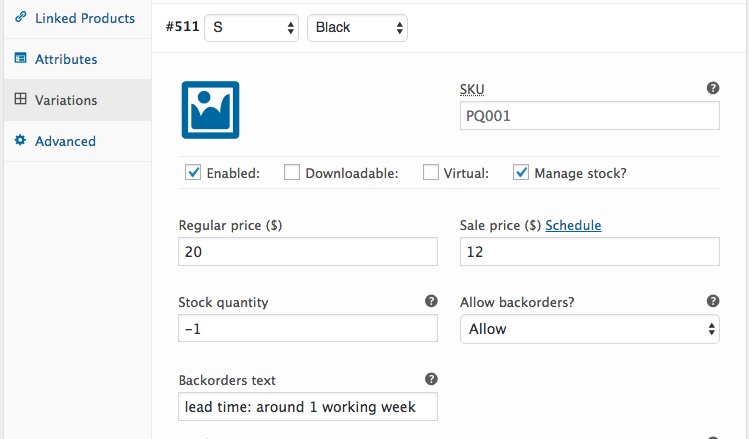
这可以通过以下代码来完成,这些代码也将处理产品和产品的变化:
// Add a custom field in admin product edit pages - inventory tab
add_action( 'woocommerce_product_options_stock_fields', 'add_product_options_stock_custom_field', 20 );
function add_product_options_stock_custom_field() {
    global $product_object, $post;

    woocommerce_wp_text_input( array(
        'id'          => '_backorder_text',
        'type'        => 'text',
        'label'       => __( 'Backorders text', 'woocommerce' ),
        'description' => __( 'Backorders text. Add a custom backorders text to be displayed when products are on backorders.', 'woocommerce' ),
        'desc_tip'    => true,
    ) );

    // jQuery: HIDE the fied if backorders are not enabled
    ?>
    <script type="text/javascript">
    jQuery( function($){
        var a = 'select#_backorders',
            b = 'p._backorder_text_field';

        if( $(a).val() === 'no' )
            $(b).hide();

        $(a).on('change blur', function(){
            if( $(a).val() === 'no' )
                $(b).hide();
            else
                $(b).show();
        });
    });
    </script>
    <?php
}

// Save the custom field value from admin product edit pages - inventory tab
add_action( 'woocommerce_process_product_meta', 'save_product_options_stock_custom_field', 20, 1 );
function save_product_options_stock_custom_field( $product_id ) {
    if ( isset( $_POST['_backorder_text'] ) )
        update_post_meta( $product_id, '_backorder_text', sanitize_text_field( $_POST['_backorder_text'] ) );
}

// Variations: Add a custom field in admin variation options inventory
add_action( 'woocommerce_variation_options_inventory', 'add_variation_settings_fields', 20, 3 );
function add_variation_settings_fields( $loop, $variation_data, $variation_post ) {

    woocommerce_wp_text_input( array(
        'id'            => '_backorder_text'.$loop,
        'name'          => '_backorder_text['.$loop.']',
        'value'         => get_post_meta( $variation_post->ID, '_backorder_text', true ),
        'type'          => 'text',
        'label'         => __( 'Backorders text', 'woocommerce' ),
        'description'   => __( 'Backorders text. Add a custom backorders text to be displayed when products are on backorders.', 'woocommerce' ),
        'desc_tip'      => true,
        'wrapper_class' => 'form-row form-row-first',
    ) );
}

// Variations: Save a custom field value from admin variation options inventory
add_action( 'woocommerce_save_product_variation', 'save_variation_settings_fields', 10, 2 );
function save_variation_settings_fields( $variation_id, $i ) {
    if( isset( $_POST['_backorder_text'][$i] ) )
        update_post_meta( $variation_id, '_backorder_text', sanitize_text_field( $_POST['_backorder_text'][$i] ) );
}

add_filter( 'woocommerce_get_availability', 'custom_on_backorder_text', 10, 2 );
function custom_on_backorder_text( $availability, $product ) {
    $backorder_text = get_post_meta( $product->get_id(), '_backorder_text', true );

    if( $availability['class'] === 'available-on-backorder' && ! empty( $backorder_text ) )
        $availability['availability'] = $backorder_text;

    return $availability;
}
代码在您的活动子主题(或活动主题)的function.php文件中。测试和工作。
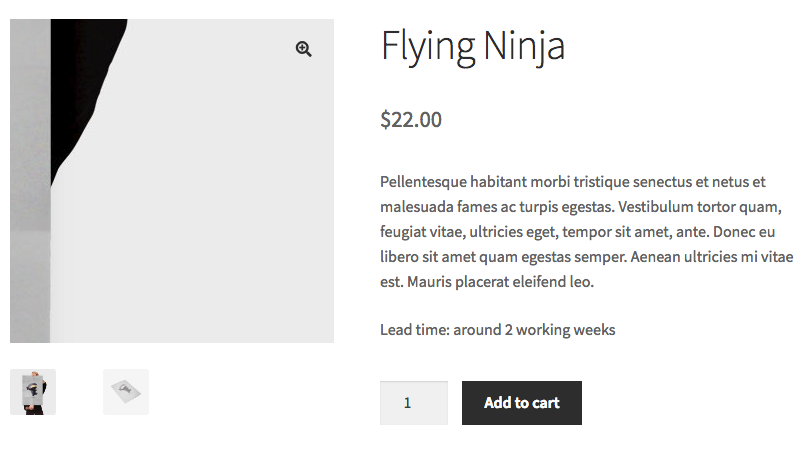
对于所有产品(变量产品除外,请参阅后面),您将得到:
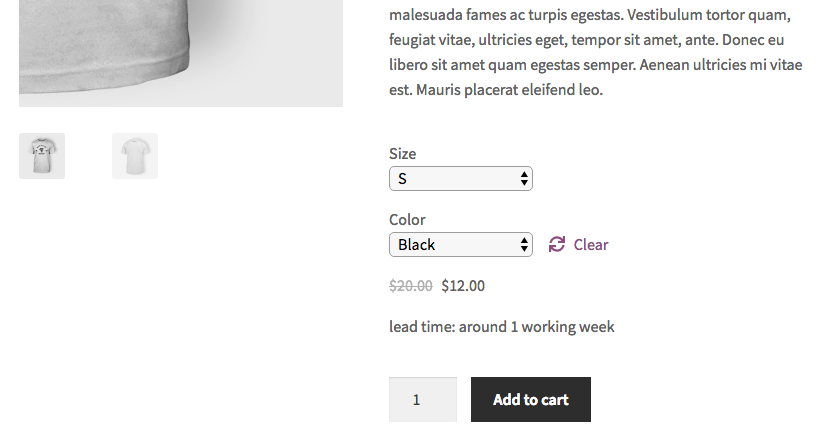
用于产品变体(指可变产品)
Stack Overflow用户
发布于 2020-10-31 12:52:07
该代码对于简单的产品非常有效。但是对于这些变体,退订单文本是可用的,但是当客户选择时,它不会显示在产品页面上。
Stack Overflow用户
发布于 2020-10-31 13:58:25
我稍微修改了@LoicTheAztec代码,以便在前端显示后台文本。
add_filter( 'woocommerce_get_availability_text', 'customize_availability_text', 10, 2);
function customize_availability_text( $availability, $product ) {
$backorder_text = get_post_meta( $product->get_id(), '_backorder_text', true );
 if (! empty( $backorder_text )){$availability = str_replace('Available on backorder',  $backorder_text , $availability);}
return $availability;
}
注意,我使用的是
woocommerce_get_availability_text过滤器而不是
woocommerce_get_availability过滤器
这与我的产品有不同的效果,而不是在简单的产品上测试。
https://stackoverflow.com/questions/50267393
复制相似问题
腾讯云开发者

Copyright © 2013 - 2026 Tencent Cloud. All Rights Reserved. 腾讯云 版权所有
深圳市腾讯计算机系统有限公司 ICP备案/许可证号:粤B2-20090059  粤公网安备44030502008569号
腾讯云计算(北京)有限责任公司 京ICP证150476号 | 京ICP备11018762号