
与heroku的电报网钩
我正试着用蟒蛇做一个电报回波机器人。我要在heroku上主持我的蟒蛇。
首先,我只对python请求使用了电报本地API方法,然后使用了一个库python-电报-bot。
我能够让常规的getUpdate方法(使用长轮询--也就是heroku定期向您的电报机器人请求更新)正常工作,但是网钩不是可以工作。
我认为问题是heroku不能访问<1024端口和电报 Web钩子只将通知推送到端口80、88、443和8443。
有谁知道我怎么做的吗?
这是我的代码:
import os

import logging
import sys
logging.basicConfig(stream=sys.stdout,level=logging.DEBUG)
log = logging.getLogger('my_application')


from proj.heroku_env_vars import teleg_token,secret_key


import telegram
from flask import Flask, request

app = Flask(__name__)
app.debug = True

global bot
bot = telegram.Bot(token=TOKEN)


@app.route('/%s'%HOOK, methods=['POST'])
def webhook_handler():
    if request.method == "POST":
        log.info('post from teleg')
        # retrieve the message in JSON and then transform it to Telegram object
        update = telegram.Update.de_json(request.get_json(force=True))

        chat_id = update.message.chat.id

        # Telegram understands UTF-8, so encode text for unicode compatibility
        text = update.message.text.encode('utf-8')

        # repeat the same message back (echo)
        bot.sendMessage(chat_id=chat_id, text=text)
    else:
        log.info('notpost from teleg')

    return 'ok'


@app.route('/swh', methods=['GET', 'POST'])
def set_webhook():
    s = bot.setWebhook('%s/%s'%(URL, HOOK), PORT=8443)
    if s:
        return "webhook setup ok"
    else:
        return "webhook setup failed"


@app.route('/dwh', methods=['GET', 'POST'])
def delete_webhook():
    s = bot.deleteWebhook()
    if s:
        return "webhook deleted ok"
    else:
        return "webhook delete failed"


@app.route('/')
def index():
    log.info('i made this request')
    return 'home page.'
=====
1.删除我的WEBHOOK
MacBook-Pro-4:proj aiden$ curl https://mysterious-sands-89012.herokuapp.com/dwh
webhook deleted ok
HEROKU测井
2018-05-07T15:24:46.592749+00:00 heroku[router]: at=info method=GET path="/dwh" host=mysterious-sands-89012.herokuapp.com request_id=4aef8faf-555e-4697-8a3d-3eea2861eba2 fwd="23.31.215.245" dyno=web.1 connect=3ms service=404ms status=200 bytes=178 protocol=https
2018-05-07T15:24:46.586755+00:00 app[web.1]: DEBUG:telegram.vendor.ptb_urllib3.urllib3.connectionpool:https://api.telegram.org:443 "POST /bot562713672:AAE8Pt1-UDWyKrtIEJ7_igD2t5Zw1z0LRRo/deleteWebhook HTTP/1.1" 200 61
2018-05-07T15:24:46.587925+00:00 app[web.1]: DEBUG:telegram.bot:True
2018-05-07T15:24:46.588080+00:00 app[web.1]: DEBUG:telegram.bot:Exiting: delete_webhook
2018-05-07T15:24:46.589420+00:00 app[web.1]: 10.101.133.97 - - [07/May/2018:15:24:46 +0000] "GET /dwh HTTP/1.1" 200 18 "-" "curl/7.54.0"
=============
2.再次设置它(指定端口8443)
MacBook-Pro-4:proj aiden$ curl https://mysterious-sands-89012.herokuapp.com/swh
webhook setup ok
HEROKU测井
2018-05-07T15:24:52.194779+00:00 app[web.1]: DEBUG:telegram.bot:Entering: set_webhook
2018-05-07T15:24:52.195462+00:00 app[web.1]: DEBUG:telegram.vendor.ptb_urllib3.urllib3.connectionpool:Starting new HTTPS connection (1): api.telegram.org
2018-05-07T15:24:52.596829+00:00 heroku[router]: at=info method=GET path="/swh" host=mysterious-sands-89012.herokuapp.com request_id=c2cfa1d8-48c2-4abf-a198-cfa8499e9676 fwd="23.31.215.245" dyno=web.1 connect=0ms service=404ms status=200 bytes=176 protocol=https
2018-05-07T15:24:52.593031+00:00 app[web.1]: DEBUG:telegram.vendor.ptb_urllib3.urllib3.connectionpool:https://api.telegram.org:443 "POST /bot562713672:AAE8Pt1-UDWyKrtIEJ7_igD2t5Zw1z0LRRo/setWebhook HTTP/1.1" 200 57
2018-05-07T15:24:52.594936+00:00 app[web.1]: DEBUG:telegram.bot:True
2018-05-07T15:24:52.595055+00:00 app[web.1]: DEBUG:telegram.bot:Exiting: set_webhook
2018-05-07T15:24:52.596418+00:00 app[web.1]: 10.141.252.172 - - [07/May/2018:15:24:52 +0000] "GET /swh HTTP/1.1" 200 16 "-" "curl/7.54.0"
=============
3.现在尝试并发送到该URL (没有指定端口)
MacBook-Pro-4:p-d "param1=value1¶m2=value2" -X POST https://mysterious-sands-89012.herokuapp.com/562713672:AAE8Pt1-UDWyKrtIEJ7_igD2t5Zw1z0LRRo
<!DOCTYPE HTML PUBLIC "-//W3C//DTD HTML 3.2 Final//EN">
<title>400 Bad Request</title>
<h1>Bad Request</h1>
<p>Failed to decode JSON object: Expecting value: line 1 column 1 (char 0)</p>HEROKU测井
2018-05-07T15:25:05.454666+00:00 app[web.1]: INFO:my_application:post from teleg
2018-05-07T15:25:05.519859+00:00 app[web.1]: 10.101.219.132 - - [07/May/2018:15:25:05 +0000] "POST /562713672:AAE8Pt1-UDWyKrtIEJ7_igD2t5Zw1z0LRRo HTTP/1.1" 400 187 "-" "curl/7.54.0"
2018-05-07T15:25:05.524749+00:00 heroku[router]: at=info method=POST path="/562713672:AAE8Pt1-UDWyKrtIEJ7_igD2t5Zw1z0LRRo" host=mysterious-sands-89012.herokuapp.com request_id=3b9713a3-b3db-4db2-8915-29f995560ec2 fwd="23.31.215.245" dyno=web.1 connect=1ms service=68ms status=400 bytes=342 protocol=https
===============
4.现在尝试并发送到该URL (指定端口)
MacBook-Pro-4:proj aiden$ curl -d "param1=value1¶m2=value2" -X POST https://mysterious-sands-89012.herokuapp.com/562713672:AAE8Pt1-UDWyKrtIEJ7_igD2t5Zw1z0LRRo:8443
<!DOCTYPE HTML PUBLIC "-//W3C//DTD HTML 3.2 Final//EN">
<title>404 Not Found</title>
<h1>Not Found</h1>
<p>The requested URL was not found on the server. If you entered the URL manually please check your spelling and try again.</p>HEROKU测井
2018-05-07T15:25:14.809828+00:00 heroku[router]: at=info method=POST path="/562713672:AAE8Pt1-UDWyKrtIEJ7_igD2t5Zw1z0LRRo:8443" host=mysterious-sands-89012.herokuapp.com request_id=458c911e-62ae-4eee-9cfd-b5a1345e5064 fwd="23.31.215.245" dyno=web.1 connect=0ms service=3ms status=404 bytes=386 protocol=https
2018-05-07T15:25:14.804975+00:00 app[web.1]: 10.180.49.12 - - [07/May/2018:15:25:14 +0000] "POST /562713672:AAE8Pt1-UDWyKrtIEJ7_igD2t5Zw1z0LRRo:8443 HTTP/1.1" 404 233 "-" "curl/7.54.0"
=================
5.如果我给我的电报机器人发一条消息,NOTHING就会出现在我的HEROKU日志上
回答 1
Stack Overflow用户
发布于 2018-05-07 22:26:24
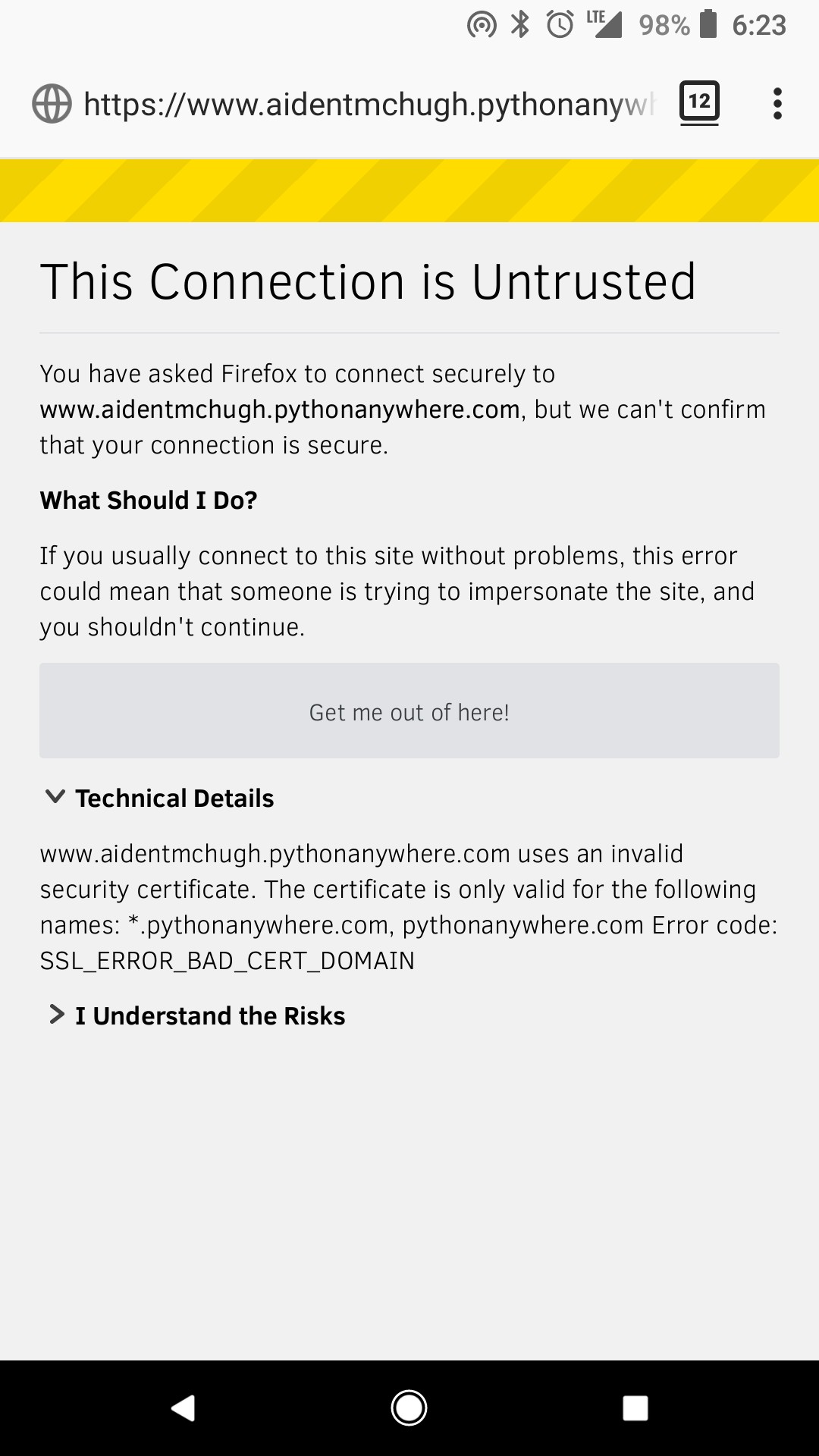
您必须使用aidentmchugh.pythonanywhere.com作为URL,而不包括www。
您的HTTPS证书没有为www域签名。
https://stackoverflow.com/questions/50215962
复制相似问题
腾讯云开发者

Copyright © 2013 - 2026 Tencent Cloud. All Rights Reserved. 腾讯云 版权所有
深圳市腾讯计算机系统有限公司 ICP备案/许可证号:粤B2-20090059  粤公网安备44030502008569号
腾讯云计算(北京)有限责任公司 京ICP证150476号 | 京ICP备11018762号