
QT信号和插槽setEnabled(bool)插槽不工作
QT信号和插槽setEnabled(bool)插槽不工作
提问于 2018-05-05 06:44:36
我一直在使用QT开发一个简单的记事本应用程序,当撤销或重做分别不适用时,我现在不得不禁用actionUndo和actionRedo。我使用了QT的connect方法,目前我的constructor function (连同includes)如下所示:
#include "notepad.h"
#include "ui_notepad.h"
#include "about.h"
#include <QFile>
#include <QTextStream>
#include <QFileDialog>
#include <QIcon>
#include <QFont>
#include <QFontDialog>
#include <QTextCursor>

Notepad::Notepad(QWidget *parent) :
    QMainWindow(parent),
    ui(new Ui::Notepad)
{
    ui->setupUi(this);
    setWindowTitle("QNotepad");
    setWindowIcon(QIcon(":/icons/icons/qnotepad.png"));
    setCentralWidget(ui->textBody);

    //Enabling the options, only when applicable
    connect(ui->textBody, SIGNAL(undoAvailable(bool)), ui->actionUndo, SLOT(setEnabled(bool)));
    connect(ui->textBody, SIGNAL(redoAvailable(bool)), ui->actionRedo, SLOT(setEnabled(bool)));

}完整的源是这里
但是它似乎不能工作,因为当我运行程序时,actionUndo和actionRedo仍然是启用的,即使没有撤销和重做操作可用。
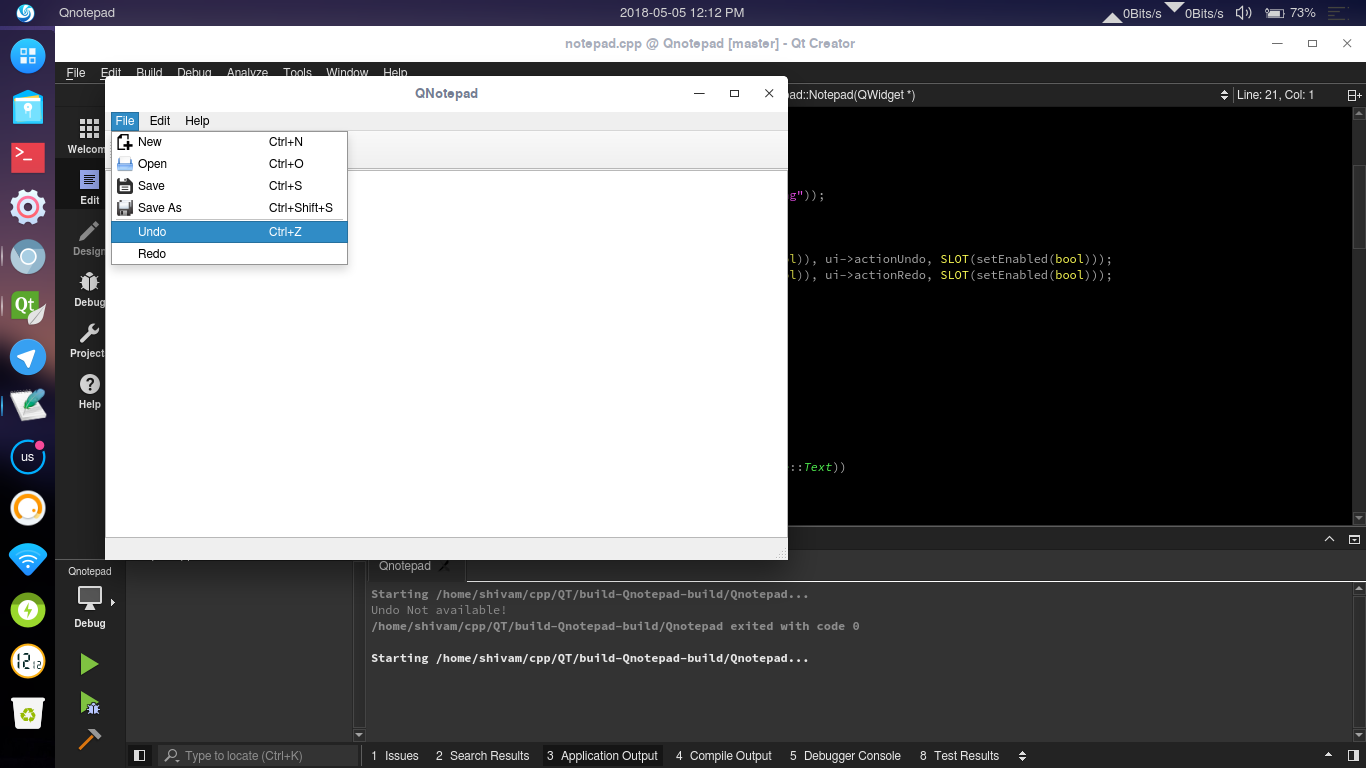
我使用Arch Linux作为主要的开发环境。
回答 1
Stack Overflow用户
回答已采纳
发布于 2018-05-05 11:07:14
Qt元素(小部件、操作等)默认情况下启用,因此您需要取消选中notepad.ui文件Qt属性窗口中的Undo和Redo操作的启用标志。或者,您可以在窗口的构造函数中这样做:
ui->actionUndo->setEnabled(false);
ui->actionRedo->setEnabled(false);

//Enabling the options, only when applicable
connect(ui->textBody, &QTextEdit::undoAvailable, ui->actionUndo, &QAction::setEnabled);
connect(ui->textBody, &QTextEdit::undoAvailable, ui->actionRedo, &QAction::setEnabled);
这样,只有当QTextEdit发出信号时,它们才会开/关。
还可以考虑为您的信号/插槽连接使用函子语法,如我的代码片段所示,因为它有几个优点。请参阅这里了解更多信息。
页面原文内容由Stack Overflow提供。腾讯云小微IT领域专用引擎提供翻译支持
原文链接:
https://stackoverflow.com/questions/50186572
复制相关文章
相似问题
腾讯云开发者

Copyright © 2013 - 2026 Tencent Cloud. All Rights Reserved. 腾讯云 版权所有
深圳市腾讯计算机系统有限公司 ICP备案/许可证号:粤B2-20090059  粤公网安备44030502008569号
腾讯云计算(北京)有限责任公司 京ICP证150476号 | 京ICP备11018762号