
在WPF中精确定位字形文本
在WPF中精确定位字形文本
提问于 2018-05-04 12:48:11
我正在为Windows编写一个化学分子编辑器。由于它必须在一个字外接程序中使用,所以我仅限于使用WPF来呈现结构。这是相当好的工作,除了一个小小的小点。
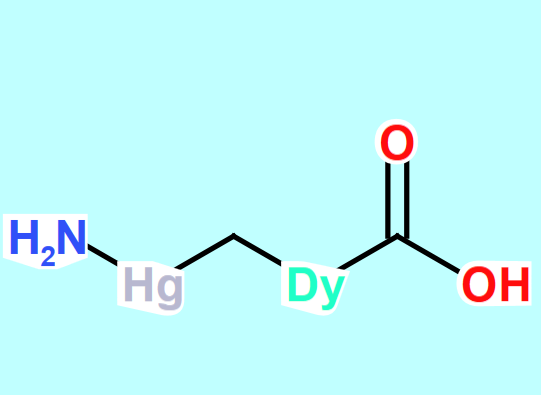
我使用GlyphRuns来呈现原子标签,它们总是稍微移到右边。如果您查看屏幕截图,您可以看到前面有一个空格,特别是带有H2N和Hg原子标签的空白。为什么?当你得到字形运行的轮廓几何时,白色的背景就是你得到的。
GlyphRun类的文档编写得非常糟糕,以至于我无法看到要修改哪些属性来精确定位我想要的文本。因此,任何尝试的建议都将受到欢迎。
更新:我被要求提供一个样本。代码是复杂的,但不是毫无理由的,所以我把它删减下来,集中讨论要点:
    public void MeasureAtCenter(Point center)
        {
            GlyphInfo = GlyphUtils.GetGlyphsAndInfo(Text, PixelsPerDip, out GlyphRun groupGlyphRun, center, _glyphTypeface, TypeSize);
            //compensate the main offset vector for any descenders
            Vector mainOffset = GlyphUtils.GetOffsetVector(groupGlyphRun, AtomShape.SymbolSize) + new Vector(0.0, -MaxBaselineOffset) + new Vector(-FirstBearing(groupGlyphRun), 0.0);


            TextRun = groupGlyphRun;
            TextMetrics = new AtomTextMetrics
            {
                BoundingBox = groupGlyphRun.GetBoundingBox(center + mainOffset),
                Geocenter = center,
                TotalBoundingBox = groupGlyphRun.GetBoundingBox(center + mainOffset),
                OffsetVector = mainOffset
            };
        }

  public static GlyphInfo GetGlyphs(string symbolText, GlyphTypeface glyphTypeFace, double size)
        {
            ushort[] glyphIndexes = new ushort[symbolText.Length];
            double[] advanceWidths = new double[symbolText.Length];
            double[] uprightBaselineOffsets = new double[symbolText.Length];
            double totalWidth = 0;

            for (int n = 0; n < symbolText.Length; n++)
            {
                ushort glyphIndex = glyphTypeFace.CharacterToGlyphMap[symbolText[n]];
                glyphIndexes[n] = glyphIndex;

                double width = glyphTypeFace.AdvanceWidths[glyphIndex] * size;
                advanceWidths[n] = width;

                double ubo = glyphTypeFace.DistancesFromHorizontalBaselineToBlackBoxBottom[glyphIndex] * size;
                uprightBaselineOffsets[n] = ubo;
                totalWidth += width;
            }
            return new GlyphInfo { AdvanceWidths = advanceWidths, Indexes = glyphIndexes, Width = totalWidth, UprightBaselineOffsets = uprightBaselineOffsets };
        }

        public static GlyphUtils.GlyphInfo GetGlyphsAndInfo(string symbolText, float pixelsPerDip, out GlyphRun hydrogenGlyphRun, Point point, GlyphTypeface glyphTypeFace, double symbolSize)
        {
            //measure the H atom first
            var glyphInfo = GlyphUtils.GetGlyphs(symbolText, glyphTypeFace, symbolSize);
            hydrogenGlyphRun = GlyphUtils.GetGlyphRun(glyphInfo, glyphTypeFace,
                symbolSize, pixelsPerDip, point);
            //work out exactly how much we should offset from the center to get to the bottom left
            return glyphInfo;
        }

 public static Vector GetOffsetVector(GlyphRun glyphRun, double symbolSize)
    {
        Rect rect = glyphRun.ComputeInkBoundingBox();

        //Vector offset = (rect.BottomLeft - rect.TopRight) / 2;
        Vector offset = new Vector(-rect.Width / 2, glyphRun.GlyphTypeface.CapsHeight * symbolSize / 2);
        return offset;
}回答 1
Stack Overflow用户
回答已采纳
发布于 2022-04-01 15:26:18
实际上,GlyphRun类需要使用的工作很多。我建议使用FormattedText对象代替。如果存在性能问题,可以考虑将FormattedText转换为几何学并重用它。MSDN文档提供了一个不同方法的比较。
页面原文内容由Stack Overflow提供。腾讯云小微IT领域专用引擎提供翻译支持
原文链接:
https://stackoverflow.com/questions/50175349
复制相关文章
相似问题
腾讯云开发者

Copyright © 2013 - 2026 Tencent Cloud. All Rights Reserved. 腾讯云 版权所有
深圳市腾讯计算机系统有限公司 ICP备案/许可证号:粤B2-20090059  粤公网安备44030502008569号
腾讯云计算(北京)有限责任公司 京ICP证150476号 | 京ICP备11018762号