
如何在Qt5forWindows中编程处理交互式CLI
我有以下互动的CLI -
c:\TEST> python test.py
Running test tool.
$help
   |'exec <testname>' or 'exec !<testnum>'
   |0 BQ1
   |1 BS1
   |2 BA1
   |3 BP1
$exec !2
   |||TEST BA1_ACTIVE
$quit
c:\TEST>有谁知道如何在Qt5中这样做吗?我尝试使用QProcess,但是它不处理上面显示的交互式命令行,因为exec !2是用户定义的。
例如,QProcess可以处理python test.py,如下所示,但是,我们如何处理CLI内部的命令,如exec !2
QProcess *usbProcess;
usbProcess = new QProcess();

QString s = "python test.py";
// ??? how do we handle interactive commands,
// such as 'exec !2' or 'exec !1' and etc ???

usbProcess->start(s);
//usbProcess->waitForReadyRead();
//usbProcess->waitForFinished();
QString text =  usbProcess->readAll();
qDebug() << text;
以下只是一个示例代码,test.py应该是原样的!我只是想在test.py之外找到一个解决方案。
"""---beginning test.py---"""

from cmd import Cmd

class MyPrompt(Cmd):

def do_help(self, args):
    if len(args) == 0:
        name = "   |'exec <testname>' or 'exec !<testnum>'\n   |0 BQ1\n   |1 BS1\n   |2 BA1\n   |3 BP1'"
    else:
        name = args
    print ("%s" % name)

def do_exec(self, args):
    if (args == "!0"):
        print ("|||TEST BQ1_ACTIVE")
    elif (args == "!1"):
        print ("|||TEST BS1_ACTIVE")
    elif (args == "!2"):
        print ("|||TEST BA1_ACTIVE")
    elif (args == "!3"):
        print ("|||TEST BP3_ACTIVE")
    else:
        print ("invalid input")

def do_quit(self, args):
    print ("Quitting.")
    raise SystemExit

if __name__ == '__main__':
    prompt = MyPrompt()
    prompt.prompt = '$ '
    prompt.cmdloop('Running test tool.')
"""---end of test.py---"""回答 2
Stack Overflow用户
发布于 2018-05-03 16:55:56
首先,避免使用waitForXXX方法,使用Qt的主要优点:信号和插槽。
在QProcess的情况下,必须使用readyReadStandardError和readyReadStandardOutput,另一方面程序不能是"python test.py",程序是"python",其参数是"test.py"。
下面的示例已经在Linux上进行了测试,但我认为您应该做的更改是设置python可执行文件和.py文件的路径。
#include <QCoreApplication>
#include <QProcess>
#include <QDebug>

int main(int argc, char *argv[])
{
    QCoreApplication a(argc, argv);
    QProcess process;
    process.setProgram("/usr/bin/python");
    process.setArguments({"/home/eyllanesc/test.py"});

    // commands to execute consecutively.
    QList<QByteArray> commands = {"help", "exec !2", "exec !0", "help", "exec !1", "exec !3", "quit"};
    QListIterator<QByteArray> itr (commands);

    QObject::connect(&process, &QProcess::readyReadStandardError, [&process](){
        qDebug()<< process.readAllStandardError();
    });
    QObject::connect(&process, &QProcess::readyReadStandardOutput, [&process, &itr](){
        QString result = process.readAll();
        qDebug().noquote()<< "Result:\n" << result;
        if(itr.hasNext()){
            const QByteArray & command = itr.next();
            process.write(command+"\n");
            qDebug()<< "command: " << command;
        }
        else{
            // wait for the application to close.
            process.waitForFinished(-1);
            QCoreApplication::quit();
        }
    });

    process.start();

    return a.exec();
}
输出:
Result:
 Running test tool.
$
command:  "help"
Result:
    |'exec <testname>' or 'exec !<testnum>'
   |0 BQ1
   |1 BS1
   |2 BA1
   |3 BP1'
$
command:  "exec !2"
Result:
 |||TEST BA1_ACTIVE
$
command:  "exec !0"
Result:
 |||TEST BQ1_ACTIVE
$
command:  "help"
Result:
    |'exec <testname>' or 'exec !<testnum>'
   |0 BQ1
   |1 BS1
   |2 BA1
   |3 BP1'
$
command:  "exec !1"
Result:
 |||TEST BS1_ACTIVE
$
command:  "exec !3"
Result:
 |||TEST BP3_ACTIVE
$
command:  "quit"
Result:
Quitting.Stack Overflow用户
发布于 2018-05-03 20:56:13
- 所有处理都应该是异步的;没有
waitFor调用。 - 从
QProcess输入的数据可以是任意块。您需要收集所有这些块,并解析它们以确定何时出现新的输入提示符。 - 进程应以文本模式打开,以便将换行符独立于平台转换为
\n。 - 标准错误转发可以由
QProcess处理。 - Python脚本不应该使用原始输入--它将挂在Windows上。相反,它应该使用stdin/stdout,并在
on_exit处理程序中返回True,而不是抛出异常。
首先,让我们将过程询问因素分解到Commander
// https://github.com/KubaO/stackoverflown/tree/master/questions/process-interactive-50159172
#include <QtWidgets>
#include <algorithm>
#include <initializer_list>

class Commander : public QObject {
   Q_OBJECT
   QProcess m_process{this};
   QByteArrayList m_commands;
   QByteArrayList::const_iterator m_cmd = m_commands.cbegin();
   QByteArray m_log;
   QByteArray m_prompt;
   void onStdOut() {
      auto const chunk = m_process.readAllStandardOutput();
      m_log.append(chunk);
      emit hasStdOut(chunk);
      if (m_log.endsWith(m_prompt) && m_cmd != m_commands.end()) {
         m_process.write(*m_cmd);
         m_log.append(*m_cmd);
         emit hasStdIn(*m_cmd);
         if (m_cmd++ == m_commands.end())
            emit commandsDone();
      }
   }
public:
   Commander(QString program, QStringList arguments, QObject * parent = {}) :
      QObject(parent) {
      connect(&m_process, &QProcess::stateChanged, this, &Commander::stateChanged);
      connect(&m_process, &QProcess::readyReadStandardError, this, [this]{
         auto const chunk = m_process.readAllStandardError();
         m_log.append(chunk);
         emit hasStdErr(chunk);
      });
      connect(&m_process, &QProcess::readyReadStandardOutput, this, &Commander::onStdOut);
      connect(&m_process, &QProcess::errorOccurred, this, &Commander::hasError);
      m_process.setProgram(std::move(program));
      m_process.setArguments(std::move(arguments));
   }
   void setPrompt(QByteArray prompt) { m_prompt = std::move(prompt); }
   void setCommands(std::initializer_list<const char*> commands) {
      QByteArrayList l;
      l.reserve(int(commands.size()));
      for (auto c : commands) l << c;
      setCommands(l);
   }
   void setCommands(QByteArrayList commands) {
      Q_ASSERT(isIdle());
      m_commands = std::move(commands);
      m_cmd = m_commands.begin();
      for (auto &cmd : m_commands)
         cmd.append('\n');
   }
   void start() {
      Q_ASSERT(isIdle());
      m_cmd = m_commands.begin();
      m_process.start(QIODevice::ReadWrite | QIODevice::Text);
   }
   QByteArray log() const { return m_log; }
   QProcess::ProcessError error() const { return m_process.error(); }
   QProcess::ProcessState state() const { return m_process.state(); }
   int exitCode() const { return m_process.exitCode(); }
   Q_SIGNAL void stateChanged(QProcess::ProcessState);
   bool isIdle() const { return state() == QProcess::NotRunning; }
   Q_SIGNAL void hasError(QProcess::ProcessError);
   Q_SIGNAL void hasStdIn(const QByteArray &);
   Q_SIGNAL void hasStdOut(const QByteArray &);
   Q_SIGNAL void hasStdErr(const QByteArray &);
   Q_SIGNAL void commandsDone();
   ~Commander() {
      m_process.close(); // kill the process
   }
};
然后,我们可以使用作为合并日志输出的前端的记录器:
template <typename T> void forEachLine(const QByteArray &chunk, T &&fun) {
   auto start = chunk.begin();
   while (start != chunk.end()) {
      auto end = std::find(start, chunk.end(), '\n');
      auto lineEnds = end != chunk.end();
      fun(lineEnds, QByteArray::fromRawData(&*start, end-start));
      start = end;
      if (lineEnds) start++;
   }
}

class Logger : public QObject {
   Q_OBJECT
   QtMessageHandler previous = {};
   QTextCharFormat logFormat;
   bool lineStart = true;
   static QPointer<Logger> &instance() { static QPointer<Logger> ptr; return ptr; }
public:
   explicit Logger(QObject *parent = {}) : QObject(parent) {
      Q_ASSERT(!instance());
      instance() = this;
      previous = qInstallMessageHandler(Logger::logMsg);
   }
   void operator()(const QByteArray &chunk, const QTextCharFormat &modifier = {}) {
      forEachLine(chunk, [this, &modifier](bool ends, const QByteArray &chunk){
         auto text = QString::fromLocal8Bit(chunk);
         addText(text, modifier, lineStart);
         lineStart = ends;
      });
   }
   static void logMsg(QtMsgType, const QMessageLogContext &, const QString &msg) {
      (*instance())(msg.toLocal8Bit().append('\n'), instance()->logFormat);
   }
   Q_SIGNAL void addText(const QString &text, const QTextCharFormat &modifier, bool newBlock);
   void setLogFormat(const QTextCharFormat &format) { logFormat = format; }
   ~Logger() override { if (previous) qInstallMessageHandler(previous); }
};然后,我们可以定义一些方便的操作符来产生修改的QTextCharFormat。
static struct SystemFixedPitchFont_t {} constexpr SystemFixedPitchFont;
QTextCharFormat operator<<(QTextCharFormat format, const QBrush &brush) {
   return format.setForeground(brush), format;
}
QTextCharFormat operator<<(QTextCharFormat format, SystemFixedPitchFont_t) {
   return format.setFont(QFontDatabase::systemFont(QFontDatabase::FixedFont)), format;
}
我们还需要一个将文本添加到日志视图中的函数:
void addText(QPlainTextEdit *view, const QString &text, const QTextCharFormat &modifier, bool newBlock) {
   view->mergeCurrentCharFormat(modifier);
   if (newBlock)
      view->appendPlainText(text);
   else
      view->textCursor().insertText(text);
}
最后,演示线束:
int main(int argc, char *argv[]) {
   QApplication app{argc, argv};

   Commander cmdr{"python", {"test.py"}};
   cmdr.setPrompt("$ ");
   cmdr.setCommands({"help", "exec !2", "exec !0", "help", "exec !1", "exec !3", "quit"});

   QWidget w;
   QVBoxLayout layout{&w};
   QPlainTextEdit logView;
   QPushButton start{"Start"};
   Logger log{logView.document()};
   layout.addWidget(&logView);
   layout.addWidget(&start);
   logView.setMaximumBlockCount(1000);
   logView.setReadOnly(true);
   logView.setCurrentCharFormat(QTextCharFormat() << SystemFixedPitchFont);
   log.setLogFormat(QTextCharFormat() << Qt::darkGreen);

   QObject::connect(&log, &Logger::addText, &logView, [&logView](auto &text, auto &mod, auto block){
      addText(&logView, text, mod, block);
   });
   QObject::connect(&cmdr, &Commander::hasStdOut, &log, [&log](auto &chunk){ log(chunk, QTextCharFormat() << Qt::black); });
   QObject::connect(&cmdr, &Commander::hasStdErr, &log, [&log](auto &chunk){ log(chunk, QTextCharFormat() << Qt::red); });
   QObject::connect(&cmdr, &Commander::hasStdIn, &log, [&log](auto &chunk){ log(chunk, QTextCharFormat() << Qt::blue); });
   QObject::connect(&cmdr, &Commander::stateChanged, &start, [&start](auto state){
      qDebug() << state;
      start.setEnabled(state == QProcess::NotRunning);
   });
   QObject::connect(&start, &QPushButton::clicked, &cmdr, &Commander::start);

   w.show();
   return app.exec();
}

#include "main.moc"
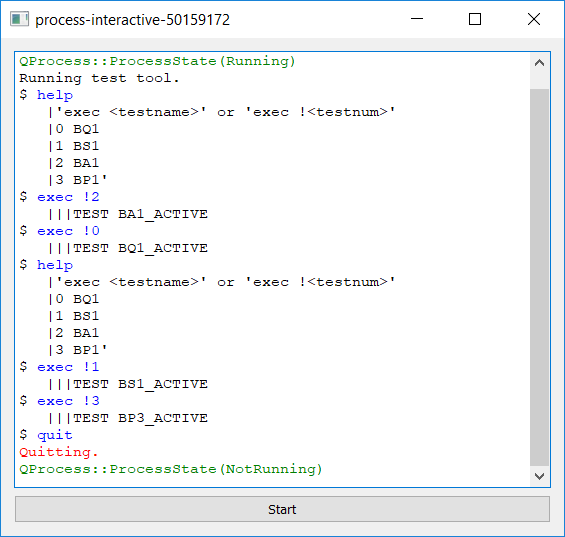
因此,产出如下:
Python脚本:
#!/usr/bin/env python
# -*- coding: utf-8 -*-
# test.py

from __future__ import print_function
from cmd import Cmd
import time, sys

class MyPrompt(Cmd):
    def do_help(self, args):
        if len(args) == 0:
            name = "   |'exec <testname>' or 'exec !<testnum>'\n   |0 BQ1\n   |1 BS1\n   |2 BA1\n   |3 BP1"
        else:
            name = args
        print ("%s" % name)

    def do_exec(self, args):
        if (args == "!0"):
            print ("   |||TEST BQ1_ACTIVE")
        elif (args == "!1"):
            print ("   |||TEST BS1_ACTIVE")
        elif (args == "!2"):
            print ("   |||TEST BA1_ACTIVE")
        elif (args == "!3"):
            print ("   |||TEST BP3_ACTIVE")
        else:
            print ("invalid input")
        time.sleep(1)

    def do_quit(self, args):
        print ("Quitting.", file=sys.stderr)
        return True

if __name__ == '__main__':
    prompt = MyPrompt()
    prompt.use_rawinput = False
    prompt.prompt = '$ '
prompt.cmdloop('Running test tool.')https://stackoverflow.com/questions/50159172
复制相似问题
腾讯云开发者

Copyright © 2013 - 2026 Tencent Cloud. All Rights Reserved. 腾讯云 版权所有
深圳市腾讯计算机系统有限公司 ICP备案/许可证号:粤B2-20090059  粤公网安备44030502008569号
腾讯云计算(北京)有限责任公司 京ICP证150476号 | 京ICP备11018762号