
如何在php中使用ajax获得依赖数据?
如何在php中使用ajax获得依赖数据?
提问于 2018-05-03 06:02:32
如何使用引导多选择多选择创建多选择依赖的下拉列表.
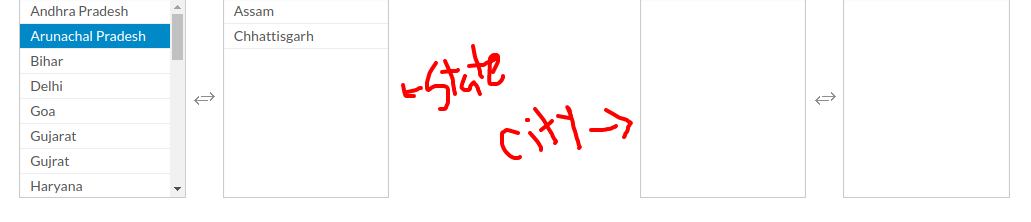
如果选择“在城市中填写选定的州城市”框
下面我提到我的ajax代码数据将被获取,但不会填充城市框。
ajax代码
   $("#my_multi_select1").change(function () {
            var stateId = $("#my_multi_select1").val();
            $.ajax({
                type: 'POST',
                url: REQUEST_URL+'Territory/getMultiTerritorylist/',
                data:{state_id:stateId},
                beforeSend: function(){
                Metronic.blockUI({target: '', iconOnly: true});
                },
                error : function (xhr, textStatus, errorThrown) {
                    //other stuff
                },
                complete : function (){
                    Metronic.unblockUI('');
                },
                success: function (result) {  console.log(result);
                  // $("#my_multi_select2").empty();
                   //$('#TerritoryId').multiselect('destroy');


                    var prePopulate = JSON.parse(result);

                    $.each(prePopulate, function (i, territory) {console.log(i + ":" + territory)
                        $("#my_multi_select1").multiSelect(['1','2']);
                    });
                    /*$('#TerritoryId').multiselect({
                        enableFiltering: true,
                        enableCaseInsensitiveFiltering: true,
                        includeSelectAllOption: true,
                        buttonWidth: '400px',
                        maxHeight: 350,
                        selectAllText: 'Select All Territory',
                        filterPlaceholder: 'Search by Territory Name',
                    });*/
                  }

            });
});回答 2
Stack Overflow用户
回答已采纳
发布于 2018-05-03 06:48:08
您可以检查value stateId .My示例:
<select id="my_multi_select1">
    <option value="1">test1</option>
    <option value="2" selected="selected">test2</option>
    <option value="3">test3</option>
</select>
<script>
    var e = document.getElementById("my_multi_select1");
    var stateId  = e.options[e.selectedIndex].value; // GET VALUE DROP DOWN
</script>Stack Overflow用户
发布于 2018-05-03 12:32:57
完全CakePHP答案
首先将JS和CSS放在您的cakeproject中。
CSS
1.bootstrap-multiselect.css
2.multi-select.css
JS
- bootstrap-select.min.js
- jquery.multi-select.js
视图文件代码
<?php echo $this->Form->input("state_id", array('type' => 'select', 'options' => array($state), 'default' => $selected_state, 'id'=>'my_multi_select1', 'multiple'=>'multiple', 'class' => 'multi-select', 'label' => FALSE_VALUE,'div' => FALSE_VALUE)); ?>

<?php echo $this->Form->input("city_id", array('type' => 'select', 'options' => '', 'default' => '', 'id'=>'my_multi_select2', 'multiple'=>'multiple', 'class' => 'multi-select', 'label' => FALSE_VALUE,'div' => FALSE_VALUE)); ?>
可变建议:
$state =>从控制器获取所有状态
$selected_state =>在为数据库中的选定状态数据添加数据之后。
为多个选择框添加脚本
<script>
$('#my_multi_select1').multiSelect();
$('#my_multi_select2').multiSelect();
</script>
用于多选择数据的AJAX
<script type="text/javascript">
  $(document).ready(function() {
   $("#my_multi_select1").change(function () {
            var stateId = $("#my_multi_select1").val();
            $.ajax({
                type: 'POST',
                url: 'http://loalhost/project/admin/City/getMultiCitylist/',
                data:{state_id:stateId},
                beforeSend: function(){

                },
                error : function (xhr, textStatus, errorThrown) {

                },
                complete : function (result){

                   //$selected_city => from controller after add data(this ajax for oth add and edit opration)

                    <?php if(isset($selected_city) && !empty($selected_city)) { ?>

                    $('#my_multi_select2').attr('disabled', false);


                    $("#my_multi_select2").empty();


                    var prePopulate = JSON.parse(result.responseText);

                    $.each(prePopulate, function (i, city) {
                      var new_id = i.split('_');
                      $("#my_multi_select2").append('<option value="' + i + '">' +
                            territory + '</option>');
                       });


                     <?php foreach ($selected_city as $key => $value) {
                        ?>
                      $("#my_multi_select2 option[value='<?php echo $value ?>']").prop('selected', 'selected').trigger('change');
                      <?php } ?>

                    $('#my_multi_select2').multiselect('refresh');
                    <?php } ?>
                },
                success: function (result) {
                   $("#my_multi_select2").empty();


                    var prePopulate = JSON.parse(result);

                    $.each(prePopulate, function (i, territory)
                        $("#my_multi_select2").append('<option value="' + i + '">' +
                            territory + '</option>');
                    });
                    $('#my_multi_select2').multiselect('refresh');


                  }

            });
        });
});
// this ajax for trigger added data on edit mode
 <?php if(isset($selected_city) && count($selected_city) > 0) { ?>
<script>

   $(document).ready(function(){
      $.ajax({
         type: "POST",
         url: 'http://localhost/Project/admin/City/getMultiCitylist',
         data: $("#my_multi_select2").closest("form").serialize(),
         success: function(result) {
            $("#my_multi_select2").empty();
                   $("#my_multi_select2").empty();


                    var prePopulate = JSON.parse(result);

                    $.each(prePopulate, function (i, city) {
                        $("#my_multi_select2").append('<option value="' + i + '">' +
                            city + '</option>');
                    });

                    $('#my_multi_select2').multiselect('refresh');
        },
        beforeSend: function(){
            $('#my_multi_select2').attr('disabled', true);
        },
        error : function (xhr, textStatus, errorThrown) {
            //other stuff
        },
        complete : function (result){
                    $('#my_multi_select2').attr('disabled', false);


                    $("#my_multi_select2").empty();


                    var prePopulate = JSON.parse(result.responseText);

                    $.each(prePopulate, function (i, city) {
                      var new_id = i.split('_');
                      $("#my_multi_select2").append('<option value="' + i + '">' +
                            city + '</option>');
                       });


                     <?php foreach ($selected_city as $key => $value) {
                        ?>
                      $("#my_multi_select2 option[value='<?php echo $value ?>']").prop('selected', 'selected').trigger('change');
                      <?php } ?>

                    $('#my_multi_select2').multiselect('refresh');


        }
    });

 });

  </script>
  <?php } ?>
所有代码放入视图文件中,并通过多个状态id获取城市,并且城市与状态id类似,2_56连接为单个进程。
谢谢
页面原文内容由Stack Overflow提供。腾讯云小微IT领域专用引擎提供翻译支持
原文链接:
https://stackoverflow.com/questions/50147961
复制相关文章
相似问题
腾讯云开发者

Copyright © 2013 - 2026 Tencent Cloud. All Rights Reserved. 腾讯云 版权所有
深圳市腾讯计算机系统有限公司 ICP备案/许可证号:粤B2-20090059  粤公网安备44030502008569号
腾讯云计算(北京)有限责任公司 京ICP证150476号 | 京ICP备11018762号