
带有Gridview的Xamarin窗体按钮
带有Gridview的Xamarin窗体按钮
提问于 2018-05-02 07:15:46
我在我的view.Carousel中有一个旋转木马在网格view.and中,我也有一个按钮,但是问题是按钮没有到正确的位置。我想把寄存器按钮放在上面和全宽度。
这是我的看法
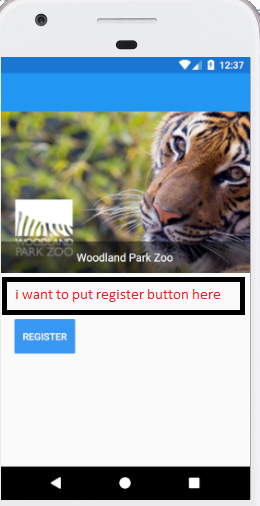
我的密码
<ContentPage xmlns="http://xamarin.com/schemas/2014/forms"
         xmlns:x="http://schemas.microsoft.com/winfx/2009/xaml"
         xmlns:local="clr-namespace:InfutureMob"
         x:Class="InfutureMob.MainPage"
         xmlns:cv="clr-namespace:Xamarin.Forms;assembly=Xamarin.Forms.CarouselView">

    <Grid RowSpacing="0" Grid.RowSpan="2">
        <!--<Grid.RowDefinitions>
            <RowDefinition Height=".3*"/>
            <RowDefinition Height=".7*"/>
        </Grid.RowDefinitions>-->
    <Grid.RowDefinitions>
        <RowDefinition Height="5*"/>
        <RowDefinition Height="*"/>
        <RowDefinition Height="5*"/>
    </Grid.RowDefinitions>
    <cv:CarouselView ItemsSource="{Binding Zoos}" x:Name="CarouselImages" >
            <cv:CarouselView.ItemTemplate>
                <DataTemplate>
                <Grid>
                    <Grid.RowDefinitions>
                        <RowDefinition Height="*"/>
                        <RowDefinition Height="Auto"/>
                    </Grid.RowDefinitions>
                    <Image Grid.RowSpan="2" Aspect="AspectFill" Source="{Binding ImageUrl}"/>
                    <StackLayout Grid.Row="1" BackgroundColor="#80000000" Padding="12">
                        <Label TextColor="White" Text="{Binding Name}" FontSize="16" HorizontalOptions="Center" VerticalOptions="CenterAndExpand"/>
                    </StackLayout>

                </Grid>

            </DataTemplate>
            </cv:CarouselView.ItemTemplate>
        </cv:CarouselView>
    <StackLayout Orientation="Horizontal" HorizontalOptions="StartAndExpand"  Margin="20,20,20,0" Grid.Row="2">


        <Button Text="Register" BackgroundColor="#3897f0" TextColor="White" HeightRequest="50" VerticalOptions="Start" />

    </StackLayout>
</Grid></ContentPage>回答 1
Stack Overflow用户
回答已采纳
发布于 2018-05-02 08:07:32
有几件事很突出..。首先,为网格定义3行,但是包含按钮的StackLayout位于Grid.Row="2“中,如果需要位于旋转木马下面,则应该是1。(对可读性而言,最好将Grid.Row="0“放在旋转木马上)
其次,您不需要用StackLayout包装按钮,并将HorizontalOptions放到FillAndExpand中以填充整个网格大小。
页面原文内容由Stack Overflow提供。腾讯云小微IT领域专用引擎提供翻译支持
原文链接:
https://stackoverflow.com/questions/50129040
复制相关文章
相似问题
腾讯云开发者

Copyright © 2013 - 2026 Tencent Cloud. All Rights Reserved. 腾讯云 版权所有
深圳市腾讯计算机系统有限公司 ICP备案/许可证号:粤B2-20090059  粤公网安备44030502008569号
腾讯云计算(北京)有限责任公司 京ICP证150476号 | 京ICP备11018762号