
引导4边框重叠按钮元素
引导4边框重叠按钮元素
提问于 2018-04-30 19:18:36
我有以下HTML
<h2 class="border-center-right mt-4">
    <span class="bg-white float-left">CREDITCARDNAME</span>
    <button type="button" class="btn btn-primary float-right">APPLY NOW</button>
</h2>
我使用的引导带4。边框目前重叠的“应用现在”按钮。我怎么才能做到这样边框就在按钮后面?

谢谢!
我将代码添加到以下Fiddle:https://jsfiddle.net/katzumi/98c5q2cf/
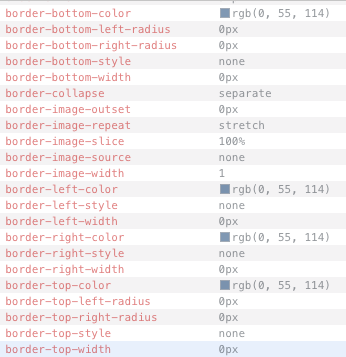
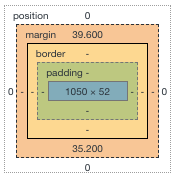
这些是当前应用于<h2 class="border-center-right mt-4">的边框样式
回答 2
Stack Overflow用户
回答已采纳
发布于 2018-04-30 20:55:42
你应该可以把左浮子从你的跨度中移除。
我把边框变成红色,这样在白色的背景下就更容易看到了。
<div class="container mb-5">
  <h2 class="border-center-right mt-4" style="border-bottom: 1px solid red;">
    <span class="d-inline-block bg-white">CREDITCARDNAME</span>
    <button type="button" class="d-inline-block btn btn-primary float-right">APPLY NOW</button>
  </h2>

  <div class="text-4-col">

  </div>
</div>Stack Overflow用户
发布于 2018-04-30 21:24:48
修好了!在边框中右类之后,我缩小了元素&::的宽度。
@include media-breakpoint-up(sm) {
  .border-center-right {
    position: relative;
    overflow: hidden;

    &::after {
      content: "";
      display: inline-block;
      height: 1px;
      position: absolute;
      top: 50%;
      transform: translateY(-50%);
      **width: 50%;**
      background: $accent-secondary;
      margin-left: 1rem;
    }
  }
}页面原文内容由Stack Overflow提供。腾讯云小微IT领域专用引擎提供翻译支持
原文链接:
https://stackoverflow.com/questions/50106832
复制相关文章
相似问题
腾讯云开发者

Copyright © 2013 - 2026 Tencent Cloud. All Rights Reserved. 腾讯云 版权所有
深圳市腾讯计算机系统有限公司 ICP备案/许可证号:粤B2-20090059  粤公网安备44030502008569号
腾讯云计算(北京)有限责任公司 京ICP证150476号 | 京ICP备11018762号