
如何在标签中添加SVG圆圈
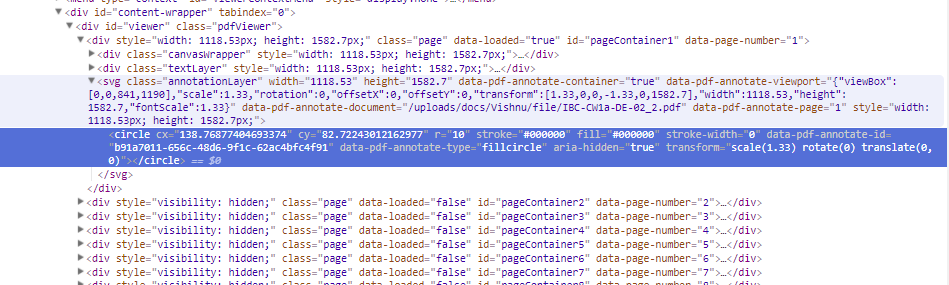
下面的圆圈标签在标签内:
<circle cx="111.70110487400142" cy="134.60212936975006" r="10" stroke="#000000" fill="#000000" stroke-width="0" data-pdf-annotate-id="8e1b063b-ec08-4c73-8b86-d8e8cce5615e" data-pdf-annotate-type="fillcircle" aria-hidden="true" transform="scale(1.33) rotate(0) translate(0, 0)"></circle>现在,我必须在标记中附加这个生成的圆圈,如下所示
<a href="#">
<circle cx="111.70110487400142" cy="134.60212936975006" r="10" stroke="#000000" fill="#000000" stroke-width="0" data-pdf-annotate-id="8e1b063b-ec08-4c73-8b86-d8e8cce5615e" data-pdf-annotate-type="fillcircle" aria-hidden="true" transform="scale(1.33) rotate(0) translate(0, 0)"></circle>
</a>
更新:
<svg class="annotationLayer" width="1118.53" height="1582.7" data-pdf-annotate-container="true" data-pdf-annotate-viewport="{"viewBox":[0,0,841,1190],"scale":1.33,"rotation":0,"offsetX":0,"offsetY":0,"transform":[1.33,0,0,-1.33,0,1582.7],"width":1118.53,"height":1582.7,"fontScale":1.33}" data-pdf-annotate-document="/uploads/docs/Vishnu/file/IBC-CW1a-DE-02_2.pdf" data-pdf-annotate-page="1" style="width: 1118.53px; height: 1582.7px;">
<circle cx="138.76877404693374" cy="82.72243012162977" r="10" stroke="#000000" fill="#000000" stroke-width="0" data-pdf-annotate-id="b91a7011-656c-48d6-9f1c-62ac4bfc4f91" data-pdf-annotate-type="fillcircle" aria-hidden="true" transform="scale(1.33) rotate(0) translate(0, 0)"></circle>
</svg>
function createCircle(a) {
var circle = document.createElementNS('http://www.w3.org/2000/svg', 'circle');
(0, _setAttributes2.default)(circle, {
cx: a.cx,
cy: a.cy,
r: a.r
});
var spot_anchor = document.createElement("a")
console.log(spot_anchor)
spot_anchor.appendChild(circle)
console.log(spot_anchor)
console.log('Create_circl1')
return circle;
}如何通过使用javascript来完成任务呢?
回答 3
Stack Overflow用户
发布于 2018-04-27 09:51:20
您的circle需要在svg标记中,否则它在html中是没有意义的。因此,按照制作circle的方式创建包装SVG,然后将circle附加到该包装,并将svg附加到anchor中。
function createCircle( a ){

  var svg = document.createElementNS( 'http://www.w3.org/2000/svg', 'svg' );
  var circle = document.createElementNS('http://www.w3.org/2000/svg', 'circle');
  var anchor = document.createElement( 'a' );

  circle.setAttribute( 'cx', a.cx );
  circle.setAttribute( 'cy', a.cy );
  circle.setAttribute( 'r', a.r );

  svg.setAttribute( 'viewBox', `${a.x - a.r} ${a.y - a.r} ${a.r * 2} ${a.r * 2}` );
  svg.setAttribute( 'width', `${a.r * 2}` );
  svg.setAttribute( 'height', `${a.r * 2}` );

  svg.appendChild( circle );
  anchor.appendChild( svg );

  return anchor;

}

document.body.appendChild( createCircle({ cx: 10, cy: 10, r: 10 }) );
不应将fill和stroke等属性直接添加到a标记中,因为这些属性不受支持且无效。在这种情况下,您应该使用data属性。甚至可以考虑使用data-svg-attributes="{'cx':10,'cy':10,'r':10}",并在需要获取正确数据时使用JSON.parse。更新:如果在包装标记的fill属性中声明这些属性,那么fill和stroke属性将被继承,因此您可以使用它们(又名style="stroke: red;")。
Stack Overflow用户
发布于 2018-04-28 05:49:14
您正在以错误的方式创建<a>元素。您正在使用:
document.createElement("a")这将在HTML命名空间中创建一个<a>元素。换句话说,一个HTML <a>元素。
您需要创建一个SVG <a>元素,这是完全不同的,即使它有相同的名称。
这样做的方式与创建<circle>元素的方式相同:
document.createElementNS('http://www.w3.org/2000/svg', 'a');Stack Overflow用户
发布于 2018-04-27 09:33:13
appendChild、replaceNode等将从树中移除节点,然后再重新定位它,因此(由于您含糊地问了它,我对atag是否存在有0的概念,所以我假设它在那里,否则使用createElementNS创建它):
yourSvg = document.querySelector("svg");
    yourCircle = svg.querySelector("circle");
    yourATag = svg.querySelector("a");
    yourATag.appendChild(yourCircle)
A标记不是可视元素,它的边界框将等于内部的内容。如果你想知道:
https://stackoverflow.com/questions/50059361
复制相似问题
腾讯云开发者

Copyright © 2013 - 2026 Tencent Cloud. All Rights Reserved. 腾讯云 版权所有
深圳市腾讯计算机系统有限公司 ICP备案/许可证号:粤B2-20090059  粤公网安备44030502008569号
腾讯云计算(北京)有限责任公司 京ICP证150476号 | 京ICP备11018762号