
ggridges直方图下的阴影面积(stat = binline)?
ggridges直方图下的阴影面积(stat = binline)?
提问于 2018-04-24 02:27:54
使用Evers suggestion博士在密度曲线下用ggridges对区域进行遮阳效果很好。然而,我发现密度曲线可能具有欺骗性,因为它们意味着数据在没有数据的情况下存在。因此,我想我应该用普通的直方图来尝试这种阴影技术。
然而,当我试图使用它与直方图,阴影是有点差。为什么会这样呢?
library(tidyverse)
install.packages("ggridges", dependencies=TRUE)  # there are many
library(ggridges)
 t2 <-   structure(list(Date = c("1853-01", "1853-02", "1853-03", "1853-04",
"1853-05", "1853-06", "1853-07", "1853-08", "1853-09", "1853-10",
"1853-11", "1853-12", "1854-01", "1854-02", "1854-03", "1854-04",
"1854-05", "1854-06", "1854-07", "1854-08", "1854-09", "1854-10",
"1854-11", "1854-12"), t = c(-5.6, -5.3, -1.5, 4.9, 9.8, 17.9,
18.5, 19.9, 14.8, 6.2, 3.1, -4.3, -5.9, -7, -1.3, 4.1, 10, 16.8,
22, 20, 16.1, 10.1, 1.8, -5.6), year = c("1853", "1853", "1853",
"1853", "1853", "1853", "1853", "1853", "1853", "1853", "1853",
"1853", "1854", "1854", "1854", "1854", "1854", "1854", "1854",
"1854", "1854", "1854", "1854", "1854")), row.names = c(NA, -24L
), class = c("tbl_df", "tbl", "data.frame"), .Names = c("Date",
"t", "year"))


gg <- ggplot(t2, aes(x = t, y = year)) +
      geom_density_ridges(stat = "binline", bins = 10, scale = 0.8,
                      draw_baseline = TRUE) +
      theme_ridges()

# Build ggplot and extract data
d <- ggplot_build(gg)$data[[1]]

# Add geom_ribbon for shaded area
gg +
  geom_ribbon(
    data = transform(subset(d, x >= 10), year = group),
    aes(x, ymin = ymin, ymax = ymax, group = group),
    fill = "red",
    alpha = 1.0)
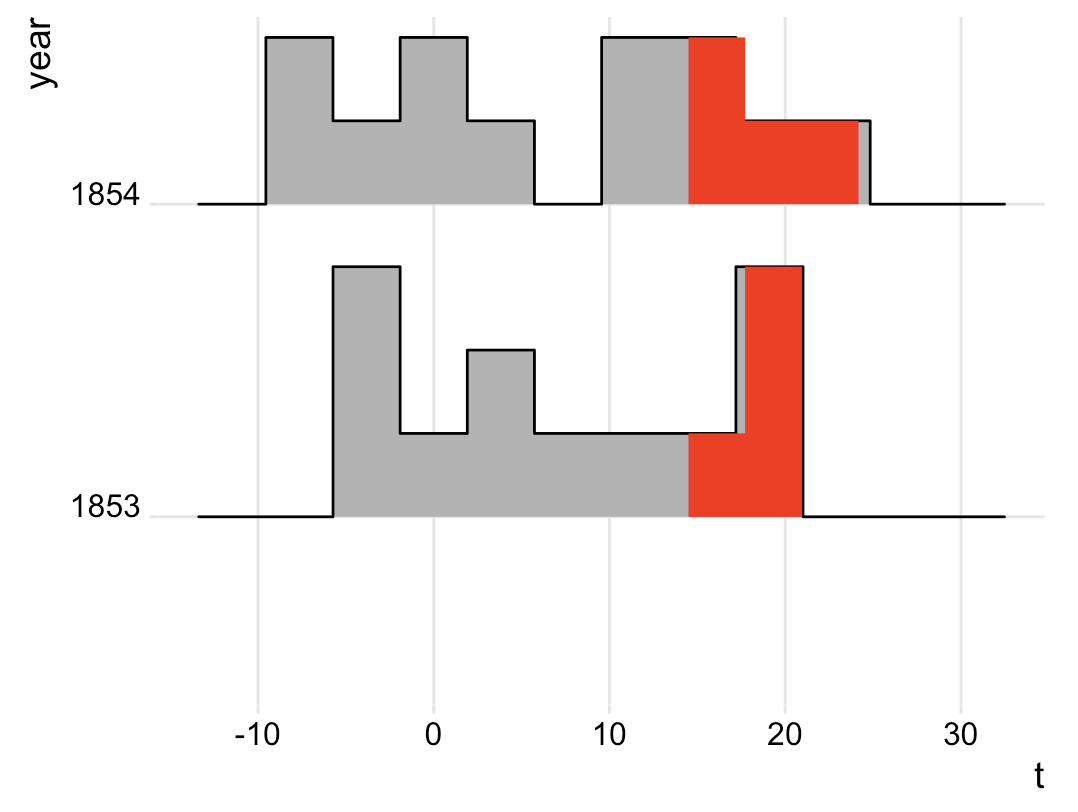
回答 2
Stack Overflow用户
回答已采纳
发布于 2018-04-24 21:39:30
下面的工作,如果你愿意调整大小和移动垃圾箱,所以一个垃圾箱边界正好在你的分界线(这里10)。
ggplot(t2, aes(x = t, y = year, fill = ifelse(..x..>=10, ">= 10", "< 10"))) +
  geom_density_ridges_gradient(stat = "binline", binwidth = 3,
                               center = 8.5, scale = 0.8,
                               draw_baseline = TRUE) +
  theme_ridges() +
  scale_fill_manual(values = c("gray70", "red"), name = NULL)
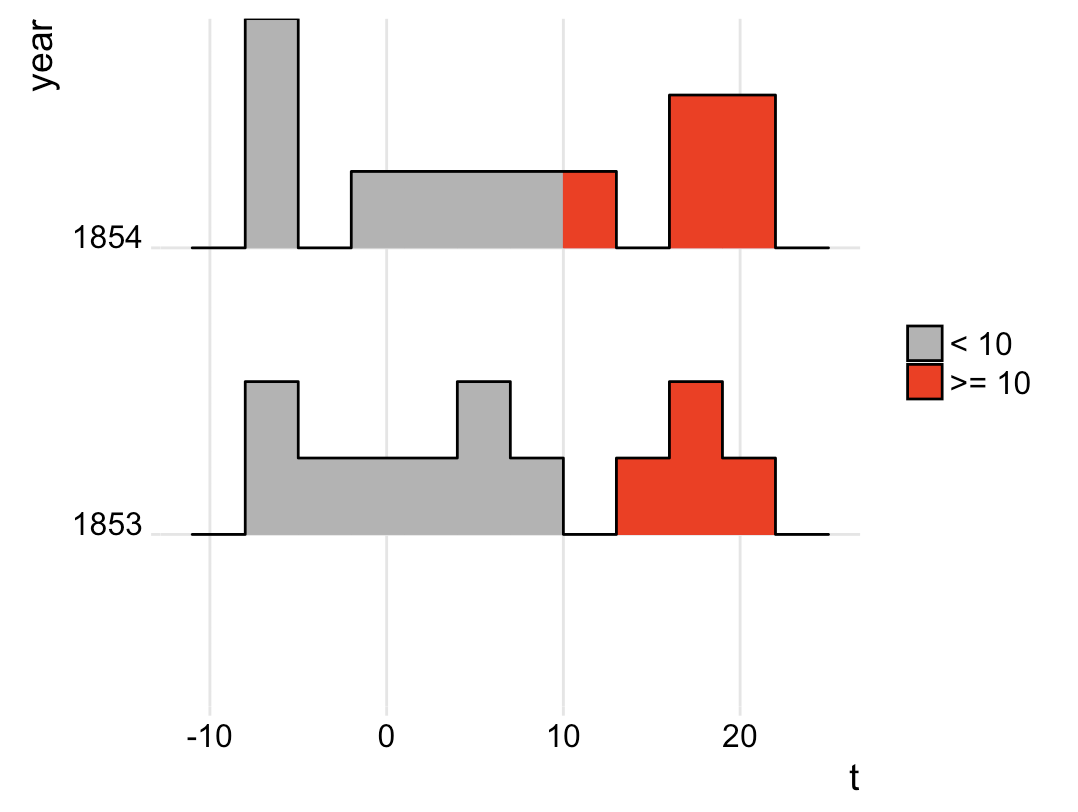
您之所以观察到所做的效果,是因为x轴在第一幅和第二幅图之间发生了变化,而x轴范围对如何绘制回收箱产生了影响。有两种解决方案:要么修复x轴范围,要么通过center和binwidth定义回收箱,而不是通过bins。(在我看来,无论你如何对待x轴,第二种选择总是可取的。)
首先,修复x轴范围:
gg <- ggplot(t2, aes(x = t, y = year)) +
  geom_density_ridges(stat = "binline", bins = 10, scale = 0.8,
                      draw_baseline = TRUE) +
  theme_ridges() +
  scale_x_continuous(limits = c(-12, 28)) # this is where the change is

# Build ggplot and extract data
d <- ggplot_build(gg)$data[[1]]

# Add geom_ribbon for shaded area
gg +
  geom_ribbon(
    data = transform(subset(d, x >= 10), year = group),
    aes(x, ymin = ymin, ymax = ymax, group = group),
    fill = "red",
    alpha = 1.0)
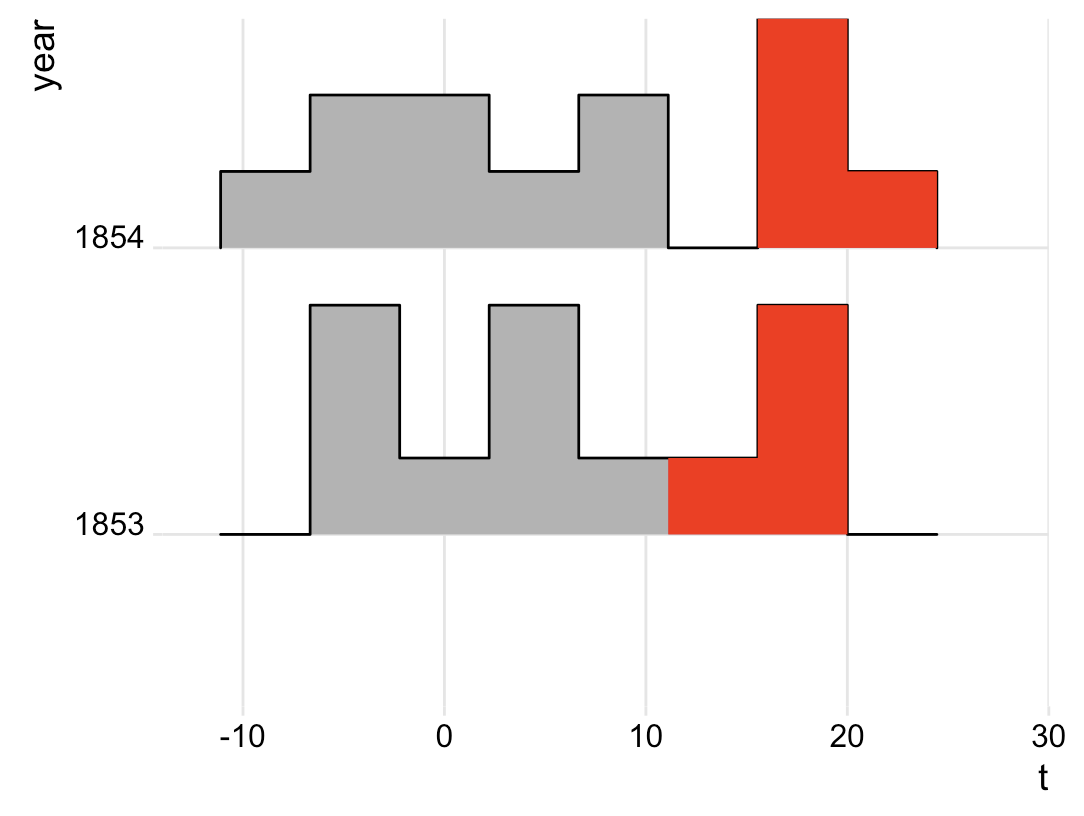
第二,另一种垃圾桶定义:
gg <- ggplot(t2, aes(x = t, y = year)) +
  geom_density_ridges(stat = "binline",
                      binwidth = 3, center = 8.5, # this is where the change is
                      scale = 0.8, draw_baseline = TRUE) +
  theme_ridges()

# Build ggplot and extract data
d <- ggplot_build(gg)$data[[1]]

# Add geom_ribbon for shaded area
gg +
  geom_ribbon(
    data = transform(subset(d, x >= 10), year = group),
    aes(x, ymin = ymin, ymax = ymax, group = group),
    fill = "red",
    alpha = 1.0)
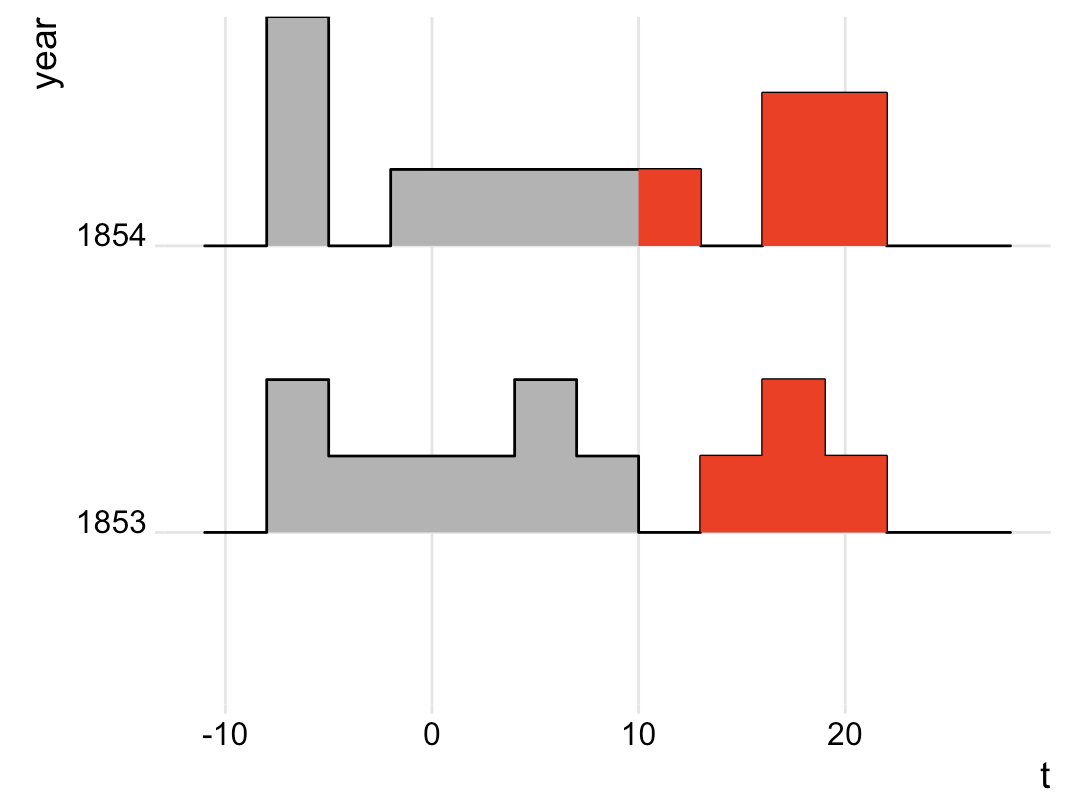
Stack Overflow用户
发布于 2018-04-24 05:50:42
确实发生了一些奇怪的事情。关于“结论”,请见下文。
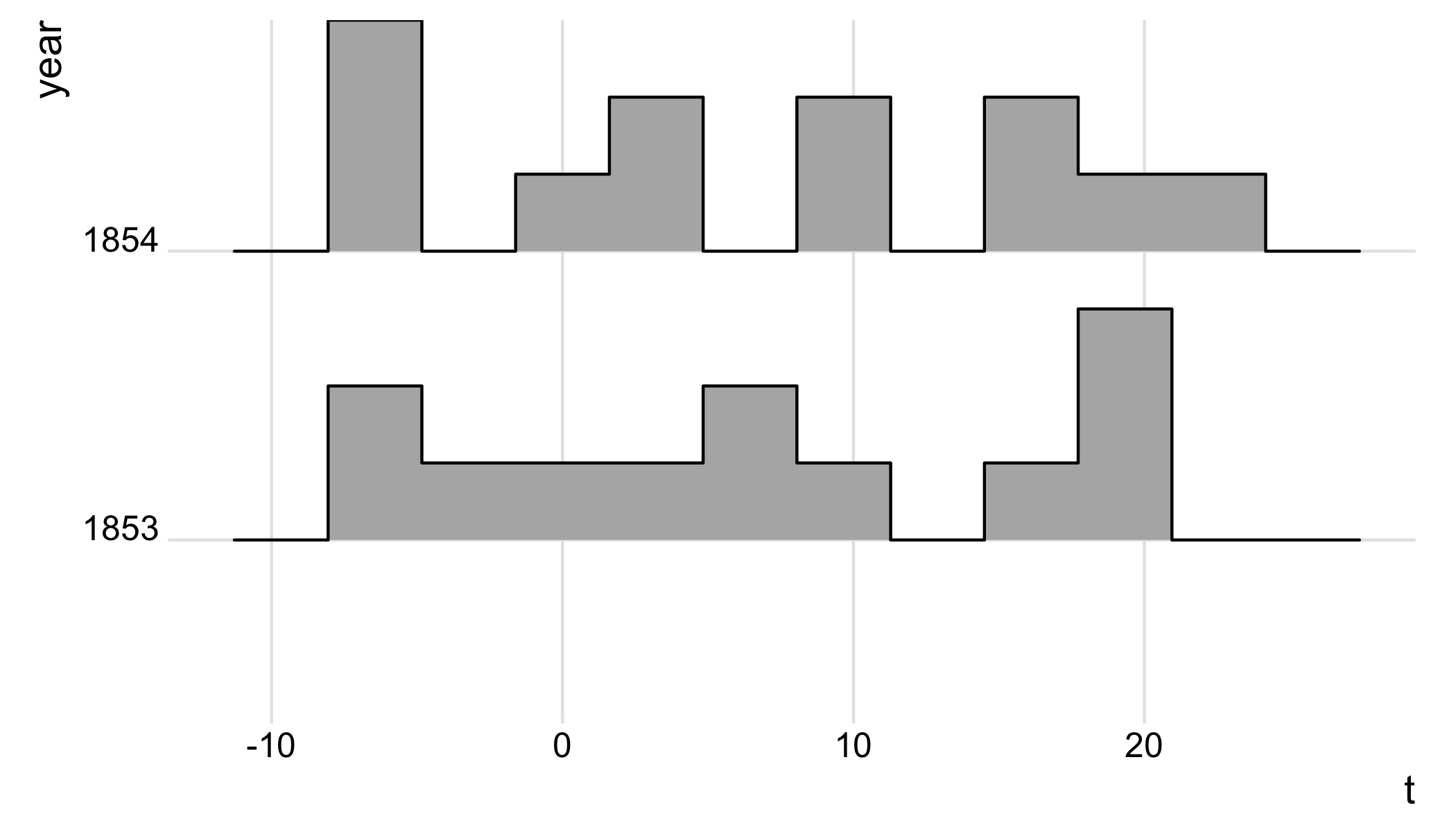
- 如果我们只绘制
gg: gg;
- 如果我们绘制
gg,再加上一个与gg跟踪相对应的楼梯: gg + geom_step( data = d,aes(xmax,ymax,group = group),方向= "vh",col = "red",size = 2);
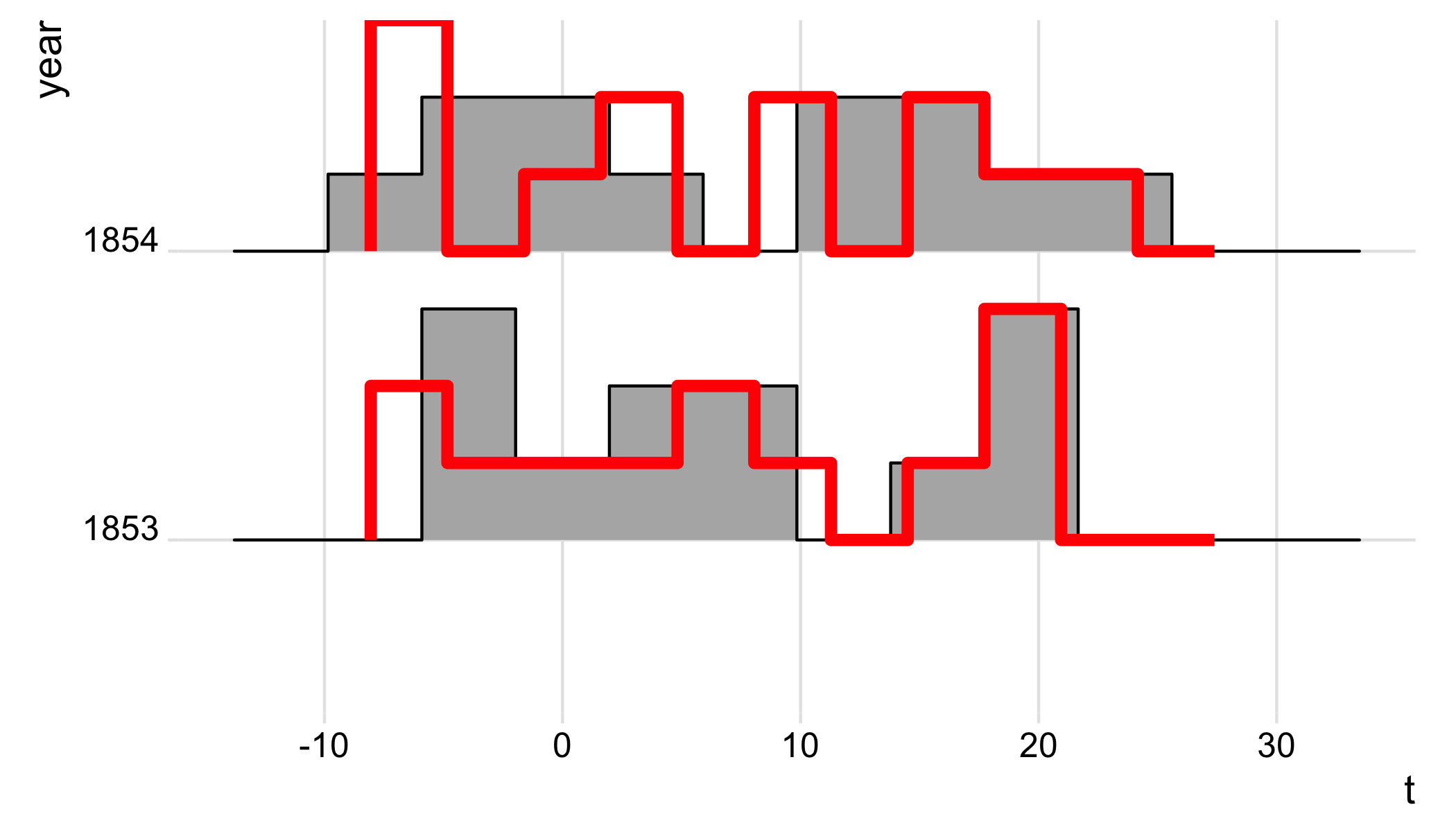
因此,添加geom_step 会改变 gg**.我不明白这怎么可能。您可以看到,** geom_step (红色曲线)在自行绘制 gg 时实际上与直方图的跟踪相对应(见第一幅图)。
页面原文内容由Stack Overflow提供。腾讯云小微IT领域专用引擎提供翻译支持
原文链接:
https://stackoverflow.com/questions/49992547
复制相关文章
相似问题
腾讯云开发者

Copyright © 2013 - 2026 Tencent Cloud. All Rights Reserved. 腾讯云 版权所有
深圳市腾讯计算机系统有限公司 ICP备案/许可证号:粤B2-20090059  粤公网安备44030502008569号
腾讯云计算(北京)有限责任公司 京ICP证150476号 | 京ICP备11018762号