
echarts4r R中的叠加轴
echarts4r R中的叠加轴
提问于 2018-04-23 08:03:01
如何在echarts4r包中制作叠加图?
如果我加上第二个y轴-在相同的情节中添加新的系列。
data.frame(x=LETTERS[1:5],y=1:5,
               z=6:10)%>%
  e_charts(x)%>%
  e_line(y)%>%
  e_line(z, y.index = 1)
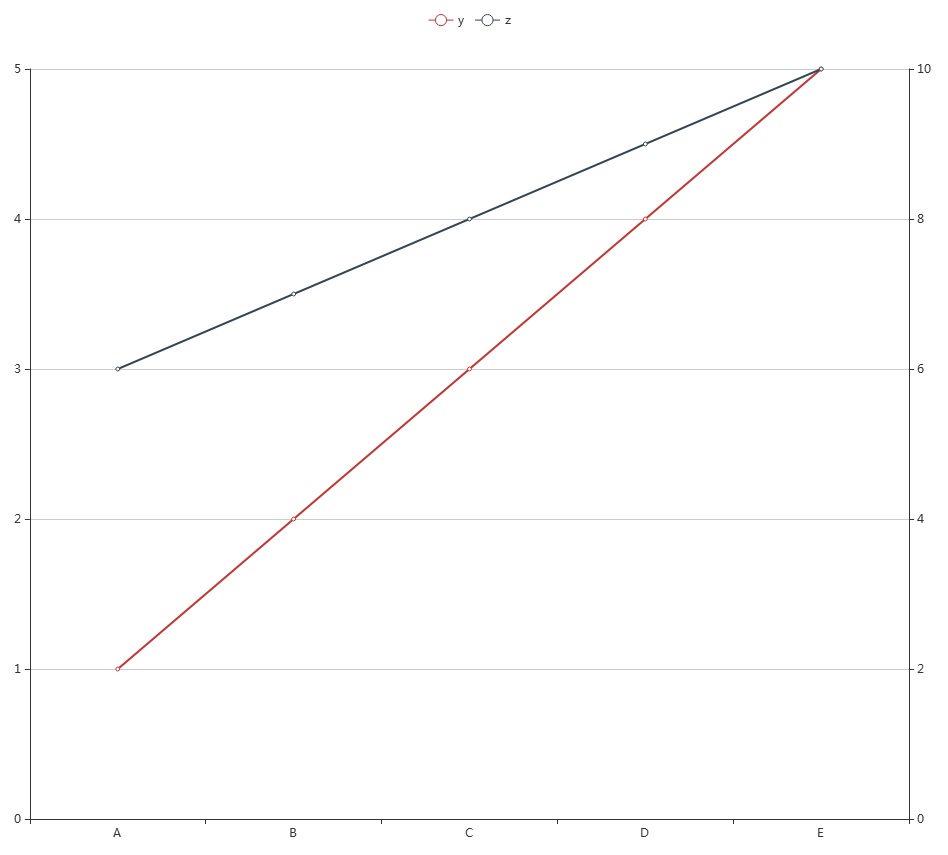
但我需要这样的:
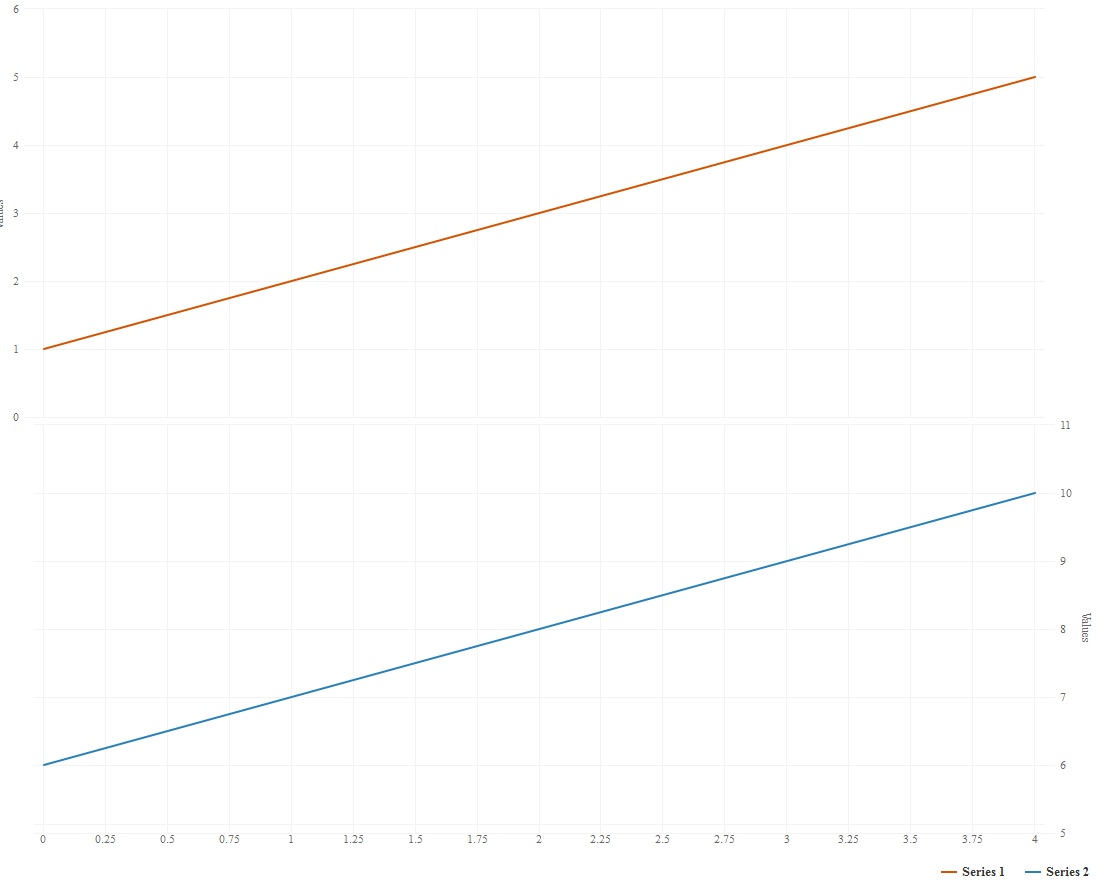
谢谢!
回答 1
Stack Overflow用户
回答已采纳
发布于 2018-04-23 08:33:03
因为你是在两个不同的Y轴(y.index = 1)上绘制的,所以你不能把它们叠加起来,如果你把它们画在同一个Y轴上,你就可以把它们叠加起来。
data.frame(x=LETTERS[1:5],
           y=1:5,
           z=6:10
) %>%
  e_charts(x) %>%
  e_line(y, stack = "stack") %>%
e_line(z, stack = "stack")请注意,您不必将“堆栈”传递给stack参数,您可以传递任何您想要的东西,这样可以对不同的组进行堆叠。
data.frame(x = LETTERS[1:5],
           y=1:5,
           z = 6:10,
           w = rnorm(5, 4, 1),
           e = rnorm(5, 5, 2)
) %>%
  e_charts(x) %>%
  e_bar(y, stack = "stack") %>%
  e_bar(z, stack = "stack") %>%
  e_bar(w , stack = "grp2") %>%
e_bar(e, stack = "grp2")为什么没有在文档中明确说明这个选项的原因:ECharts附带了数百个(如果不是数千个选项),将它们全部作为参数列出是不可能的。但是,所有选项都可以在包中使用;请参阅正式文件
编辑
您可以在多个Y轴上堆叠,但不能跨越它们。这也适用于:
data.frame(x = LETTERS[1:5],
           y=1:5,
           z = 6:10,
           w = rnorm(5, 4, 1),
           e = rnorm(5, 5, 2)
) %>%
  e_charts(x) %>%
  e_bar(y, stack = "stack") %>% # defaults to y.index = 0
  e_bar(z, stack = "stack") %>% # defaults to y.index = 0
  e_bar(w , stack = "grp2", y.index = 1) %>% # secondary axis + stack
  e_bar(e, stack = "grp2", y.index = 1) # secondary axis + stack
对于最初想要的多个图表,一个x轴,多个Y轴,一个页面上的两个图:
df <- data.frame(x=LETTERS[1:5],y=1:5, z=6:10)

df %>%
  e_charts(x) %>%
  e_line(y) %>%
  e_line(z, y.index = 1, x.index = 1) %>%
  e_y_axis(gridIndex = 1) %>%
  e_x_axis(gridIndex = 1) %>%
  e_grid(height = "35%") %>%
  e_grid(height = "35%", top = "50%") %>%
e_datazoom(x.index = c(0, 1)) # brush http://echarts4r.john-coene.com/articles/brush.html页面原文内容由Stack Overflow提供。腾讯云小微IT领域专用引擎提供翻译支持
原文链接:
https://stackoverflow.com/questions/49976132
复制相关文章
相似问题
腾讯云开发者

Copyright © 2013 - 2026 Tencent Cloud. All Rights Reserved. 腾讯云 版权所有
深圳市腾讯计算机系统有限公司 ICP备案/许可证号:粤B2-20090059  粤公网安备44030502008569号
腾讯云计算(北京)有限责任公司 京ICP证150476号 | 京ICP备11018762号