
Uwp图像缩放
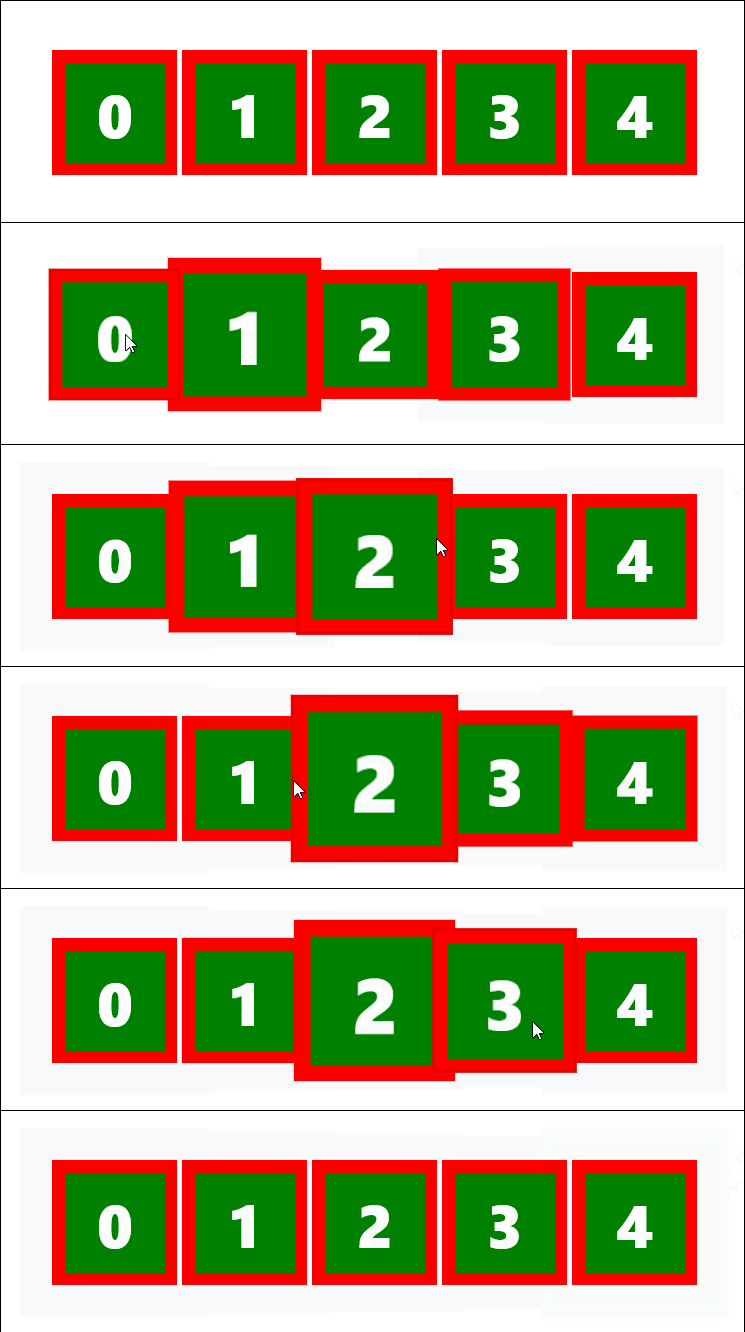
我正在尝试使用RenderTransform在网格视图项中缩放图像。缩放已成功执行,但缩放图像在网格视图项后面。如何把它摆在前面。
<VisualState x:Name="PointerOver">
 <Storyboard  >
  <DoubleAnimation Duration="0" Storyboard.TargetName="BorderRectangle"
   Storyboard.TargetProperty="Opacity" To="1" />
    <ObjectAnimationUsingKeyFrames
      Storyboard.TargetName="contentborderscale"
      Storyboard.TargetProperty="ScaleY" >
       <DiscreteObjectKeyFrame KeyTime="0" Value="2" />
   </ObjectAnimationUsingKeyFrames>
   <ObjectAnimationUsingKeyFrames Storyboard.TargetName="contentborderscale"
    Storyboard.TargetProperty="ScaleX">
     <DiscreteObjectKeyFrame  KeyTime="0" Value="2"  />
   </ObjectAnimationUsingKeyFrames>
   <PointerUpThemeAnimation Storyboard.TargetName="ContentPresenter" />
 </Storyboard>
</VisualState>回答 1
Stack Overflow用户
发布于 2018-04-21 19:40:03
简而言之,您希望缩放GridViewItem的容器。
我检查了我对GridView selectedItem Popup (Method 2)的回答
方法2:在指针Hover上 XAML部件 C#部件 私有FrameworkElement lastPopUpElement = null;私有GridView_PointerEntered(对象发送方,PointerRoutedEventArgs e) { lastPopUpElement =lastPopUpElement= FrameworkElement)为FrameworkElement;Canvas.SetZIndex (lastPopUpElement,1);lastPopUpElement.Scale(scaleX: 1.5f,scaleY: 1.5f,centerX: 50,centerY: 50,easingType: centerX)centerX();}私有空(对象发送方,#e 20# e) { if ( !=空){(,0);lastPopUpElement.Scale(centerX: 50,centerY: 50,easingType: EasingType.Sine).Start();}} 样本输出
https://stackoverflow.com/questions/49938159
复制相似问题
腾讯云开发者

Copyright © 2013 - 2026 Tencent Cloud. All Rights Reserved. 腾讯云 版权所有
深圳市腾讯计算机系统有限公司 ICP备案/许可证号:粤B2-20090059  粤公网安备44030502008569号
腾讯云计算(北京)有限责任公司 京ICP证150476号 | 京ICP备11018762号