
不能在jitpack上发布
不能在jitpack上发布
提问于 2018-04-20 07:46:44
我在将多风格的图书馆发布到jitpack上有问题。日志显示生成成功,但状态为错误。
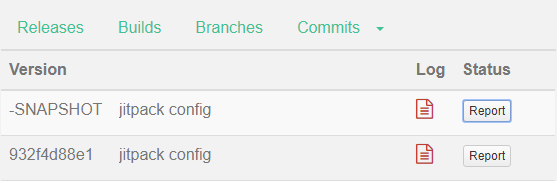
我遵循了jitpack站点上的说明,但是它们的示例使用了旧的gradle版本,并且它不适用于gradle 4.4
这是日志:
Build starting...
Start: Fri Apr 20 07:35:56 UTC 2018
Git:
1.28.1-1-g932f4d8
commit 932f4d88e13b1c8c52b4dbae8c203e7d52a0eadf
Author: yzheka
Date:   Fri Apr 20 10:34:49 2018 +0300

    jitpack config


Run gradle build
Gradle build script
Found gradle version: 4.4.
Using gradle wrapper
Picked up JAVA_TOOL_OPTIONS: -Dfile.encoding=UTF-8 -Djavax.xml.accessExternalSchema=all
Downloading https://services.gradle.org/distributions/gradle-4.4-all.zip
..............................................................................................
Unzipping /home/jitpack/.gradle/wrapper/dists/gradle-4.4-all/9br9xq1tocpiv8o6njlyu5op1/gradle-4.4-all.zip to /home/jitpack/.gradle/wrapper/dists/gradle-4.4-all/9br9xq1tocpiv8o6njlyu5op1
Set executable permissions for: /home/jitpack/.gradle/wrapper/dists/gradle-4.4-all/9br9xq1tocpiv8o6njlyu5op1/gradle-4.4/bin/gradle

------------------------------------------------------------
Gradle 4.4
------------------------------------------------------------

Build time:   2017-12-06 09:05:06 UTC
Revision:     cf7821a6f79f8e2a598df21780e3ff7ce8db2b82

Groovy:       2.4.12
Ant:          Apache Ant(TM) version 1.9.9 compiled on February 2 2017
JVM:          1.8.0_131 (Oracle Corporation 25.131-b11)
OS:           Linux 4.14.15-xxxx-std-ipv6-64 amd64

0m4.923s
Getting a list of gradle tasks
Picked up JAVA_TOOL_OPTIONS: -Dfile.encoding=UTF-8 -Djavax.xml.accessExternalSchema=all
Running: ./gradlew clean -Pgroup=com.github.yzheka -Pversion=-1.28.1-g932f4d8-1 -xtest -xlint install
Picked up JAVA_TOOL_OPTIONS: -Dfile.encoding=UTF-8 -Djavax.xml.accessExternalSchema=all
:clean
:app:clean UP-TO-DATE
:busybox:clean UP-TO-DATE
:busybox:install

BUILD SUCCESSFUL in 0s
4 actionable tasks: 2 executed, 2 up-to-date
Looking for artifacts...
Picked up JAVA_TOOL_OPTIONS: -Dfile.encoding=UTF-8 -Djavax.xml.accessExternalSchema=all
EXIT_CODE=0
2018-04-20T07:36:32.030445377Z
Exit code: 0
No build artifacts found回答 2
Stack Overflow用户
回答已采纳
发布于 2018-05-23 19:17:38
在jitpack日志中,您可以看到为什么jitpack不能发布库。只需删除部分代码,因为jitpack错误。
无法为类型为publishNonDefault的对象获取只写属性“com.android.build.gradle.LibraryExtension”的值。
if( android.publishNonDefault && variant.name == android.defaultPublishConfig ) {
                def bundleTask = tasks["bundle${name.capitalize()}"]
                artifacts {
                    archives(bundleTask.archivePath) {
                        classifier null
                        builtBy bundleTask
                    }
                }
            }
        }
    }
然后jitpack在发布库时不会显示错误。就像一种魅力。要出版你的图书馆,只需再一次实现,然后发表你的字典。
我只是作为一个例子为您做的,参见我在这里分叉的存储库,https://github.com/markizdeviler/Busybox。
Stack Overflow用户
发布于 2022-01-22 09:50:01
这种方式是为我工作的:
在Module gradle中的dependencies部件后面添加以下行:
afterEvaluate {
    publishing {
        publications {
            release(MavenPublication) {
                from components.release
                groupId = 'com.github.yourgitid' //your git id
                artifactId = 'Myket-Intent' //your-repository
                version = '0.1.15' // same as Tag
            }
        }
    }
}
在此之后,您可以看到:
BUILD SUCCESSFUL in 41s
123 actionable tasks: 120 executed, 3 up-to-date
Build tool exit code: 0
Looking for artifacts...
Picked up JAVA_TOOL_OPTIONS: -Dfile.encoding=UTF-8 -Dhttps.protocols=TLSv1.2
Picked up JAVA_TOOL_OPTIONS: -Dfile.encoding=UTF-8 -Dhttps.protocols=TLSv1.2
Looking for pom.xml in build directory and ~/.m2
Found artifact: com.github.Mori-hub:Myket-Intent:0.1.15
2022-01-22T09:38:10.889110195Z
Exit code: 0

Build artifacts:
com.github.Mori-hub:Myket-Intent:0.1.15页面原文内容由Stack Overflow提供。腾讯云小微IT领域专用引擎提供翻译支持
原文链接:
https://stackoverflow.com/questions/49936617
复制相关文章
相似问题
腾讯云开发者

Copyright © 2013 - 2026 Tencent Cloud. All Rights Reserved. 腾讯云 版权所有
深圳市腾讯计算机系统有限公司 ICP备案/许可证号:粤B2-20090059  粤公网安备44030502008569号
腾讯云计算(北京)有限责任公司 京ICP证150476号 | 京ICP备11018762号