
CollectionView中的标签重叠
CollectionView中的标签重叠
提问于 2018-04-18 08:30:17
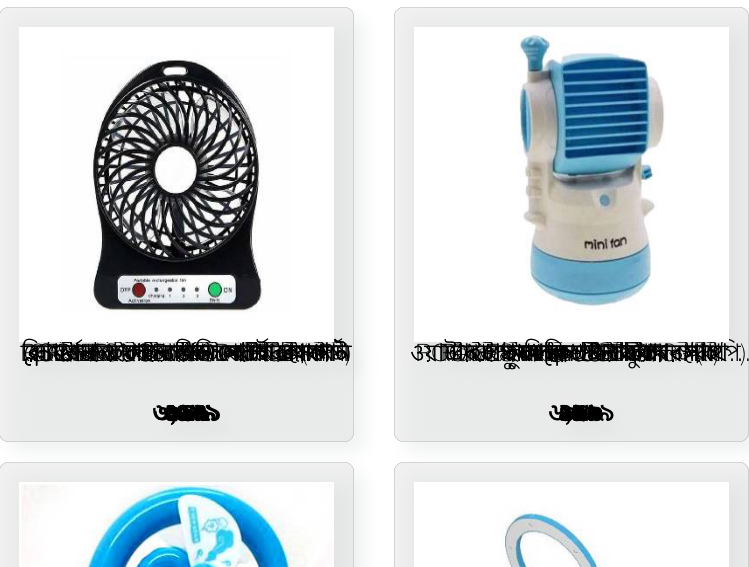
我已经用图像和标签实现了集合视图。图像运行良好,但标签重叠。我已经实现了所有必要的方法,但找不到标签重叠的问题。下面提供了我的代码
 - (NSInteger)collectionView:(UICollectionView *)collectionView numberOfItemsInSection:(NSInteger)section
{
    return 40;
}
//loading data
    - (UICollectionViewCell *)collectionView:(UICollectionView *)collectionView cellForItemAtIndexPath:(NSIndexPath *)indexPath
{
    UICollectionViewCell *cell=[collectionView dequeueReusableCellWithReuseIdentifier:@"cellIdentifier" forIndexPath:indexPath];

   aProduct=[featuredProductsArray objectAtIndex:indexPath.row];
    UIImageView* imageView=[[UIImageView alloc]initWithFrame:CGRectMake(10, 10, cell.frame.size.width-20, cell.frame.size.width-20)];
    //imageView.image=[UIImage imageNamed:@"ad_share.png"];
    NSString* imageUrl=[aProduct.SmallImageLists firstObject];

    [imageView sd_setImageWithURL:[NSURL URLWithString:imageUrl]
             placeholderImage:[UIImage imageNamed:@"ad_share.png"]];

    [cell addSubview:imageView];

    UILabel *lblTitle=[[UILabel alloc]initWithFrame:CGRectMake(5, cell.frame.size.height-60, cell.frame.size.width, 30)];
    lblTitle.text=aProduct.DealTitle;
    lblTitle.font=[UIFont fontWithName:@"HelveticaNeue-Thin" size:12.0];
     lblTitle.textAlignment=NSTextAlignmentCenter;
    [cell addSubview:lblTitle];


    UILabel *lblPrice=[[UILabel alloc]initWithFrame:CGRectMake(5, cell.frame.size.height-30, cell.frame.size.width, 30)];
    lblPrice.text=aProduct.DealPrice;
    lblPrice.font=[UIFont fontWithName:@"HelveticaNeue-Bold" size:12.0];
     lblPrice.textAlignment=NSTextAlignmentCenter;
    [cell addSubview:lblPrice];


    cell.backgroundColor=[UIColor colorWithRed:228.0/255.0 green:228.0/255.0 blue:228.0/255.0 alpha:0.5];
    [cell.layer setCornerRadius:5.0f];
    [cell.layer setBorderColor:[UIColor lightGrayColor].CGColor];
    [cell.layer setBorderWidth:0.2f];
    [cell.layer setShadowColor:[UIColor colorWithRed:225.0/255.0 green:228.0/255.0 blue:228.0/255.0 alpha:1.0].CGColor];
    [cell.layer setShadowOpacity:1.0];
    [cell.layer setShadowRadius:5.0];
    [cell.layer setShadowOffset:CGSizeMake(5.0f, 5.0f)];

    return cell;
}

    - (CGSize)collectionView:(UICollectionView *)collectionView layout:(UICollectionViewLayout*)collectionViewLayout sizeForItemAtIndexPath:(NSIndexPath *)indexPath
{
    return CGSizeMake(self.view.frame.size.width/2-10, self.view.frame.size.width/2+30);
}
截图如下所示
回答 2
Stack Overflow用户
回答已采纳
发布于 2018-04-18 08:50:51
问题是细胞被重用了。每次重用它们时,都会在单元格上添加更多的标签和图像。所以你看到标签是重叠的。
在我看来,有两种方法可以解决这个问题:
- 创建
UICollectionViewCell的子类。在子类上初始化单元格时创建UIImages和UILabels。oncellForItemAtIndexPath使用UIImages和UILabels,而不再次初始化它们。例如 - ( dequeueReusableCellWithReuseIdentifier:@"cellIdentifier“*)collectionView:(UICollectionView *)collectionView cellForItemAtIndexPath:(NSIndexPath *)indexPath { UICollectionViewCell *cell=collectionView forIndexPath:indexPath;aProduct=featuredProductsArray objectAtIndex:indexPath.row;NSString* imageUrl=aProduct.SmallImageLists firstObject;[cell.imageView sd_setImageWithURL:NSURL URLWithString:imageUrl :imageUrl placeholderImage:UIImage:@”ad_share.png“];sd_setImageWithURL:NSURL;sd_setImageWithURL:NSURL fontWithName:@@”HelveticaNeue-瘦“大小:12.0;;cell.lblPrice.textAlignment=NSTextAlignmentCenter;cell.lblPrice.font=UIFont fontWithName:@"HelveticaNeue-Bold“大小:12.0;cell.backgroundColor=UIColor颜色:228.0/255.0绿色:228.0/255.0蓝色:228.0/255.0 alpha:0.5;cell.layer setCornerRadius:5.0f;[cell.layer setBorderColor:UIColor lightGrayColor.CGColor];cell.layer setBorderWidth:0.2f;[cell.layer setShadowColor:UIColor彩色-红色:225.0/255.0绿色:228.0/255.0蓝色:228.0/255.0α:1.0.CGColor];cell.layer setShadowOpacity:1.0;cell.layer setShadowRadius:5.0;cell.layer setShadowOffset:CGSizeMake(5.0f,5.0f);返回单元格;}
- 另一种方法是在重用单元格时删除它的子视图。
- (UICollectionViewCell *)collectionView:(UICollectionView *)collectionView cellForItemAtIndexPath:(NSIndexPath *)indexPath { UICollectionViewCell *cell=collectionView UICollectionViewCell*cell=collectionView forIndexPath:indexPath;//移除(UIView *v in cell.contentView.subviews) {v removeFromSuperview;} aProduct=featuredProductsArray objectAtIndex:indexPath.row;UIImageView* imageView=[UIImageView allocinitWithFrame:CGRectMake(10,10,cell.framework.UIView.#en0#20)];//imageView.image=UIImage:@“ad_share.png”;NSString* imageUrl=aProduct.SmallImageLists firstObject;[imageView sd_setImageWithURL:NSURL URLWithString:imageUrl placeholderImage:UIImage:@“ad_share.png”];单元格addSubview:imageView;UILabel *lblTitle=[UILabel allocinitWithFrame:CGRectMake(5,cell.framework.size.60,cell.frame.size.width,30)];lblTitle.text=aProduct.DealTitle;lblTitle.font=UIFont fontWithName:@@“HelveticaNeue-瘦”大小:12.0;lblTitle.textAlignment=NSTextAlignmentCenter;单元格addSubview:lblTitle;UILabel *lblPrice=[UILabel allocinitWithFrame:CGRectMake(5,cell.framework.size-30,cell.frame.size.width,30)];lblPrice.text=aProduct.DealPrice;lblPrice.font=UIFont fontWithName:@"HelveticaNeue-Bold“大小:12.0;lblPrice.textAlignment=NSTextAlignmentCenter;单元格addSubview:lblPrice;cell.backgroundColor=UIColor彩色UILabel:228.0/255.0绿色:228.0/255.0蓝色:228.0/255.0 alpha:0.5;cell.layer setCornerRadius:5.0f;[cell.layer setBorderColor:UIColor lightGrayColor.CGColor];cell.layer setBorderWidth:0.2f;[cell.layer setShadowColor:UIColor彩色-红色:225.0/255.0绿色:228.0/255.0蓝色:228.0/255.0α:1.0.CGColor];cell.layer setShadowOpacity:1.0;cell.layer setShadowRadius:5.0;cell.layer setShadowColor:CGSizeMake(5.0f,5.0f);返回单元格;}
Stack Overflow用户
发布于 2018-04-18 09:45:15
你已经知道答案了。但另一个解决方案是,因为每次创建UILabel的新实例并将其添加到可重用单元时(这就是问题的原因)。在您的情况下,使用viewwithtag也应该有效。例如。
- (UICollectionViewCell *)collectionView:(UICollectionView *)collectionView cellForItemAtIndexPath:(NSIndexPath *)indexPath {
UICollectionViewCell *cell=[collectionView dequeueReusableCellWithReuseIdentifier:@"cellIdentifier" forIndexPath:indexPath];

aProduct=[featuredProductsArray objectAtIndex:indexPath.row];

UIImageView* imageView = [cell viewWithTag:10];
if (imageView == nil) {
    imageView = [[UIImageView alloc]initWithFrame:CGRectMake(10, 10, cell.frame.size.width-20, cell.frame.size.width-20)];
    imageView.tag = 10;
    [cell addSubview:imageView];

}
imageView.image=[UIImage imageNamed:@"ad_share.png"];
NSString* imageUrl=[aProduct.SmallImageLists firstObject];

[imageView sd_setImageWithURL:[NSURL URLWithString:imageUrl]
             placeholderImage:[UIImage imageNamed:@"ad_share.png"]];


UILabel *lblTitle = [cell viewWithTag:20];

if (lblTitle == nil) {
    lblTitle=[[UILabel alloc]initWithFrame:CGRectMake(5, cell.frame.size.height-60, cell.frame.size.width, 30)];
    lblTitle.tag = 20;
    [cell addSubview:lblTitle];

}

lblTitle.text= aProduct.DealTitle;
lblTitle.font=[UIFont fontWithName:@"HelveticaNeue-Thin" size:12.0];
lblTitle.textAlignment=NSTextAlignmentCenter;


UILabel *lblPrice = [cell viewWithTag:30];

if (lblPrice == nil) {
    lblPrice=[[UILabel alloc]initWithFrame:CGRectMake(5, cell.frame.size.height-30, cell.frame.size.width, 30)];
    lblPrice.tag = 30;
    [cell addSubview:lblPrice];

}

lblPrice.text= aProduct.DealPrice;
lblPrice.font=[UIFont fontWithName:@"HelveticaNeue-Bold" size:12.0];
lblPrice.textAlignment=NSTextAlignmentCenter;


cell.backgroundColor=[UIColor colorWithRed:228.0/255.0 green:228.0/255.0 blue:228.0/255.0 alpha:0.5];
[cell.layer setCornerRadius:5.0f];
[cell.layer setBorderColor:[UIColor lightGrayColor].CGColor];
[cell.layer setBorderWidth:0.2f];
[cell.layer setShadowColor:[UIColor colorWithRed:225.0/255.0 green:228.0/255.0 blue:228.0/255.0 alpha:1.0].CGColor];
[cell.layer setShadowOpacity:1.0];
[cell.layer setShadowRadius:5.0];
[cell.layer setShadowOffset:CGSizeMake(5.0f, 5.0f)];

return cell;


}页面原文内容由Stack Overflow提供。腾讯云小微IT领域专用引擎提供翻译支持
原文链接:
https://stackoverflow.com/questions/49894824
复制相关文章
相似问题
腾讯云开发者

Copyright © 2013 - 2026 Tencent Cloud. All Rights Reserved. 腾讯云 版权所有
深圳市腾讯计算机系统有限公司 ICP备案/许可证号:粤B2-20090059  粤公网安备44030502008569号
腾讯云计算(北京)有限责任公司 京ICP证150476号 | 京ICP备11018762号