
颤振: CupertinoPicker BottomSheet侦听器onClose?
我正在通过颤振库查看与CupertinoPicker相关的代码。
以下是相关的代码摘录:
        child: new GestureDetector(
          // Blocks taps from propagating to the modal sheet and popping.
//          onTap: () { },
          child: new SafeArea(
            child: new CupertinoPicker(
              scrollController: scrollController,
              itemExtent: _kPickerItemHeight,
              backgroundColor: CupertinoColors.white,
              onSelectedItemChanged: (int index) {
                setState(() {
                  print(_selectedItemIndex);
                  _selectedItemIndex = index;
                });
              },
              children: new List<Widget>.generate(coolColorNames.length, (int index) {
                return new Center(child:
                  new Text(coolColorNames[index]),
                );
              }),
            ),
          ),
        ),
现在,我需要一个回调/侦听器,当CupertinoPicker关闭时,换句话说,当用户做出了选择,而他的选择是最终的,我需要知道他的最终选择是什么。
这里的用例是,当底部表关闭时,我想根据他的最终选择进行api回调。
目前,我只能获得值,因为选择器是由用户旋转的,因为只有onSelectedItemChanged的回调。见下文。
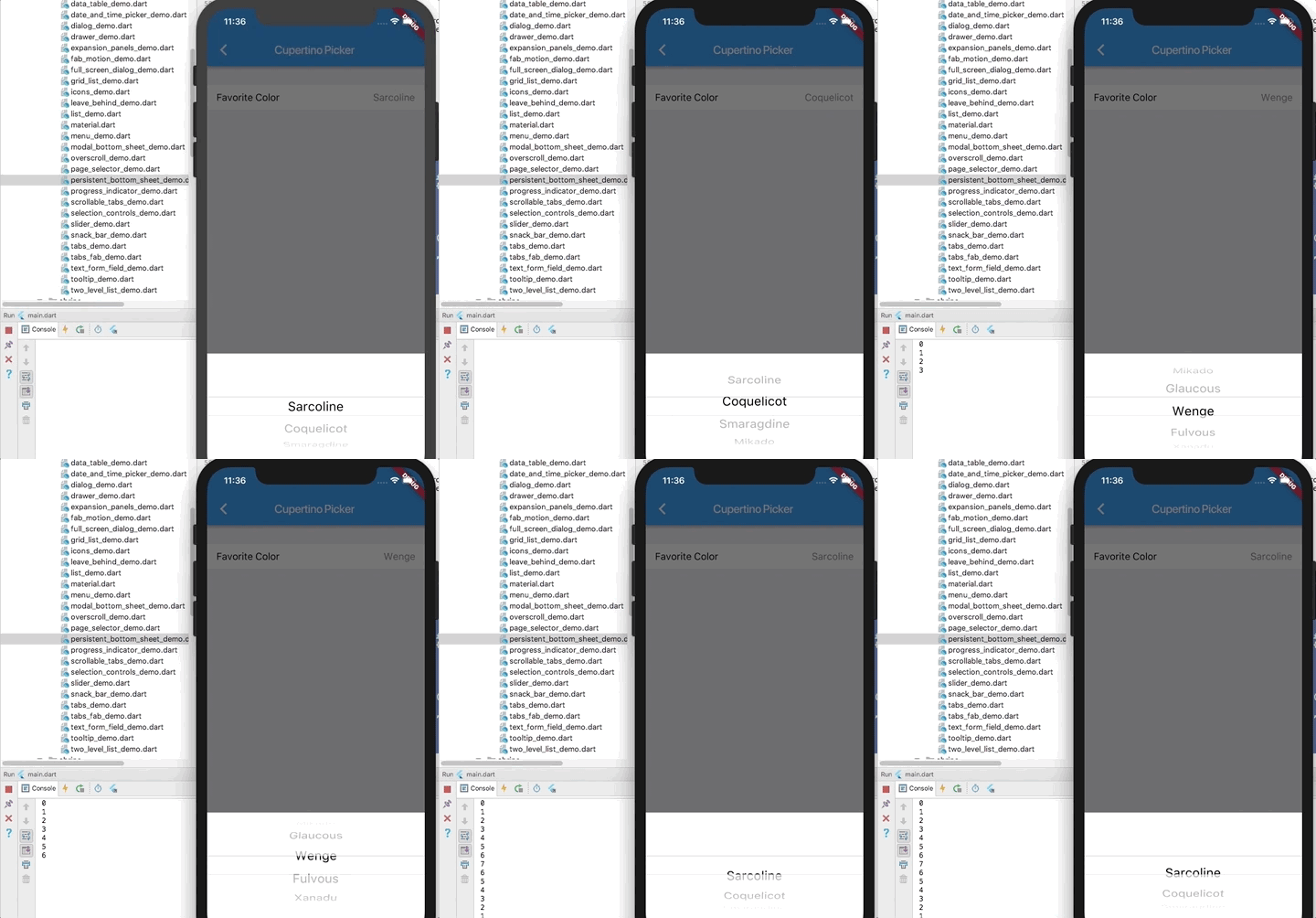
我看到BottomSheet小部件有一个onClosing回调:https://docs.flutter.io/flutter/material/BottomSheet-class.html
但是,对于如何获得它的实例,我感到困惑,因为颤振库示例正在使用以下代码调用底部表,并且没有从代码中获取底表的方法:
      new GestureDetector(
        onTap: () async {
          await showModalBottomSheet<void>(
            context: context,
            builder: (BuildContext context) {
              return _buildBottomPicker();
            },
          );
        },
        child: _buildMenu(),
      ),
有谁知道我怎样才能得到这个回叫侦听器吗?
基于Remi的解决方案,我在Navigator.of回调中添加了onTap (上下文).pop(Value)代码。但是,CupertinoPicker不是持久的,因此如果用户接触到选择器外部,则选择器将退出,并返回一个空值:
  Widget _buildBottomPicker() {
    final FixedExtentScrollController scrollController =
        new FixedExtentScrollController(initialItem: _selectedItemIndex);

    return new Container(
      height: _kPickerSheetHeight,
      color: CupertinoColors.white,
      child: new DefaultTextStyle(
        style: const TextStyle(
          color: CupertinoColors.black,
          fontSize: 22.0,
        ),
        child: new GestureDetector(
          // Blocks taps from propagating to the modal sheet and popping.
          onTap: () { Navigator.of(context).pop(_selectedItemIndex);},
          child: new SafeArea(
            child: new CupertinoPicker(
              scrollController: scrollController,
              itemExtent: _kPickerItemHeight,
              backgroundColor: CupertinoColors.white,
              onSelectedItemChanged: (int index) {
                setState(() {
//                  print(_selectedItemIndex);
//                  Navigator.of(context).pop(index);
                  _selectedItemIndex = index;
                });
              },
              children: new List<Widget>.generate(coolColorNames.length, (int index) {
                return new Center(child:
                  new Text(coolColorNames[index]),
                );
              }),
            ),
          ),
        ),
      ),
    );
}回答 4
Stack Overflow用户
发布于 2018-04-17 09:47:06
其实比你想的要简单得多。
showDialog及其对应方(包括showModalBottomSheet)返回包含结果的Future。因此,您可以进行以下操作:
final selectedId = await showModalBottomSheet<int>(...);唯一的要求是,当弹出您的模式/对话框/路由/任何东西时,您可以执行Navigator.of(context).pop(value)来发送该值。
Stack Overflow用户
发布于 2019-09-06 09:12:39
就像这样:
future.whenComplete(() => requestRefresh());Stack Overflow用户
发布于 2019-02-23 21:05:09
正如前面的答案所述,所需的值将以未来的形式返回给您。虽然这是真的,但我并不清楚如何实现这一点。在我的例子中,我想通过同一屏幕上的类别列表过滤待办事项列表。因此,通过使用onSelectedItemChanged返回的int键,我能够像这样过滤.
Widget _buildCategoryPicker(BuildContext context, _todoBloc) {
final FixedExtentScrollController scrollController =
    FixedExtentScrollController(initialItem: _selectedIndex);

return GestureDetector(
  onTap: () async {
    await showCupertinoModalPopup<String>(
      context: context,
      builder: (BuildContext context) {
        return _buildBottomPicker(
          CupertinoPicker(
            (...)
            onSelectedItemChanged: (int index) {
              setState(() => _selectedIndex = index);
            },
            children: (...),
          ), // CupertinoPicker
        );
      },
    ); // await showCupertinoModalPopup

   // Filters the todoList.
    _todoBloc.filter.add(categories[_selectedIndex]);
   },
   child: _buildMenu(
     ...
   ),
 );
}
你不需要在你的showCupertinoModalPopup或者类似的东西上设置期末考试.
final selectedId = await showCupertinoModalPopup<String>(...);https://stackoverflow.com/questions/49874771
复制相似问题
腾讯云开发者

Copyright © 2013 - 2026 Tencent Cloud. All Rights Reserved. 腾讯云 版权所有
深圳市腾讯计算机系统有限公司 ICP备案/许可证号:粤B2-20090059  粤公网安备44030502008569号
腾讯云计算(北京)有限责任公司 京ICP证150476号 | 京ICP备11018762号