
Swift中的负cornerRadius
Swift中的负cornerRadius
提问于 2018-04-17 07:23:31
我想设计一个按钮包围标签在Swift。
有谁知道如何设计像下面图片中的负片圆形标签吗?

回答 1
Stack Overflow用户
回答已采纳
发布于 2018-04-17 08:28:59
正确的方法是创建一个Bezierpath,并将其分配为UIView的子层。
我将要使用的代码将使用UIView。要么在此视图中创建一个标签,要么创建子类UILabel,而不是UIView,以获得所需的结果。
示例代码可以如下所示:
func makeShape(){
    let boundingView = UIView()
    self.view.addSubview(boundingView)
    boundingView.translatesAutoresizingMaskIntoConstraints = false
    boundingView.leftAnchor.constraint(equalTo: self.view.leftAnchor, constant: 0).isActive = true
    boundingView.topAnchor.constraint(equalTo: self.view.topAnchor, constant: self.view.safeAreaInsets.top + 20).isActive = true
    boundingView.widthAnchor.constraint(equalToConstant: 200).isActive = true
    boundingView.heightAnchor.constraint(equalToConstant: 80).isActive = true
    self.view.layoutIfNeeded()

    let redShape = UIBezierPath()
    redShape.move(to: CGPoint.init(x: boundingView.frame.minX, y: boundingView.frame.minY))
    redShape.addLine(to: CGPoint.init(x: boundingView.frame.maxX, y: boundingView.frame.minY))
    redShape.addCurve(to: CGPoint.init(x: boundingView.frame.maxX, y: boundingView.frame.maxY), controlPoint1: CGPoint.init(x: boundingView.frame.maxX - 20, y: boundingView.frame.midY - 20), controlPoint2: CGPoint.init(x: boundingView.frame.maxX - 20, y: boundingView.frame.midY + 20))
    redShape.addLine(to: CGPoint.init(x: boundingView.frame.minX, y: boundingView.frame.maxY))
    redShape.close()

    let fillColor = UIColor.init(red: 1, green: 0, blue: 0, alpha: 1)
    fillColor.setFill()
    redShape.fill()
    let shapeLayer = CAShapeLayer()
    shapeLayer.frame = boundingView.bounds
    shapeLayer.path = redShape.cgPath
    shapeLayer.fillColor = fillColor.cgColor
    boundingView.layer.addSublayer(shapeLayer)
}
在上面的代码中做你喜欢的自动布局。但是要注意形状是如何画出来的。希望能帮上忙。输出:
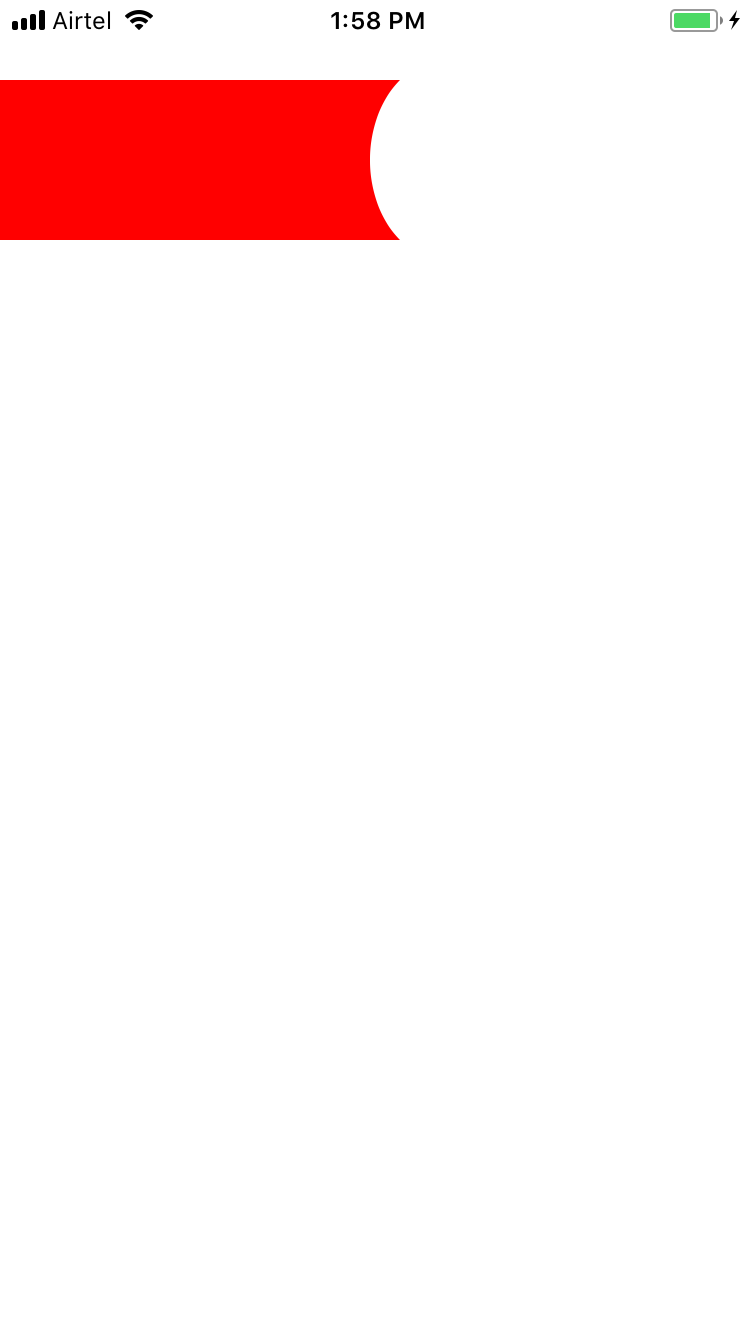
编辑:我相信在UILabel中添加一个子层将完全隐藏UILabel的文本。因此,我建议您严格遵循上述代码,并将UILabel作为subView添加到boundingView中。
页面原文内容由Stack Overflow提供。腾讯云小微IT领域专用引擎提供翻译支持
原文链接:
https://stackoverflow.com/questions/49872138
复制相关文章
相似问题
腾讯云开发者

Copyright © 2013 - 2026 Tencent Cloud. All Rights Reserved. 腾讯云 版权所有
深圳市腾讯计算机系统有限公司 ICP备案/许可证号:粤B2-20090059  粤公网安备44030502008569号
腾讯云计算(北京)有限责任公司 京ICP证150476号 | 京ICP备11018762号