
当滚动_NSContiguousstring时,仪表显示“UITableView”内存泄漏
我有一个由10个元素组成的UItableView。我打开了仪器来捕捉内存泄漏,当我滚动tableView时,它开始产生内存泄漏。在“仪器”中,我试图找出导致泄漏的原因,但却找不出原因,它说"_NScontiguousstring“指的是整个泄漏。
我为目标C找到了一些解决方案,它们检查"CellForRowAt“函数中的单元格是否为零。我不认为它是有用的斯威夫特,但我尝试了,正如预期,它不起作用。
我的问题是是什么会导致这种记忆泄漏?
我测试它的设备;
11.3.1上的iPhone X
iPhone 6 11.2.5控制器类;
class TableViewController: UITableViewController {
let teamModel = TeamModel(uid: "adsada", name: "First Team ", idea: "idea 1", slogan: "Slogan 1", university: "dasda", image: "info", isActive: true)
let teamModel2 = TeamModel(uid: "adsada", name: "Team 2", idea: "idea 2", slogan: "adasd", university: "dasda", image: "info", isActive: true)
let teamModel3 = TeamModel(uid: "adsada", name: "Team 3", idea: "idea 3", slogan: "adasd", university: "dasda", image: "info", isActive: true)
let teamModel4 = TeamModel(uid: "adsada", name: "Team 4", idea: "idea 4", slogan: "adasd", university: "dasda", image: "info", isActive: true)
let teamModel5 = TeamModel(uid: "adsada", name: "Team 5", idea: "idea 5", slogan: "adasd", university: "dasda", image: "info", isActive: true)
let teamModel6 = TeamModel(uid: "adsada", name: "Team 6", idea: "idea 6", slogan: "adasd", university: "dasda", image: "info", isActive: true)
let teamModel7 = TeamModel(uid: "adsada", name: "Team 7", idea: "idea 7", slogan: "adasd", university: "dasda", image: "info", isActive: true)

var data: [TeamModel] = []
override func viewDidLoad() {
    super.viewDidLoad()
    tableView.register(mainTableCell.self, forCellReuseIdentifier: "mainTableCell")
    data = [teamModel,teamModel2,teamModel3,teamModel4,teamModel5,teamModel6,teamModel7]
}
// MARK: - Table view data source
override func numberOfSections(in tableView: UITableView) -> Int {
    // #warning Incomplete implementation, return the number of sections
    return 1
}
override func tableView(_ tableView: UITableView, numberOfRowsInSection section: Int) -> Int {
    // #warning Incomplete implementation, return the number of rows
    return data.count
}
override func tableView(_ tableView: UITableView, cellForRowAt indexPath: IndexPath) -> UITableViewCell {
    let cell = tableView.dequeueReusableCell(withIdentifier: "mainTableCell", for: indexPath) as! mainTableCell
    let cell_data = data[indexPath.row]

    cell.cell_data = cell_data

    return cell
}
override func tableView(_ tableView: UITableView, heightForRowAt indexPath: IndexPath) -> CGFloat {
    return 120
}
}
细胞类别;
class mainTableCell: UITableViewCell{
var cell_data: TeamModel?{
    didSet{
        guard let unwrappedCell = cell_data else { return }
        if let url = unwrappedCell.imageURL{
            profileImage.image = UIImage(named: "info")
        } else{
            self.profileImage.image = UIImage(named: "info")
        }
        self.teamLbl.text = unwrappedCell.name
       mainBackground.backgroundColor = UIColor.gray
    }
}

let mainBackground: UIView = {
    let v = UIView()
    v.layer.cornerRadius = 8
    v.layer.masksToBounds = true
    return v
}()

var isVoteable: Bool = false

//let shadowView = ShadowView()

let profileImage: UIImageView = {
    let imageView = UIImageView()
    imageView.contentMode = .scaleAspectFill
    imageView.clipsToBounds = true
    imageView.layer.masksToBounds = true
    return imageView
}()

let teamLbl: UILabel = {
    let label = UILabel()
    label.textColor = UIColor.black
    label.numberOfLines = 1
    label.adjustsFontSizeToFitWidth = true
    return label
}()

let myVoteLbl: UILabel = {
    let l = UILabel()
    l.text = "Oyum: --"
    return l
}()
let voteBtn: UIButton = {
   let b = UIButton(type: .custom)
    b.setImage(UIImage(named: "info"), for: .normal)

    return b
}()
override init(style: UITableViewCellStyle, reuseIdentifier: String?){
    super.init(style: style, reuseIdentifier: reuseIdentifier)

    setupViews()
}
func setupViews() {

    self.backgroundColor = UIColor.white


    self.mainBackground.addSubview(profileImage)
    self.mainBackground.addSubview(teamLbl)
    self.mainBackground.addSubview(voteBtn)
    self.mainBackground.addSubview(myVoteLbl)

    //self.addSubview(shadowView)
    self.addSubview(mainBackground)
    self.backgroundColor = UIColor.clear

    profileImage.translatesAutoresizingMaskIntoConstraints = false
    teamLbl.translatesAutoresizingMaskIntoConstraints = false
    voteBtn.translatesAutoresizingMaskIntoConstraints = false
    myVoteLbl.translatesAutoresizingMaskIntoConstraints = false
    mainBackground.translatesAutoresizingMaskIntoConstraints = false
    //shadowView.translatesAutoresizingMaskIntoConstraints = false

}
override func layoutSubviews() {
    super.layoutSubviews()

   // self.setCircularImageView()
    mainBackground.anchor(self.topAnchor, left: self.leftAnchor, bottom: self.bottomAnchor, right: self.rightAnchor, topConstant: 10, leftConstant: 10, bottomConstant: 10, rightConstant: 10, widthConstant: 0, heightConstant: 0)
    // shadowView.anchor(self.topAnchor, left: self.leftAnchor, bottom: self.bottomAnchor, right: self.rightAnchor, topConstant: 5, leftConstant: 5, bottomConstant: 5, rightConstant: 5, widthConstant: 0, heightConstant: 0)

    profileImage.anchor(nil, left: self.mainBackground.leftAnchor, bottom: nil, right: nil, topConstant: 0, leftConstant: 10, bottomConstant: 0, rightConstant: 0, widthConstant: 60, heightConstant: 60)
    profileImage.anchorCenterYToSuperview()


    teamLbl.anchor(self.mainBackground.topAnchor, left: profileImage.rightAnchor, bottom: nil, right: self.voteBtn.leftAnchor, topConstant: 20, leftConstant: 20, bottomConstant: 0, rightConstant: 0, widthConstant: 0, heightConstant: 40)
    myVoteLbl.anchor(nil, left: profileImage.rightAnchor, bottom: self.mainBackground.bottomAnchor, right: nil, topConstant: 0, leftConstant: 20, bottomConstant: 20, rightConstant: 0, widthConstant: 0, heightConstant: 0)

    voteBtn.anchor(nil, left: nil, bottom: nil, right: self.mainBackground.rightAnchor, topConstant: 0, leftConstant: 0, bottomConstant: 0, rightConstant: 0, widthConstant: 80, heightConstant: 80)
    voteBtn.anchorCenterYToSuperview()
}

func setCircularImageView() {
    self.profileImage.layer.cornerRadius = CGFloat(roundf(Float(self.profileImage.frame.size.width / 2.0)))
}
required init?(coder aDecoder: NSCoder) {
    fatalError("init(coder:) has not been implemented")
}
}
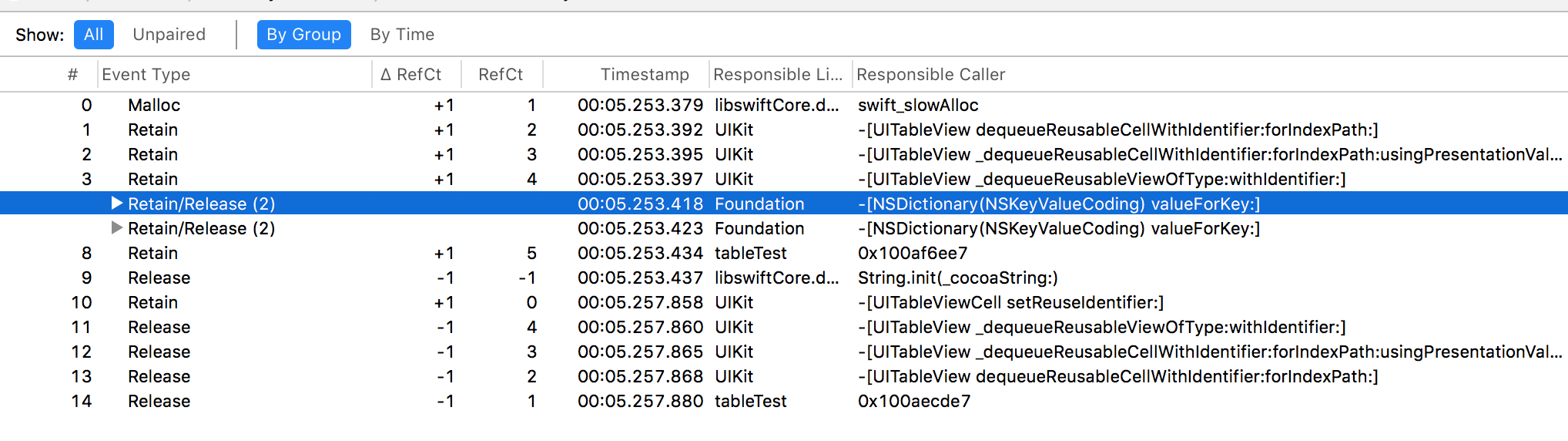
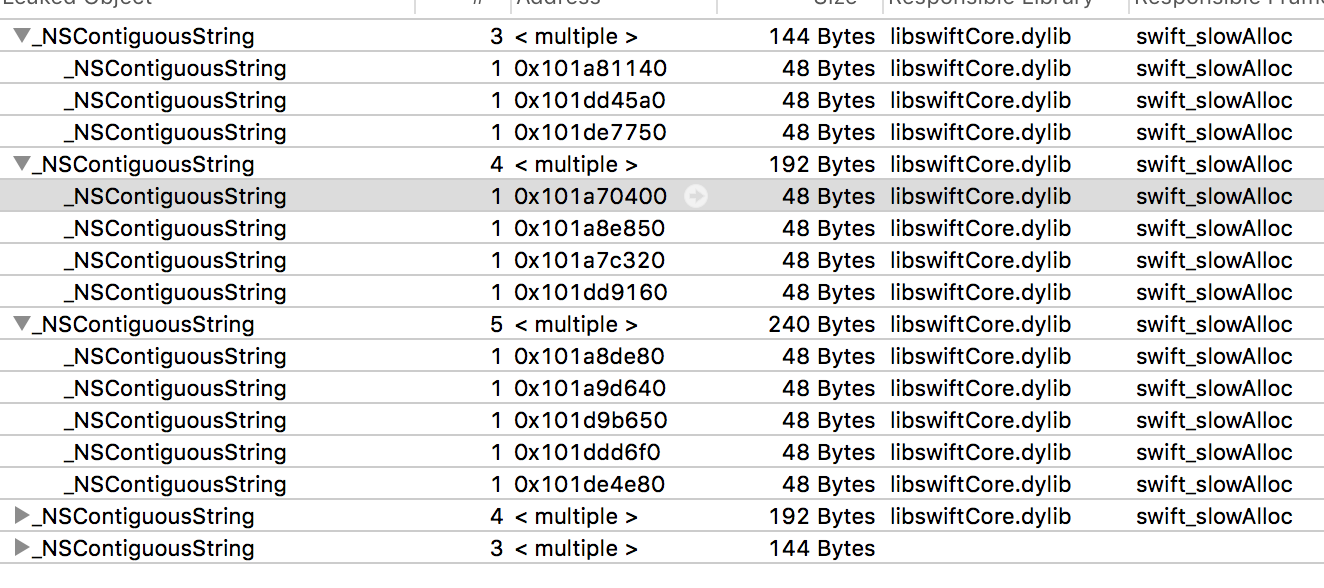
编辑:我在下面的答案中添加了prepareForReuse方法,但是现在单元格只显示白色。我做错了什么吗?
    override func prepareForReuse() {
    super.prepareForReuse()

    teamLbl.text = ""
    myVoteLbl.text = ""
    profileImage.image = nil
}
我还将cell_data变量设置为“弱变量cell_data: TeamModel?”,并在prepareForReuse()方法中将其为零,但仍然会出现相同的泄漏。
编辑2:完整的项目;
https://github.com/emreond/TableView-Memory-Leak-Project
编辑3:我发现当我在cell_data的EDIT中添加If check和change属性时,一些单元格视图看起来被破坏了。例如,当我在teamLbl中更改cell_data文本颜色时。在一些牢房里,它看起来被毁了。
编辑4:当我评论锚代码来检查@Darp的答案时,(我在屏幕上没有看到任何东西,也没有任何约束),它仍然继续泄漏。
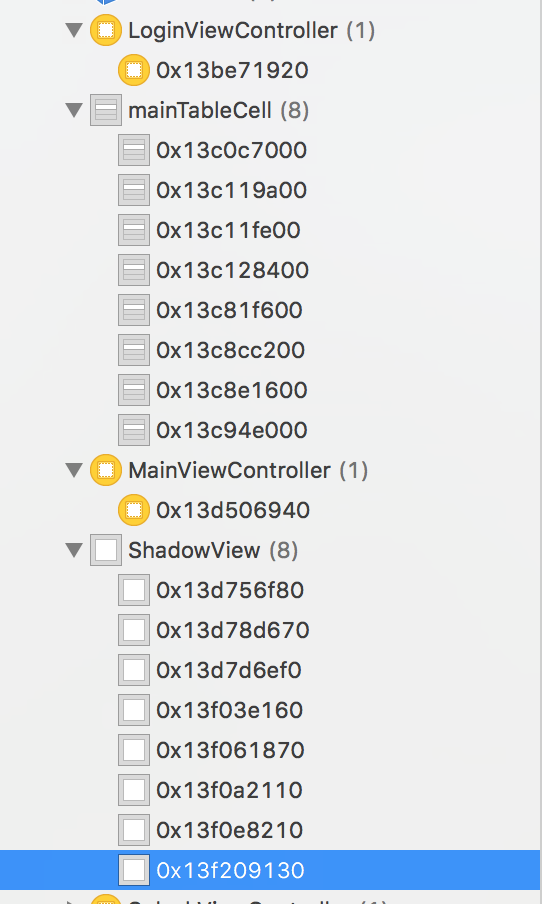
编辑5:我仍在处理这个漏洞,但找不到任何解决方案。实际上,当我在屏幕上查看内存时,我看到只有8个单元格在内存中,看起来是正确的。
回答 1
Stack Overflow用户
发布于 2018-05-13 11:54:18
我对_NSContiguousString也有同样的问题。即使在一个只有一个标签的空应用程序中,它也显示了48个字节的泄漏。
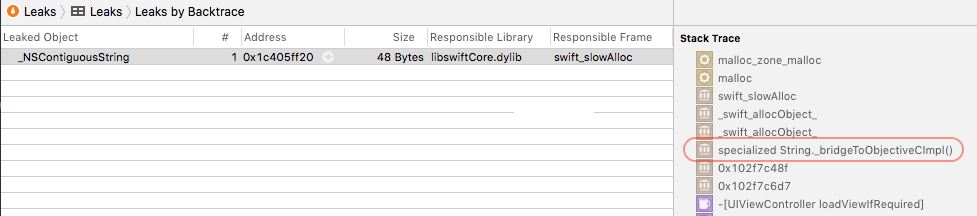
我不确定,但我猜测泄漏的原因可能是与NSString桥接(我也看到堆栈跟踪顶部的[_SwiftNativeNSStringBase retain] )。
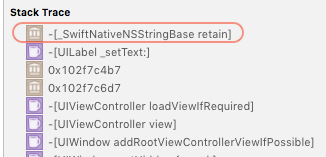
我发现NSString本身可能被仪器认为是as a leaking object,因为它已经实现为Singleton。
我自己的问题是:Memory leaks when assigning text to UILabel (iOS, Swift 4, XCode9)
https://stackoverflow.com/questions/49871981
复制相似问题
腾讯云开发者

Copyright © 2013 - 2026 Tencent Cloud. All Rights Reserved. 腾讯云 版权所有
深圳市腾讯计算机系统有限公司 ICP备案/许可证号:粤B2-20090059  粤公网安备44030502008569号
腾讯云计算(北京)有限责任公司 京ICP证150476号 | 京ICP备11018762号