
如何在鼠标离开项目后在JavaFX中重置菜单项悬停颜色?
如何在鼠标离开项目后在JavaFX中重置菜单项悬停颜色?
提问于 2018-04-14 18:35:30
我创建了一个Java文件,并包括了用于创建窗口的Css样式,如下所示:
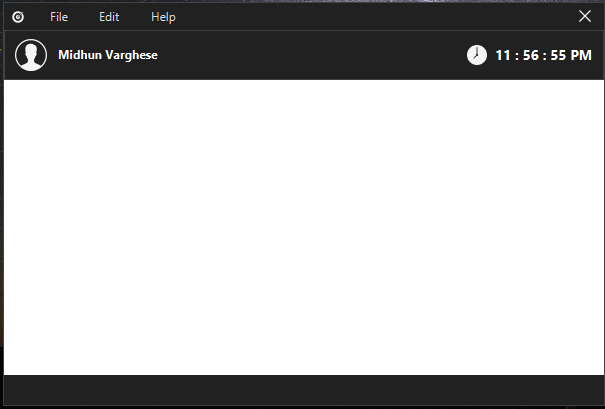
这是我的CSS样式表
.button {
-fx-background-color:transparent;
-fx-background-radius:0;
-fx-border-color:transparent;
-fx-border-width:0;
}

.button:focused {
-fx-background:transparent;
-fx-background-radius:0;
-fx-border-color:transparent;
-fx-border-width:0;
}

.button:hover {
-fx-background-color:transparent, red ,red, red;
-fx-background-radius:0;
-fx-border-width:0;
}

.button:pressed {
-fx-background-color:#DD2C00;
}

.menu {
-fx-padding:1 10 1 5;
}

.menu .context-menu {
-fx-padding:1 1 1 1;
}

.menu-bar {
-fx-background-color:#212121;
-fx-padding:0 1 0 1;
-fx-spacing:1;
}

.menu-bar .label {
-fx-padding:0 10 0 10;
}

.menu-bar > .container > .menu-button {
-fx-background-color:#212121;
-fx-padding:5 5 5 5;
}

.menu-bar > .container > .menu-button > .label {
-fx-text-fill:#E0E0E0;
}

.menu-bar > .container > .menu-button > .label:disabled,.menu-item .label:disabled {
-fx-opacity:1.0;
}

.menu-bar > .container > .menu-button:hover > .label,.menu-bar > .container > .menu-button:focused > .label {
-fx-text-fill:#FFF;
}

.menu-bar > .container > .menu-button:hover,.menu-bar > .container > .menu-button:focused {
-fx-background-color:#424242;
}

.menu-bar > .container > .menu-button:showing > .label,.menu-item .label {
-fx-text-fill:#000;
}

.menu-bar > .container > .menu-button:showing,.context-menu {
-fx-background-color:#FFF;
}

.menu-item {
-fx-background-color:#FFF;
-fx-padding:5 20 5 20;
}

.menu-item:focused .label,.menu-item:hovered .label {
-fx-text-fill:#EaE3EA;
}

.menu-item:focused,.menu-item:hovered {
-fx-background-color:#1565C0;
}
.menu-item:left {
    -fx-background-color: #FFF;
}
.root {
-fx-font-family:"Segoe UI";
-fx-font-weight:bold;
-fx-smooth:true;
}
问题是当我把鼠标放在菜单项上时,
它仍然是蓝色的,不会变回白色。
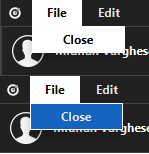
希望有JavaFX菜单设计知识和经验的人能指导我达到这个目标。
回答 1
Stack Overflow用户
发布于 2018-04-15 04:27:46
这可能是因为现在还太早,无法正确思考,但我认为您的文件中有不必要的CSS规则。在任何情况下,使用以下规则(除您的规则外):
.menu-item {
   -fx-background-color: white;
   -fx-padding: 5 20 5 20;
}

.menu-item:hover {
    -fx-background-color: -fx-focus-color;
}我从你的css规则中离开了-fx-padding。上面仅仅将每个菜单项的背景色设置为白色,然后打开:悬停规则,我将其设置为默认的选择颜色#039ED3,这与编写-fx-focus-color相同。
页面原文内容由Stack Overflow提供。腾讯云小微IT领域专用引擎提供翻译支持
原文链接:
https://stackoverflow.com/questions/49834870
复制相关文章
相似问题
腾讯云开发者

Copyright © 2013 - 2026 Tencent Cloud. All Rights Reserved. 腾讯云 版权所有
深圳市腾讯计算机系统有限公司 ICP备案/许可证号:粤B2-20090059  粤公网安备44030502008569号
腾讯云计算(北京)有限责任公司 京ICP证150476号 | 京ICP备11018762号