
高图集-将y轴绘图线标签置于图表区域之外。
高图集-将y轴绘图线标签置于图表区域之外。
提问于 2018-04-13 22:44:29
如何将绘制线标签放置在图表区域外的yAxis上?或增加图表区域的外部宽度以显示绘制线标签。
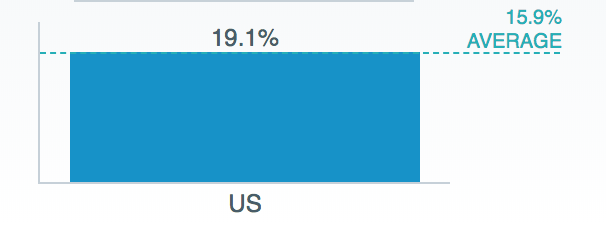
JSFIDDLE
> yAxis: {
>     plotLines: [{
>       color: '#FF0000',
>       width: 1,
>       value: 15.9,
>       label: {
>         allowOverlap: false,
>         text: '15.9%<br> Average',
>         align: 'right',
>         style: {
>           color: 'blue',
>           fontWeight: 'normal',
>           fontSize: '10px'
>         }
>       },
>       zIndex: 5
>     }]   },

回答 1
Stack Overflow用户
回答已采纳
发布于 2018-04-14 14:21:41
使用marginRight,并更新plotline标签
   label: {
    x: 50, //shifts right
    y:-15, //shifts top
  },
var chart = Highcharts.chart('container', {
  chart: {
    type: 'column',
    marginRight: 100
  },
  xAxis: {
    categories: ['US']
  },
  yAxis: {
    plotLines: [{
      color: '#FF0000',
      width: 1,
      value: 15.9,
      label: {
        allowOverlap: false,
        text: '15.9%<br> Average',
        align: 'right',
        x: 50,
        y: -15,
        style: {
          color: 'blue',
          fontWeight: 'normal',
          fontSize: '10px'
        }
      },
      zIndex: 5
    }]
  },
  plotOptions: {
    series: {
      allowPointSelect: true
    }
  },
  series: [{
    data: [30.5]
  }]
});


// the button action
$('#button').click(function() {
  var selectedPoints = chart.getSelectedPoints();

  if (chart.lbl) {
    chart.lbl.destroy();
  }
  chart.lbl = chart.renderer.label('You selected ' + selectedPoints.length + ' points', 100, 60)
    .attr({
      padding: 10,
      r: 5,
      fill: Highcharts.getOptions().colors[1],
      zIndex: 5
    })
    .css({
      color: 'white'
    })
    .add();
});<script src="https://code.jquery.com/jquery-3.1.1.min.js"></script>
<script src="https://code.highcharts.com/highcharts.js"></script>
<div id="container" style="height: 400px"></div>
<button id="button" class="autocompare">Get selected points</button>
页面原文内容由Stack Overflow提供。腾讯云小微IT领域专用引擎提供翻译支持
原文链接:
https://stackoverflow.com/questions/49826075
复制相关文章
相似问题
腾讯云开发者

Copyright © 2013 - 2026 Tencent Cloud. All Rights Reserved. 腾讯云 版权所有
深圳市腾讯计算机系统有限公司 ICP备案/许可证号:粤B2-20090059  粤公网安备44030502008569号
腾讯云计算(北京)有限责任公司 京ICP证150476号 | 京ICP备11018762号