
Heroku - PythonPath问题上的Django应用程序
我第一次尝试在Heroku上配置我的django应用程序。我已经把我的代码推到"heroku“,但是我得到了一个ModuleNotFound错误:
ModuleNotFoundError: No module named 'UsefulFunctions'
这是完整的线索:
$ git push heroku master
Counting objects: 390, done.
Delta compression using up to 4 threads.
Compressing objects: 100% (251/251), done.
Writing objects: 100% (390/390), 56.56 KiB | 2.83 MiB/s, done.
Total 390 (delta 205), reused 262 (delta 122)
remote: Compressing source files... done.
remote: Building source:
remote:
remote: -----> Python app detected
remote: -----> Installing python-3.6.4
remote: -----> Installing pip
remote: -----> Installing requirements with pip
remote:        Collecting django (from -r /tmp/build_9b6fcbcef79c70d29d429c430e653020/requirements.txt (line 1))
remote:          Downloading Django-2.0.4-py3-none-any.whl (7.1MB)
remote:        Collecting psycopg2 (from -r /tmp/build_9b6fcbcef79c70d29d429c430e653020/requirements.txt (line 2))
remote:          Downloading psycopg2-2.7.4-cp36-cp36m-manylinux1_x86_64.whl (2.7MB)
remote:        Collecting python-decouple (from -r /tmp/build_9b6fcbcef79c70d29d429c430e653020/requirements.txt (line 3))
remote:          Downloading python-decouple-3.1.tar.gz
remote:        Collecting django-debug-toolbar (from -r /tmp/build_9b6fcbcef79c70d29d429c430e653020/requirements.txt (line 4))
remote:          Downloading django_debug_toolbar-1.9.1-py2.py3-none-any.whl (206kB)
remote:        Collecting Pillow (from -r /tmp/build_9b6fcbcef79c70d29d429c430e653020/requirements.txt (line 5))
remote:          Downloading Pillow-5.1.0-cp36-cp36m-manylinux1_x86_64.whl (2.0MB)
remote:        Collecting pytz (from django->-r /tmp/build_9b6fcbcef79c70d29d429c430e653020/requirements.txt (line 1))
remote:          Downloading pytz-2018.4-py2.py3-none-any.whl (510kB)
remote:        Collecting sqlparse>=0.2.0 (from django-debug-toolbar->-r /tmp/build_9b6fcbcef79c70d29d429c430e653020/requirements.txt (line 4))
remote:          Downloading sqlparse-0.2.4-py2.py3-none-any.whl
remote:        Installing collected packages: pytz, django, psycopg2, python-decouple, sqlparse, django-debug-toolbar, Pillow
remote:          Running setup.py install for python-decouple: started
remote:            Running setup.py install for python-decouple: finished with status 'done'
remote:        Successfully installed Pillow-5.1.0 django-2.0.4 django-debug-toolbar-1.9.1 psycopg2-2.7.4 python-decouple-3.1 pytz-2018.4 sqlparse-0.2.4
remote:
remote: -----> $ python manage.py collectstatic --noinput
remote:        /app/.heroku/python/lib/python3.6/site-packages/psycopg2/__init__.py:144: UserWarning: The psycopg2 wheel package will be renamed from release 2.8; in order to keep installing from binary please use "pip install psycopg2-binary" instead. For details see: <http://initd.org/psycopg/docs/install.html#binary-install-from-pypi>.
remote:          """)
remote:        Traceback (most recent call last):
remote:          File "manage.py", line 15, in <module>
remote:            execute_from_command_line(sys.argv)
remote:          File "/app/.heroku/python/lib/python3.6/site-packages/django/core/management/__init__.py", line 371, in execute_from_command_line
remote:            utility.execute()
remote:          File "/app/.heroku/python/lib/python3.6/site-packages/django/core/management/__init__.py", line 347, in execute
remote:            django.setup()
remote:          File "/app/.heroku/python/lib/python3.6/site-packages/django/__init__.py", line 24, in setup
remote:            apps.populate(settings.INSTALLED_APPS)
remote:          File "/app/.heroku/python/lib/python3.6/site-packages/django/apps/registry.py", line 112, in populate
remote:            app_config.import_models()
remote:          File "/app/.heroku/python/lib/python3.6/site-packages/django/apps/config.py", line 198, in import_models
remote:            self.models_module = import_module(models_module_name)
remote:          File "/app/.heroku/python/lib/python3.6/importlib/__init__.py", line 126, in import_module
remote:            return _bootstrap._gcd_import(name[level:], package, level)
remote:          File "<frozen importlib._bootstrap>", line 994, in _gcd_import
remote:          File "<frozen importlib._bootstrap>", line 971, in _find_and_load
remote:          File "<frozen importlib._bootstrap>", line 955, in _find_and_load_unlocked
remote:          File "<frozen importlib._bootstrap>", line 665, in _load_unlocked
remote:          File "<frozen importlib._bootstrap_external>", line 678, in exec_module
remote:          File "<frozen importlib._bootstrap>", line 219, in _call_with_frames_removed
remote:          File "/tmp/build_9b6fcbcef79c70d29d429c430e653020/users/models.py", line 4, in <module>
remote:            from UsefulFunctions.dbUtils import *
remote:        ModuleNotFoundError: No module named 'UsefulFunctions'
remote:
remote:  !     Error while running '$ python manage.py collectstatic --noinput'.
remote:        See traceback above for details.
remote:
remote:        You may need to update application code to resolve this error.
remote:        Or, you can disable collectstatic for this application:
remote:
remote:           $ heroku config:set DISABLE_COLLECTSTATIC=1
remote:
remote:        https://devcenter.heroku.com/articles/django-assets
remote:  !     Push rejected, failed to compile Python app.
remote:
remote:  !     Push failed
remote: Verifying deploy...
remote:
remote: !       Push rejected to salty-savannah-12027.
remote:
To https://git.heroku.com/salty-savannah-12027.git
 ! [remote rejected] master -> master (pre-receive hook declined)
error: failed to push some refs to 'https://git.heroku.com/salty-savannah-12027.git'
应用程序结构
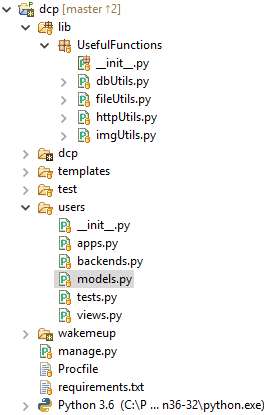
我尝试了各种类型的模糊处理,让它在我的<app>/lib目录中识别我的PYTHONPATH,但是没有运气:
http://blog.sionide21.com/posts/2014/01/managing-pythonpath-on-heroku/ https://www.biggleszx.com/2012/03/your-first-heroku-django-app/
谁能帮我指出正确的方向吗?
回答 2
Stack Overflow用户
发布于 2018-04-14 15:03:29
事实证明这是一个重要的问题。我原来的进口线:
from UsefulFunctions.dbUtils import *由于我的UsefulFunctions变量被重置,Python无法定位PYTHONPATH。因此,我将其更改为绝对导入:
from lib.UsefulFunctions.dbUtils import *这篇文章有助于:
https://chrisyeh96.github.io/2017/08/08/definitive-guide-python-imports.html
Stack Overflow用户
发布于 2018-04-13 16:15:54
为什么不将UsefulFunctions放在现有的PYTHONPATH中,而不是编辑PYTHONPATH以包含文件呢?Django应用程序通常有一个utils模块(utils.py)来实现这种功能。如果它是特定于你的用户应用程序,你可以把它放在users/utils.py,但如果你需要它更一般,它可以在应用程序之外,在项目中的manage.py旁边。
尽管如此,如果您确实希望将其保留在项目根和应用程序目录之外,我注意到UsefulFunctions没有.py扩展,因此您至少必须将它变成一个.py文件。
https://stackoverflow.com/questions/49821084
复制相似问题
腾讯云开发者

Copyright © 2013 - 2026 Tencent Cloud. All Rights Reserved. 腾讯云 版权所有
深圳市腾讯计算机系统有限公司 ICP备案/许可证号:粤B2-20090059  粤公网安备44030502008569号
腾讯云计算(北京)有限责任公司 京ICP证150476号 | 京ICP备11018762号