
将d3.v4.js条形图的标题除以两行或多行
将d3.v4.js条形图的标题除以两行或多行
提问于 2018-04-13 12:01:04
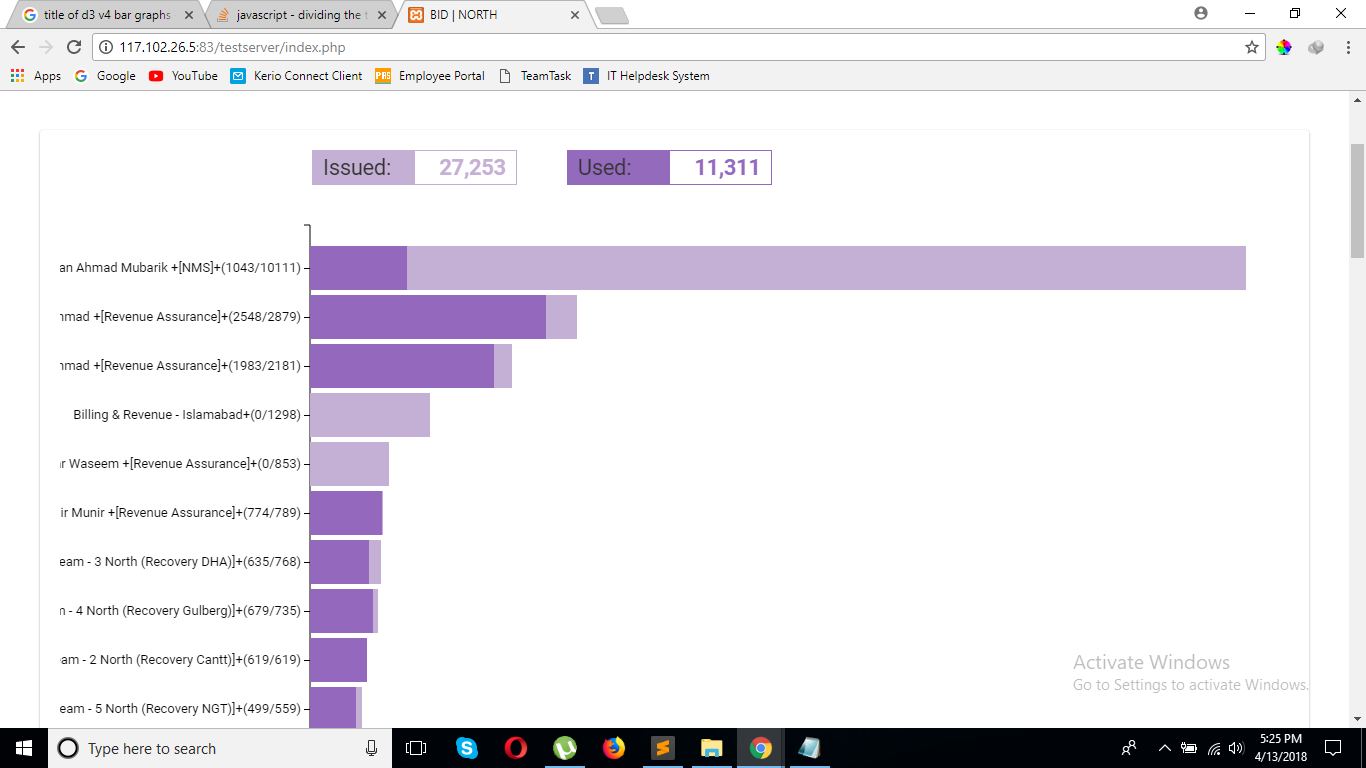
我使用的是d3.v4图形,它们工作得很好,但是我的条形图的标题太长了,我想把标题分成两行。
svg.append("g")
.attr("class", "y axis")
.call(yAxis)
.append("text")
.attr("transform", "rotate(-90)")
.attr("y", 6)
.attr("dy", ".71em")
.style("text-anchor", "end");
var state = svg.selectAll(".state")
    .data(data)
    .enter().append("g")
    .attr("class", "g")
    .attr("transform", function (d) {
        return "translate(0," + y(d.State) + ")";
})d.State包含了标题,这是我迄今为止尝试过的:
return "translate(0," + y(d.State.text().split("+")) + ")";“+”符号在标题中,我插入了这个符号,将标题分成两半。
回答 1
Stack Overflow用户
回答已采纳
发布于 2018-04-13 13:04:13
在这里输入图像描述这段代码适用于我
svg.append("g")
      .attr("class", "y axis")
      .call(yAxis)
    .append("text")
      .attr("transform", "rotate(-90)")
      .attr("y", 6)
      .attr("dy", ".71em")
      .style("text-anchor", "end");

  var state = svg.selectAll(".state")
      .data(data)
      .enter().append("g")
      .attr("class", "g")
      .attr("transform", function(d) {
         return "translate(0," + y(d.State) + ")";
       })

  $('.y .tick text')
  .each(function(d){
      var self = d3.select(this);
      var lines = self.text().split("+");
      self.text("");
      self.append("tspan")
        .attr("x", -8)
        .attr("dy", "0em")
        .attr('font-weight', 'bold')
        .text(lines[0]);
      self.append('tspan')
        .attr("x", -8)
        .attr("dy", ".92em")
        .style('fill', '2E3092')
        .text(lines[1]);
})页面原文内容由Stack Overflow提供。腾讯云小微IT领域专用引擎提供翻译支持
原文链接:
https://stackoverflow.com/questions/49816528
复制相关文章
相似问题
腾讯云开发者

Copyright © 2013 - 2026 Tencent Cloud. All Rights Reserved. 腾讯云 版权所有
深圳市腾讯计算机系统有限公司 ICP备案/许可证号:粤B2-20090059  粤公网安备44030502008569号
腾讯云计算(北京)有限责任公司 京ICP证150476号 | 京ICP备11018762号