
如何使libphonenumber格式化法语电话号码?
如何使libphonenumber格式化法语电话号码?
提问于 2018-04-13 01:13:55
我正在查看libphonenumber库(https://github.com/googlei18n/libphonenumber),但我只能让它在"US“和"BR”区域工作。我如何让它在"FR“地区工作?我正在寻找的格式是14022500。
我能够用我自己的代码获得这种格式。
            @Override
            public void afterTextChanged(Editable s) {
                // phone digits without formatting
                phone = s.toString().replaceAll("[^\\d]", "");
                        if (phone.length() == 1) {
                            edtPhoneNumber.setText(s.toString().concat(" "));
                            // move cursor to original position relative to the end of the string
                            edtPhoneNumber.setSelection(edtPhoneNumber.getText().length() - cursorPos);
                        } else {
                            if (pairings.length() >= 2) {
                                pairings = "";
                            }
                            pairings = pairings.concat(phone.substring((phone.length()-1)));
                            if (pairings.length() >= 2) {
                                if (phone.length() < 9) {
                                    edtPhoneNumber.setText(s.toString().concat(" "));
                                } else {
                                    edtPhoneNumber.setText(s.toString());
                                }
                            } else {
                                edtPhoneNumber.setText(s.toString());
                            }
                            // move cursor to original position relative to the end of the string
                            edtPhoneNumber.setSelection(edtPhoneNumber.getText().length() - cursorPos);
                        }
              }
我对这个库的实现如下。使用感兴趣的区域代码实例化后,
AsYouTypeFormatter aytf = PhoneNumberUtil.getInstance().getAsYouTypeFormatter("FR") 然后,我在afterTextChanged(可编辑的)中有以下代码
                    if(phone.length() > 0){
                        for(int i = 0; i < phone.length(); i++){
                            formattedPhoneNumber = aytf.inputDigit(phone.charAt(i));

                        }
                        //The formatted output shows properly in this EditText but not when I try to put it back into the original one (phoneNumberText)
                        edtPhoneNumber.setText(formattedPhoneNumber);
                        edtPhoneNumber.setSelection(edtPhoneNumber.getText().length() - cursorPos);
                        aytf.clear();
                    }

                    formattedPhoneNumber = null;
isPhoneFormatting = false;回答 1
Stack Overflow用户
回答已采纳
发布于 2018-04-15 16:46:52
我可能错了,但根据wiki,法语数字的数字格式以"0“开头。因此,您的测试输入对LibPhoneNumber无效。France
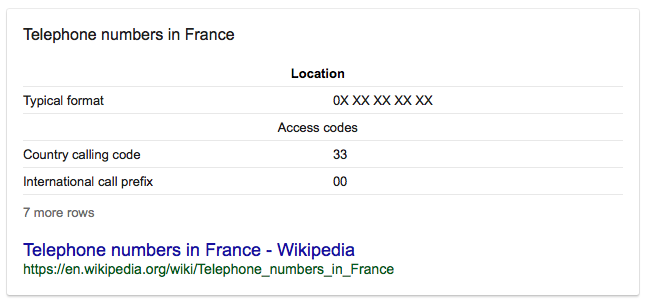
该计划使用10位数字的封闭编号方案,其中前两位数表示区域:
01法兰西岛
02法国西北部
03法国东北部
04法国东南部
05法国西南部
06及07流动电话服务
08 Freephone (numéro vert)和分担费用服务。
09非地理号码(由Voice服务使用,以前为087号)
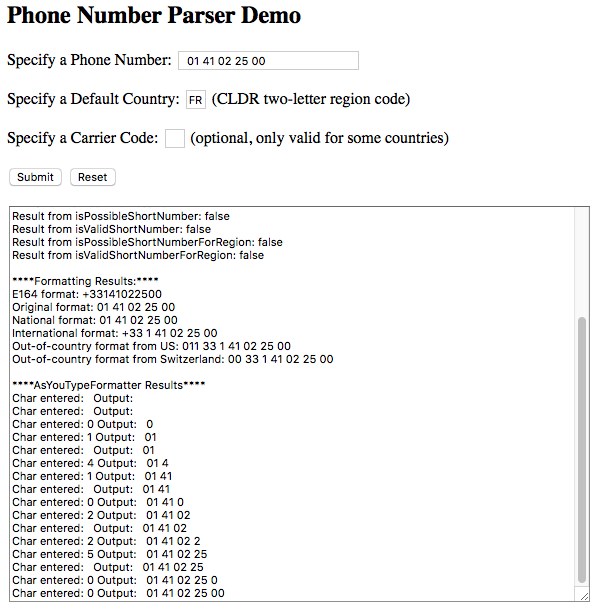
如果在测试值前面添加"0“,它的格式似乎是正确的。
页面原文内容由Stack Overflow提供。腾讯云小微IT领域专用引擎提供翻译支持
原文链接:
https://stackoverflow.com/questions/49807912
复制相关文章
相似问题
腾讯云开发者

Copyright © 2013 - 2026 Tencent Cloud. All Rights Reserved. 腾讯云 版权所有
深圳市腾讯计算机系统有限公司 ICP备案/许可证号:粤B2-20090059  粤公网安备44030502008569号
腾讯云计算(北京)有限责任公司 京ICP证150476号 | 京ICP备11018762号