
将结构化数据记录到Azure存储表中,由Serilog将所有对象存储在RenderedMessage中,我需要类中每个字段的列
将结构化数据记录到Azure存储表中,由Serilog将所有对象存储在RenderedMessage中,我需要类中每个字段的列
提问于 2018-04-12 17:43:10
我在下面的代码中使用SeriLog将带有对象的日志记录/存储到Azure表存储,但是我将对象存储在"RenderedMessage“列(在蔚蓝表中)或”数据“列中,而需要将类中的每个字段/属性存储到表存储中的分隔列中。请见下文:
 var _simpleTransation = new SimpleTransation(99, "some title9", "type99");

 var logger = new LoggerConfiguration()
                .WriteTo.AzureTableStorage(storage,LogEventLevel.Information,null, "LogStorage",false,null,null,null,false)
                .Enrich.WithProperty("SimpleTransation", "@_simpleTransation", true)
                .Enrich.FromLogContext()
                .CreateLogger()
                .ForContext<SimpleTransation>();

   logger.Information<SimpleTransation>("{@SimpleTransation}", _simpleTransation);
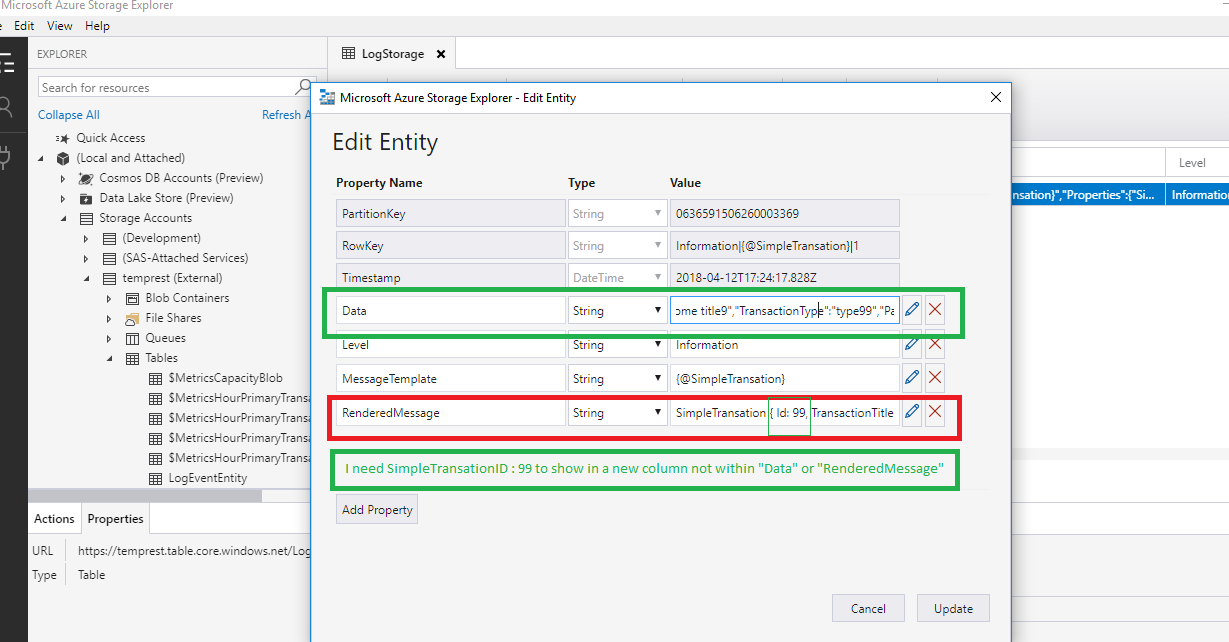
因此,我需要在表示我的对象字段的蔚蓝存储表中添加列,而不是在RenderedMessage日志中序列化整个对象?
回答 1
Stack Overflow用户
回答已采纳
发布于 2018-04-13 09:27:18
因此,我需要在表示我的对象字段的蔚蓝存储表中添加列,而不是在RenderedMessage日志中序列化整个对象?
您可以在写入蔚蓝表存储时使用propertyColumns属性添加新列。
Note:您需要调用Enrich.FromLogContext()和,属性将在Azure表存储中显示。
这里有一篇关于富集的文章。日志事件可以通过各种方式使用属性来丰富。
您需要使用LogContext.PushProperty来添加要添加的属性和值。
您可以参考以下代码来尝试:
    static void Main(string[] args)
    {
        var storage = CloudStorageAccount.Parse(CloudConfigurationManager.GetSetting("StorageConnectionString"));

        string tableName = "table411";
        var exampleuser = new User { Id = 1, Name = "joey", Age = 23 };
        var _log = new LoggerConfiguration()
            .Enrich.FromLogContext()
            .WriteTo.AzureTableStorageWithProperties(storage, propertyColumns: new string[] { "UserId" });

        LogContext.PushProperty("UserId", exampleuser.Id);

        var logger = _log.CreateLogger();

        logger.Information("{@User}",exampleuser);
    }
    class User
    {
        public int Id { get; set; }
        public string Name { get; set; }
        public int Age { get; set; }
    }
屏幕截图:

页面原文内容由Stack Overflow提供。腾讯云小微IT领域专用引擎提供翻译支持
原文链接:
https://stackoverflow.com/questions/49802904
复制相关文章
相似问题
腾讯云开发者

Copyright © 2013 - 2026 Tencent Cloud. All Rights Reserved. 腾讯云 版权所有
深圳市腾讯计算机系统有限公司 ICP备案/许可证号:粤B2-20090059  粤公网安备44030502008569号
腾讯云计算(北京)有限责任公司 京ICP证150476号 | 京ICP备11018762号