
Android仿真色带的硬件加速OpenGL ES 3.0
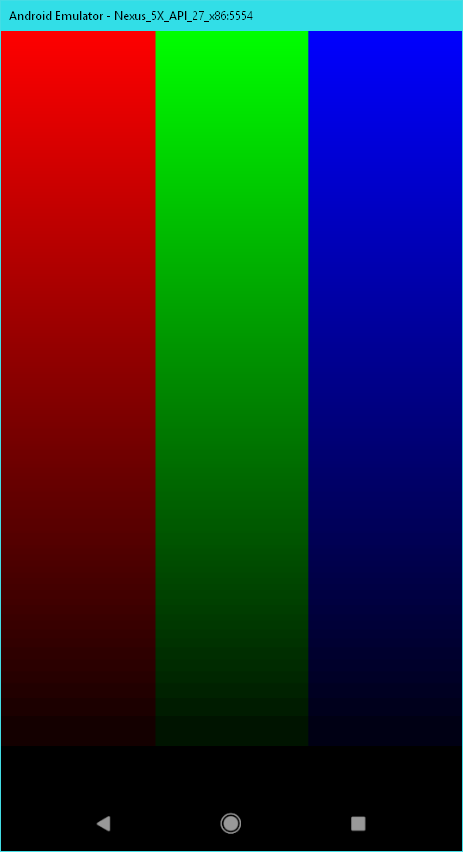
只有在我的Android仿真器上使用硬件加速渲染时,我才会把相当高的精度降低到颜色谱的低端。
通过硬件加速(角D3D11或桌面原生OpenGL):
没有硬件加速(SwiftShader):
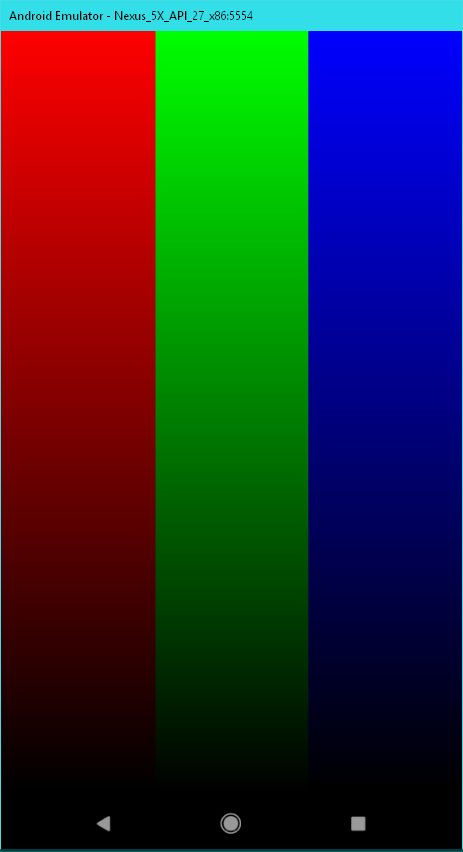
带状是明显的非线性,并成为相当突出时,试图渲染顺利的照明。
我已经设置了getWindow().setFormat(PixelFormat.RGBA_8888);,并在我的片段着色器中使用了precision highp float;。
这个我们使用的是AndroidStudio3.1.1,Windows10,OpenGL ES 3.0。
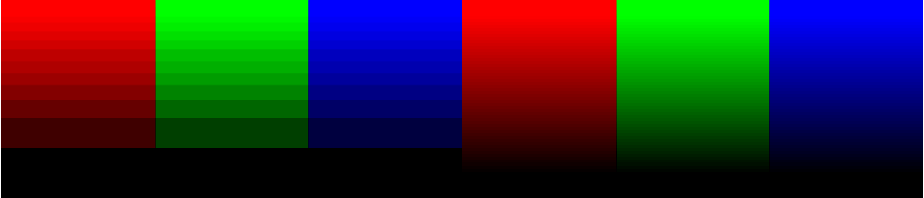
*编辑:这里并排增加亮度和对比度
回答 1
Stack Overflow用户
发布于 2018-06-16 07:52:43
这看起来像是sRGB颜色在某一时刻以线性8位格式存储,然后被转换回sRGB。它会导致你所观察到的那种低亮度不精确。
调用eglCreateWindowSurface时,尝试在attrib_list参数中传递{EGL_COLORSPACE_KHR, EGL_COLORSPACE_SRGB_KHR, EGL_NONE}。如果您正在使用GLSurfaceView,这将需要实现EGLWindowSurfaceFactory并调用setEGLWindowSurfaceFactory。这要求存在EGL_KHR_gl_colorspace扩展。
public class EGLFactory implements GLSurfaceView.EGLWindowSurfaceFactory {
  private static final int EGL_GL_COLORSPACE_KHR = 0x309D;
  private static final int EGL_GL_COLORSPACE_SRGB_KHR = 0x3089;
  public EGLSurface createWindowSurface(EGL10 egl, EGLDisplay display,
                                        EGLConfig config, Object nativeWindow) {
    final int[] attribList = {
      EGL_GL_COLORSPACE_KHR,
      EGL_GL_COLORSPACE_SRGB_KHR,
      EGL10.EGL_NONE
    };
    return egl.eglCreateWindowSurface(display, config, nativeWindow, attribList);
  }
  public void destroySurface(EGL10 egl, EGLDisplay display, EGLSurface surface) {
    egl.eglDestroySurface(display, surface);
  }
}如果您想了解更多关于sRGB:http://blog.johnnovak.net/2016/09/21/what-every-coder-should-know-about-gamma/的信息,这里有一个很好的帖子
https://stackoverflow.com/questions/49776684
复制相似问题
腾讯云开发者

Copyright © 2013 - 2026 Tencent Cloud. All Rights Reserved. 腾讯云 版权所有
深圳市腾讯计算机系统有限公司 ICP备案/许可证号:粤B2-20090059  粤公网安备44030502008569号
腾讯云计算(北京)有限责任公司 京ICP证150476号 | 京ICP备11018762号