
NSMutableParagraphStyle:一些不适用于iOS 10.3.2和10.3.3的属性
NSMutableParagraphStyle:一些不适用于iOS 10.3.2和10.3.3的属性
提问于 2018-04-09 14:23:09
我试图以以下方式设置一个NSMutableParagraphStyle:
@IBOutlet weak var headline: UILabel! {
    didSet {
        let style = NSMutableParagraphStyle()
        style.maximumLineHeight = 15
        style.lineSpacing = 0
        style.alignment = .center
        let attributes: [NSAttributedStringKey : Any] = [NSAttributedStringKey.paragraphStyle : style,
                                                         NSAttributedStringKey.baselineOffset : 0]

        let attributedString = NSMutableAttributedString(string: headline.text!, attributes: attributes)
        headline.attributedText = attributedString
    }
}
...which 没有改变文本在iOS 10.3.2和.3上的外观。它在iOS 9和iOS 11上工作。
我添加了baselineOffset,它似乎解决了一些用户(雷达)的问题--这对我的情况没有帮助。还有其他的解决办法吗?还是所有10.3.x的用户现在都不得不整天忍受着布局的破坏?
编辑:@Larme --我试过这样做,但也不起作用:
        let attributedString = NSMutableAttributedString(string: headline.text!, attributes: attributes)
        attributedString.addAttribute(NSAttributedStringKey.backgroundColor, value: UIColor.blue, range: NSMakeRange(0, 3))
        headline.attributedText = attributedString
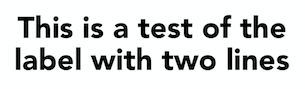
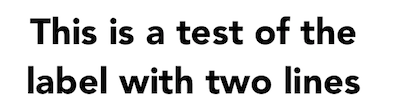
编辑:在iOS 10.3和11设备上测试matt的代码后,我得出结论,设置行距和设置最大高度的文本对齐不受限制是有问题的。即使没有在代码中执行任何操作,只使用Xcode UI设置属性化文本,我也会得到以下结果(请注意行距):
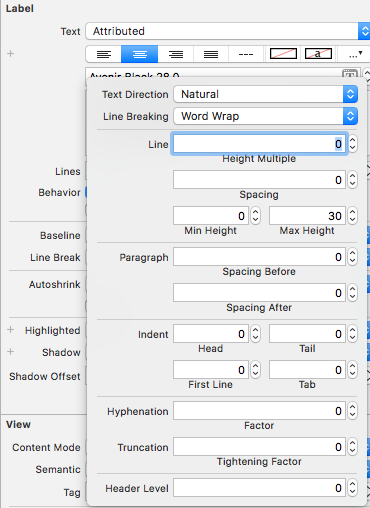
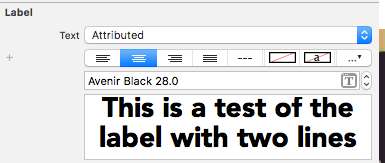
iOS 11设备
iOS 10.3.3设备
回答 1
Stack Overflow用户
回答已采纳
发布于 2018-04-25 09:12:56
不是的。这绝对是一个缺陷,我认为没有任何可能的方式来解决,除非让苹果修补它。
对不起:(
页面原文内容由Stack Overflow提供。腾讯云小微IT领域专用引擎提供翻译支持
原文链接:
https://stackoverflow.com/questions/49735263
复制相关文章
相似问题
腾讯云开发者

Copyright © 2013 - 2026 Tencent Cloud. All Rights Reserved. 腾讯云 版权所有
深圳市腾讯计算机系统有限公司 ICP备案/许可证号:粤B2-20090059  粤公网安备44030502008569号
腾讯云计算(北京)有限责任公司 京ICP证150476号 | 京ICP备11018762号