
Material组件的菜单在切换后不显示
Material组件的菜单在切换后不显示
提问于 2018-04-08 11:51:55
我正在玩的材料-UI中的应用程序条和抽屉组件。每当我点击应用程序栏中的汉堡菜单时,抽屉就会切换。但我的汉堡图标就像被完全覆盖了一样。所以,如果我想要我的抽屉菜单关闭,我必须刷新页面。我的组成部分如下:
App.js
class App extends Component {
render() {
return (
  <MuiThemeProvider>
    <div className="App">
      <AppBarComponent />


     </div>
   </MuiThemeProvider>
  );
 }
}
AppBarComponent.js
  class AppBarComponent extends React.Component {

  constructor(props) {
    super(props);
    this.state = { open: false };
  }

  handleToggle = () => this.setState({ open: !this.state.open });

  render() {
    return (
      <div>
        <AppBar title="App Bar Title"
          iconClassNameRight="muidocs-icon-navigation-expand-more"
          onLeftIconButtonClick={this.handleToggle}
        />
        <Drawer open={this.state.open}>
          <MenuItem>Menu Item 1</MenuItem>
          <MenuItem>Menu Item 2</MenuItem>
          </Drawer>
      </div>
    );
  }
};

export default AppBarComponent;

每当我点击汉堡包菜单时,抽屉就会切换为:
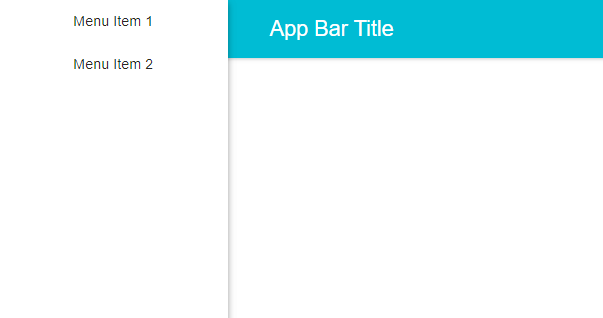
正如我们所看到的那样,汉堡包菜单是完整的。如何使App组件响应?我是否必须手动编写css类,还是有任何方法对其进行调整?
回答 2
Stack Overflow用户
回答已采纳
发布于 2018-04-08 12:27:33
唯一的解决办法可能是,你可以把抽屉在右边。openSecondary属性在折叠组件中可用,可以使从左侧切换的布尔值变为真值。
Stack Overflow用户
发布于 2018-12-20 16:29:47
您可以将抽屉的z索引设置为低于AppBar的z索引的值。将AppBar位置更改为绝对位置,将抽屉更改为相对位置。可能不得不玩填充物,但不会受伤。
页面原文内容由Stack Overflow提供。腾讯云小微IT领域专用引擎提供翻译支持
原文链接:
https://stackoverflow.com/questions/49717521
复制相关文章
相似问题
腾讯云开发者

Copyright © 2013 - 2026 Tencent Cloud. All Rights Reserved. 腾讯云 版权所有
深圳市腾讯计算机系统有限公司 ICP备案/许可证号:粤B2-20090059  粤公网安备44030502008569号
腾讯云计算(北京)有限责任公司 京ICP证150476号 | 京ICP备11018762号