
html2canvas与内插式SVG
我试图使用html2canvas从div内部显示的内容创建一个PNG图像。该司包括:
- 更多的带有文本内容的div(由html2canvas捕获OK )
- 像下面这样的内联SVG元素:
<svg version="1.1" id="img-15" xmlns="http://www.w3.org/2000/svg" xmlns:xlink="http://www.w3.org/1999/xlink" x="0px" y="0px" viewBox="0 0 645 585" style="enable-background:new 0 0 512.001 512.001;" xml:space="preserve" class="svg replaced-svg"><path [...]/></svg>
在使用html2canvas之前,如下所示:
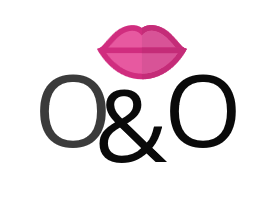
然后,我使用以下代码生成PNG-映像:html2canvas(document.querySelector("#monogram-zone"),{width:pWidth,height:pHeight,x:pLeft,y:pTop,backgroundColor:null}).then(canvas => { document.getElementById("monogram").appendChild(canvas); });
..。结果如下:

问题:我的SVG去哪里了,我怎样才能让html2canvas和文本div一起捕获它?
回答 1
Stack Overflow用户
发布于 2022-09-20 13:06:12
有点晚了,…对于任何在这个问题上绊脚石的人来说,可能是svg标记上有转换。
由于某种原因,html2canvas将转换重新应用于已经转换的元素。
下面是一个说明这个问题的JSFiddle:https://jsfiddle.net/vqnpx582/
使用JSFiddle,因为下面的代码不起作用!
window.takeScreenshot = () => {
    html2canvas(document.querySelector("#monogram-zone")).then(canvas => {
    document.getElementById("monogram").appendChild(canvas);
    });
}div div {
font-size: 3rem;
font-family: sans-serif;
}
#textOgray {
color: #555;
position: fixed;
left: 20px;
top: 30px;
}
#textamp {
position: fixed;
left: 50px;
top: 37px;
}
#textO {
position: fixed;
left: 80px;
top: 30px;
}
#monogram-zone {
width: 160px;
height: 90px;
overflow: hidden;
background-color: cyan;
position: relative;
}<script src="https://html2canvas.hertzen.com/dist/html2canvas.js"></script>
<div id='monogram-zone'>
<svg version="1.1" id="img-15" xmlns="http://www.w3.org/2000/svg" xmlns:xlink="http://www.w3.org/1999/xlink" viewbox="-10 -10 100 50" xml:space="preserve" style="transform: translate3d(10px, 20px, 30px);" class="svg replaced-svg">
<path fill="red" stroke-width="10" stroke="red" d="M0 0 h300 100"/>
</svg>
<div id='textOgray'>O</div>
<div id='textamp'>&</div>
<div id='textO'>O</div>
</div>
<button onclick="takeScreenshot()">to image</button>
<div id="monogram" />
正如您在小提琴中看到的那样,当运行html2canvas时,红色的条会被第二次转换,移动到不同的位置。
这可能导致一些元素从捕获的div中消失。
https://stackoverflow.com/questions/49690830
复制相似问题
腾讯云开发者

Copyright © 2013 - 2026 Tencent Cloud. All Rights Reserved. 腾讯云 版权所有
深圳市腾讯计算机系统有限公司 ICP备案/许可证号:粤B2-20090059  粤公网安备44030502008569号
腾讯云计算(北京)有限责任公司 京ICP证150476号 | 京ICP备11018762号