
Svg动画在几分钟内意外停止
Svg动画在几分钟内意外停止
提问于 2018-04-05 16:49:03
首先,请查看下面的片段,您将看到五个球沿着一条路径移动的重复动画。
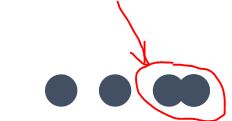
但不幸的是,你会发现第一个球将在几分钟内在m0,0停下来,之后,下面的球一个接一个地停下来。
即使我把dur="0.4s"和dur="0.39s"联系在一起,它也有同样的问题。(我认为它是由dur的界值引起的)。
更新:
我发现SVG在Firefox (最新版本)中似乎运行良好(至少运行了5个小时)。
谷歌Chrome (最新版本)将有上述问题提到。
Chrome似乎不能很好地支持SVG动画。
更新2:
对于Chrome,似乎只有<animateMotion>有问题,因为我运行的这个SVG只有<animate>,到目前为止没有任何问题(至少两个小时)。
谢谢。
svg{
 width:50%;
 height:50%;
}<svg fill="#435063" viewBox="0 0 64 64">
<g>
<path d="m-40,0 q-8, -7, 0, -15 l40, 0 l0,15"
stroke="#529fd9" stroke-width="1" fill="none" id="route1"></path>
<path d="m0,0 l-40, 0" stroke="#529fd9" stroke-width="1" fill="none" id="route2"></path>
<ellipse cx="53" cy="32" rx="3" ry="3" stroke-width="1">
<animateMotion id="a1" dur="1.6s" begin="0s;a1.end+0.4s">
<mpath xlink:href="#route2"></mpath>
</animateMotion>
<animateMotion dur="0.39s" begin="a1.end">
<mpath xlink:href="#route1"></mpath>
</animateMotion>
<animate
attributeName="ry"
values="3;2;2;2;3"
begin="a1.end+0.05s" dur="0.32s"
/>
<animate
attributeName="rx"
values="3;5;5;5;3"
begin="a1.end+0.05s" dur="0.32s"
/>
</ellipse>
<ellipse cx="53" cy="32" rx="3" ry="3" stroke-width="1">
<animateMotion id="b1" dur="1.6s" begin="0.4s;b1.end+0.4s">
<mpath xlink:href="#route2"></mpath>
</animateMotion>
<animateMotion dur="0.39s" begin="b1.end">
<mpath xlink:href="#route1"></mpath>
</animateMotion>
<animate
attributeName="ry"
values="3;2;2;2;3"
begin="b1.end+0.05s" dur="0.32s"
/>
<animate
attributeName="rx"
values="3;5;5;5;3"
begin="b1.end+0.05s" dur="0.32s"
/>
</ellipse>
<ellipse cx="53" cy="32" rx="3" ry="3" stroke-width="1">
<animateMotion id="c1" dur="1.6s" begin="0.8s;c1.end+0.4s">
<mpath xlink:href="#route2"></mpath>
</animateMotion>
<animateMotion dur="0.39s" begin="c1.end">
<mpath xlink:href="#route1"></mpath>
</animateMotion>
<animate
attributeName="ry"
values="3;2;2;2;3"
begin="c1.end+0.05s" dur="0.32s"
/>
<animate
attributeName="rx"
values="3;5;5;5;3"
begin="c1.end+0.05s" dur="0.32s"
/>
</ellipse>
<ellipse cx="53" cy="32" rx="3" ry="3" stroke-width="1">
<animateMotion id="d1" dur="1.6s" begin="1.2s;d1.end+0.4s">
<mpath xlink:href="#route2"></mpath>
</animateMotion>
<animateMotion dur="0.39s" begin="d1.end">
<mpath xlink:href="#route1"></mpath>
</animateMotion>
<animate
attributeName="ry"
values="3;2;2;2;3"
begin="d1.end+0.05s" dur="0.32s"
/>
<animate
attributeName="rx"
values="3;5;5;5;3"
begin="d1.end+0.05s" dur="0.32s"
/>
</ellipse>
<ellipse cx="53" cy="32" rx="3" ry="3" stroke-width="1">
<animateMotion id="e1" dur="1.6s" begin="1.6s;e1.end+0.4s">
<mpath xlink:href="#route2"></mpath>
</animateMotion>
<animateMotion dur="0.39s" begin="e1.end">
<mpath xlink:href="#route1"></mpath>
</animateMotion>
<animate
attributeName="ry"
values="3;2;2;2;3"
begin="e1.end+0.05s" dur="0.32s"
/>
<animate
attributeName="rx"
values="3;5;5;5;3"
begin="e1.end+0.05s" dur="0.32s"
/>
</ellipse>
</g>
</svg>
屏幕截图下面的显示两个球已经停止了。
回答 1
Stack Overflow用户
回答已采纳
发布于 2020-06-11 22:38:52
这是Chrome的一个bug (version <= M77)。现在它已经从>=M78 (正如Chrome项目成员所提到的)开始修复了。因此,升级到最新版本,然后运行良好。
页面原文内容由Stack Overflow提供。腾讯云小微IT领域专用引擎提供翻译支持
原文链接:
https://stackoverflow.com/questions/49677597
复制相关文章
相似问题
腾讯云开发者

Copyright © 2013 - 2026 Tencent Cloud. All Rights Reserved. 腾讯云 版权所有
深圳市腾讯计算机系统有限公司 ICP备案/许可证号:粤B2-20090059  粤公网安备44030502008569号
腾讯云计算(北京)有限责任公司 京ICP证150476号 | 京ICP备11018762号