
为Out-GridView列添加自定义对象
为Out-GridView列添加自定义对象
提问于 2018-04-04 12:10:49
假设我有:
$installed_apps = invoke-command -computername P1184CDC -scriptblock {
Get-ItemProperty "HKLM:\Software\Microsoft\Windows\CurrentVersion\Uninstall\*"| ? DisplayName -ne $null
Get-ItemProperty "HKLM:\Software\wow6432node\Microsoft\Windows\CurrentVersion\Uninstall\*" | ? DisplayName -ne $null
}


$installed_apps | Out-GridView -wait
这将在一个漂亮的网格视图中返回所有已安装的应用程序(第一个命令为32位,包含wow6432node的命令为64位):
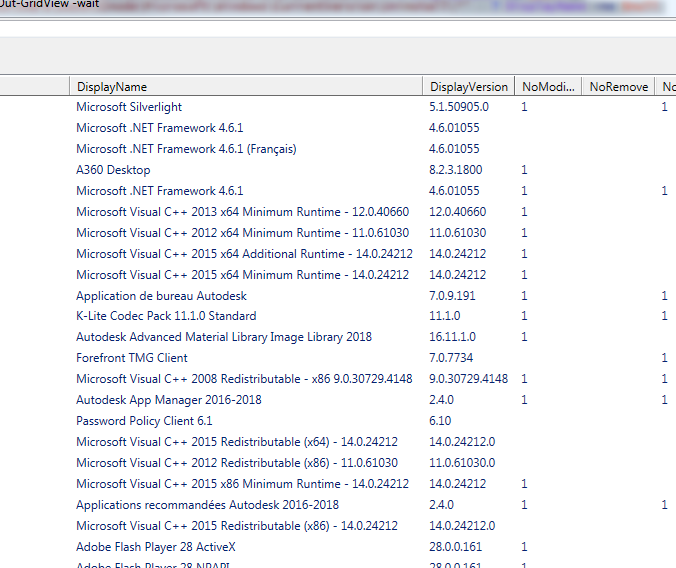
我试图在结果中添加一个"Architecture“列,以便识别从命令返回的所有64位对象:
Get-ItemProperty "HKLM:\Software\Microsoft\Windows\CurrentVersion\Uninstall\*"| ? DisplayName -ne 从命令返回的所有32位对象:
Get-ItemProperty "HKLM:\Software\wow6432node\Microsoft\Windows\CurrentVersion\Uninstall\*" | ? DisplayName -ne $null现在,它们都在一起,但如果能够按32位或64位类型对它们进行排序,那就太好了。
我认为我必须使用新对象PsObject,例如:
$architecture = New-Object PSObject -Property @{
Architecture = "x86"
}
在ForEach循环中,但是我对如何将其与从命令返回的应用程序一起进行设置非常不适应。谢谢您抽时间见我!
回答 1
Stack Overflow用户
回答已采纳
发布于 2018-04-04 12:19:57
这将向返回的对象添加一个“Architecture”属性(因此,在GridView中添加一个相应的列):
$installed_apps = invoke-command  -scriptblock {
    Get-ItemProperty "HKLM:\Software\Microsoft\Windows\CurrentVersion\Uninstall\*" |
        Where-Object DisplayName -ne $null |
            Add-Member -MemberType NoteProperty -Name Architecture -Value "64-bit" -PassThru

    Get-ItemProperty "HKLM:\Software\wow6432node\Microsoft\Windows\CurrentVersion\Uninstall\*" |
        Where-Object DisplayName -ne $null |
            Add-Member -MemberType NoteProperty -Name Architecture -Value "32-bit" -PassThru
}


$installed_apps | Out-GridView -wait
顺便说一句,wow6432node节点是32位应用程序读写的地方,而不是64位.
页面原文内容由Stack Overflow提供。腾讯云小微IT领域专用引擎提供翻译支持
原文链接:
https://stackoverflow.com/questions/49650698
复制相关文章
相似问题
腾讯云开发者

Copyright © 2013 - 2026 Tencent Cloud. All Rights Reserved. 腾讯云 版权所有
深圳市腾讯计算机系统有限公司 ICP备案/许可证号:粤B2-20090059  粤公网安备44030502008569号
腾讯云计算(北京)有限责任公司 京ICP证150476号 | 京ICP备11018762号