
RawImage从Texture2D变为VideoPlayer纹理时的闪烁
使用统一2017.3
我有一个RawImage,我在其中显示一系列的图像,加载为Taskture2D。工作完美和无缝。
然后,我使用示例RawImage代码将视频显示在同一个VideoPlayer中,并分配
rawImage.texture = videoPlayer.texture;视频播放得非常好,但是作为从静止图像切换到视频的一部分,RawImage中有一个明显的闪烁,就好像有一两帧黑色显示。视频的第一帧与我显示的最后一幅静态图像相匹配,因此我原本预计过渡过程会非常无缝。
请注意,在所有这些之前,视频已经“准备”了--我的代码是yields,直到videoPlayer.isPrepared返回true,然后才告诉视频播放并设置纹理。
我想可能是因为纹理还没有完全准备好,但我试着在调用Play和设置纹理之前屈服一两次,但这对闪烁没有任何影响。
我看到了这个项目:https://answers.unity.com/questions/1294011/raw-image-flickering-when-texture-changed.html,它表明这与正在设置的实体实例有关。我不完全理解答案中提出的解决方案,也不知道如何使它适应我自己的情况,但也许它对那些比我更擅长团结的人意味着什么。
对如何摆脱那个闪烁的画面有什么建议吗?
编辑:这是代码
public class VideoAnimation : MonoBehaviour, IAnimation {
    private VideoPlayer _videoPlayer;
    private UnityAction _completeAction;
    private bool _prepareStarted;

    public void Configure(VideoClip clip, bool looping)
    {
        _videoPlayer = gameObject.AddComponent<VideoPlayer>();
        _videoPlayer.playOnAwake = false;
        _videoPlayer.isLooping = looping;
        _videoPlayer.source = VideoSource.VideoClip;
        _videoPlayer.clip = clip;
        _videoPlayer.skipOnDrop = true;
    }

    public void Prepare()
    {
        _prepareStarted = true;
        _videoPlayer.Prepare();
    }

    public void Begin(RawImage destImage, UnityAction completeAction)
    {
        _completeAction = completeAction;
        _videoPlayer.loopPointReached += OnLoopPointReached;
        StartCoroutine(GetVideoPlaying(destImage));
    }

    private IEnumerator GetVideoPlaying(RawImage destImage)
    {
        if (!_prepareStarted)
        {
            _videoPlayer.Prepare();
        }

        while(!_videoPlayer.isPrepared)
        {
            yield return null;
        }

        _videoPlayer.Play();
        destImage.texture = _videoPlayer.texture;
    }

    public void OnLoopPointReached(VideoPlayer source)
    {
        if (_completeAction != null)
        {
            _completeAction();
        }
    }

    public void End()
    {
        _videoPlayer.Stop();
        _videoPlayer.loopPointReached -= OnLoopPointReached;
    }

    public class Factory : Factory<VideoAnimation>
    {
    }
}在我所处理的具体案例中,Configure和Prepare被提前调用,而RawImage则显示视频之前的最后一个静态图像。然后,当到了播放视频的时候,就会调用Begin。因此,当调用_prepareStarted时,Begin已经是true。插入日志消息显示,isPrepared在调用Begin时返回true,因此我也不会在那里循环。
我试过改变两行的顺序
    _videoPlayer.Play();
destImage.texture = _videoPlayer.texture;但它似乎并没有改变什么。我还认为,也许VideoPlayer是在普通视频之前输出了一个黑色帧,但是在Play之后和纹理设置之前插入一个yield或3个并没有什么不同。
在插入Texture的纹理之前,我看到的样本中没有一个在RawImage中有VideoPlayer。因此,在这些示例中,RawImage是从黑色开始的,这意味着一个额外的黑色帧不会被注意到。
编辑2:
嗯,我想出了一个解决办法,我想,这是一个解释。
首先,VideoPlayer.frame被记录为“当前由VideoPlayer显示的框架索引”。严格地说,这不是真的。或者,它可能在某个视频播放器的管道中,但它不是使用视频播放器的纹理的代码可以观察到的帧。
当您使用Prepare VideoPlayer时,至少在我使用的模式下,VideoPlayer会创建一个内部RenderTexture。你可能会认为,一旦玩家准备好了,这个纹理就会包含视频的第一帧。没有。在有任何东西之前,有一个非常明显的延迟。因此,当我的代码将RawImage纹理设置为播放机的纹理时,它正在安排一个纹理,至少在那个时候,该纹理是空的。这完美地解释了黑色闪烁,因为这是背景画布的颜色。
因此,我第一次尝试解决方案是在这里插入循环:
    _videoPlayer.Play();
    while(_videoPlayer.frame < 1)
    {
        yield return null;
    }
destImage.texture = _videoPlayer.texture;在Play和纹理集之间。
我想,尽管有这些文档,也许frame是即将显示的框架。如果是这样的话,这将导致第一个(第0)帧已经在缓冲区中,并将消除闪烁。不是的。还在闪烁。但当我改变到
    _videoPlayer.Play();
    while(_videoPlayer.frame < 2)
    {
        yield return null;
    }
    destImage.texture = _videoPlayer.texture;
然后,过渡是无缝的。因此,我最初尝试在两者之间插入收益率是正确的方法--我只是没有充分地插入。一个短的,事实上。我在循环中插入了一个计数器,它显示了我在上面的循环中产生了4次,这是我所期望的,因为视频是30 and,我在我的计算机上以60 and的速度运行。(同步锁已开启。)
最后一项实验表明:
    _videoPlayer.Play();
    while(_videoPlayer.frame < 1)
    {
        yield return null;
    }
    yield return null;
    destImage.texture = _videoPlayer.texture;
也没有导致闪烁。(或者,至少我看不见一个。)因此,一旦VideoPlayer报告它正在显示第二帧(根据文档数字是基于0的),在过渡无缝之前需要额外的一个游戏帧。(除非有第60秒的闪烁,我的眼睛看不见。)这个游戏框架可能与联合的图形管道或VideoPlayer管道有关--我不知道。
因此,底线是,从调用Play到视频播放器的纹理中有任何东西能够到达屏幕,都会有明显的延迟,除非等待,否则会显示"nothing“(在我的例子中,这会导致黑色背景闪烁)。
我突然意识到,由于VideoPlayer正在生成一个RenderTexture,所以也可以将以前的静态纹理混合到视频播放器的纹理中(这样就有了一些东西),然后立即进行切换。另一个实验要运行..。
回答 2
Stack Overflow用户
发布于 2018-04-04 01:24:04
嗯,让我们试着用着色器,也许它对你有帮助。
首先,我们必须创建自定义着色器,它必须像标准UI着色器一样工作。您可以在此链接中下载所有内置着色器。
采取UI-Default.shader并修改它。我帮你修改的!
只需统一创建shader并粘贴以下代码:
Shader "Custom/CustomShaderForUI"
{
Properties
{
    //[PerRendererData] _MainTex ("Sprite Texture", 2D) = "white" {}
    _CustomTexture ("Texture", 2D) = "white" {} // <--------------- new property
    _Color ("Tint", Color) = (1,1,1,1)

    _StencilComp ("Stencil Comparison", Float) = 8
    _Stencil ("Stencil ID", Float) = 0
    _StencilOp ("Stencil Operation", Float) = 0
    _StencilWriteMask ("Stencil Write Mask", Float) = 255
    _StencilReadMask ("Stencil Read Mask", Float) = 255

    _ColorMask ("Color Mask", Float) = 15

    [Toggle(UNITY_UI_ALPHACLIP)] _UseUIAlphaClip ("Use Alpha Clip", Float) = 0
}

SubShader
{
    Tags
    {
        "Queue"="Transparent"
        "IgnoreProjector"="True"
        "RenderType"="Transparent"
        "PreviewType"="Plane"
        "CanUseSpriteAtlas"="True"
    }

    Stencil
    {
        Ref [_Stencil]
        Comp [_StencilComp]
        Pass [_StencilOp]
        ReadMask [_StencilReadMask]
        WriteMask [_StencilWriteMask]
    }

    Cull Off
    Lighting Off
    ZWrite Off
    ZTest [unity_GUIZTestMode]
    Blend SrcAlpha OneMinusSrcAlpha
    ColorMask [_ColorMask]

    Pass
    {
        Name "Default"
    CGPROGRAM
        #pragma vertex vert
        #pragma fragment frag
        #pragma target 2.0

        #include "UnityCG.cginc"
        #include "UnityUI.cginc"

        #pragma multi_compile __ UNITY_UI_CLIP_RECT
        #pragma multi_compile __ UNITY_UI_ALPHACLIP

        struct appdata_t
        {
            float4 vertex   : POSITION;
            float4 color    : COLOR;
            float2 texcoord : TEXCOORD0;
            UNITY_VERTEX_INPUT_INSTANCE_ID
        };

        struct v2f
        {
            float4 vertex   : SV_POSITION;
            fixed4 color    : COLOR;
            float2 texcoord  : TEXCOORD0;
            float4 worldPosition : TEXCOORD1;
            UNITY_VERTEX_OUTPUT_STEREO
        };

        fixed4 _Color;
        fixed4 _TextureSampleAdd;
        float4 _ClipRect;

        v2f vert(appdata_t v)
        {
            v2f OUT;
            UNITY_SETUP_INSTANCE_ID(v);
            UNITY_INITIALIZE_VERTEX_OUTPUT_STEREO(OUT);
            OUT.worldPosition = v.vertex;
            OUT.vertex = UnityObjectToClipPos(OUT.worldPosition);

            OUT.texcoord = v.texcoord;

            OUT.color = v.color * _Color;
            return OUT;
        }

        //sampler2D _MainTex;
        sampler2D _CustomTexture; // <---------------------- new property

        fixed4 frag(v2f IN) : SV_Target
        {
            //half4 color = (tex2D(_MainTex, IN.texcoord) + _TextureSampleAdd) * IN.color;
            half4 color = (tex2D(_CustomTexture, IN.texcoord) + _TextureSampleAdd) * IN.color; // <- using new property

            #ifdef UNITY_UI_CLIP_RECT
            color.a *= UnityGet2DClipping(IN.worldPosition.xy, _ClipRect);
            #endif

            #ifdef UNITY_UI_ALPHACLIP
            clip (color.a - 0.001);
            #endif

            return color;
        }
    ENDCG
    }
}
}接下来,创建一个材质,并将RenderTexture设置为着色器中的纹理字段(而不是RawImage组件中的)。
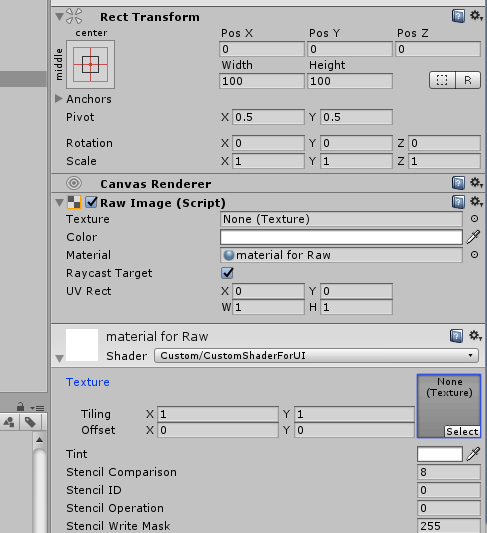
希望这能有所帮助!
Stack Overflow用户
发布于 2018-07-20 19:40:11
在加载视频时尝试隐藏RawImage gameObject。这将修复由于VideoPlayer未被完全加载而引起的任何闪烁。
public VideoPlayer _videoPlayer;
public RawImage _videoImage;

private void PlayClip(VideoClip videoClip)
{
    StartCoroutine(PlayClipCoroutine(videoClip));
}

private IEnumerator PlayClipCoroutine(VideoClip clip)
{
  _videoImage.gameObject.SetActive(false);
  _videoPlayer.clip = clip;
  _videoPlayer.Prepare();

  while (!_videoPlayer.isPrepared)
  {
      yield return null;
  }

  _videoPlayer.Play();
  _videoImage.texture = _videoPlayer.texture;
  _videoImage.gameObject.SetActive(true);
}https://stackoverflow.com/questions/49639033
复制相似问题
腾讯云开发者

Copyright © 2013 - 2026 Tencent Cloud. All Rights Reserved. 腾讯云 版权所有
深圳市腾讯计算机系统有限公司 ICP备案/许可证号:粤B2-20090059  粤公网安备44030502008569号
腾讯云计算(北京)有限责任公司 京ICP证150476号 | 京ICP备11018762号