
QML: DropShadow复制源矩形
QML: DropShadow复制源矩形
提问于 2018-04-03 08:09:40
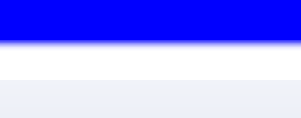
我正试着使我的水平矩形掉一个阴影。当我在下面的代码中这样做时,矩形会重复,这样两行中就会有两个水平矩形。它显示在图像中(复制的图像是白色的)。我如何摆脱复制的矩形,以便只保留阴影和原始矩形?
Window {
    visible: true
    width: 640
    height: 480
    color: "white"

    Item {
        anchors.fill: parent

        ColumnLayout {
            id: layout
            anchors.fill: parent
            spacing: 0

            Rectangle {
              id: bar
              color: "blue"
              height: 40
              Layout.fillWidth: true
            }

            DropShadow {
                anchors.fill: bar
                horizontalOffset: 0
                verticalOffset: 3
                radius: 8.0
                samples: 12
                source: bar
                color: "blue"
            }

            Rectangle {
                Layout.fillHeight: true
                Layout.preferredWidth: parent.width
                color: "grey"
            }

        }
    }
}
回答 2
Stack Overflow用户
回答已采纳
发布于 2018-04-03 11:06:29
没有重复的矩形,只有一个缺口。您正在使用一个布局,它将根据其大小将其包含的项放置出来。你可以锚定阴影来填充矩形,所以这就是它的位置,但是布局不应该以这样的格式使用,因此它留下了一个空空间,阴影应该在放置灰色矩形之前到达。
如果你去掉了空白,阴影就不会显示,因为灰色长方形就在上面。修改z值似乎也无济于事。它可能与使用布局有关。
如果您摆脱了布局并使用锚定,您可以获得所需的结果,这允许您首先将灰色矩形放在阴影下。
  Item {
    anchors.fill: parent
    Rectangle {
      anchors.bottom: parent.bottom
      anchors.top: bar.bottom
      width: parent.width
      color: "grey"
    }
    Column { // or you can put the layout here if you want
      id: bar
      anchors.top: parent.top
      width: parent.width
      Rectangle {
        color: "blue"
        height: 40
        width: parent.width
      }
      // other stuff
    }
    DropShadow {
      anchors.fill: bar
      horizontalOffset: 0
      verticalOffset: 3
      radius: 8.0
      samples: 12
      source: bar
      color: "blue"
    }
}Stack Overflow用户
发布于 2018-04-03 08:19:20
将DropShadow创建为Rectangle子级:
Item {
    ColumnLayout {
        id: layout
        anchors.fill: parent
        spacing: 0

        Rectangle {
          id: bar
          color: "blue"
          height: 40
          Layout.fillWidth: true
            ...
            ...  // some buttons, images etc.

            DropShadow {
                anchors.fill: parent
                horizontalOffset: 0
                verticalOffset: 3
                radius: 8.0
                samples: 12
                source: bar
                color: "blue"
            }
        }
        ...
        ... // some other components to the layout ...
    }
}还可以将DropShadow对象分配给layer.effect属性:
Item {
    ColumnLayout {
        id: layout
        anchors.fill: parent
        spacing: 0

        Rectangle {
          id: bar
          color: "blue"
          height: 40
          Layout.fillWidth: true
            ...
            ...  // some buttons, images etc.

          layer.enabled: true  // Set Layer for Enable
          layer.effect: DropShadow {
                horizontalOffset: 0
                verticalOffset: 3
                radius: 8.0
                samples: 12
                source: bar
                color: "blue"
            }
        }
        ...
        ... // some other components to the layout ...
    }
}页面原文内容由Stack Overflow提供。腾讯云小微IT领域专用引擎提供翻译支持
原文链接:
https://stackoverflow.com/questions/49625214
复制相关文章
相似问题
腾讯云开发者

Copyright © 2013 - 2026 Tencent Cloud. All Rights Reserved. 腾讯云 版权所有
深圳市腾讯计算机系统有限公司 ICP备案/许可证号:粤B2-20090059  粤公网安备44030502008569号
腾讯云计算(北京)有限责任公司 京ICP证150476号 | 京ICP备11018762号