
ASP.NET样板模板项目生成错误
ASP.NET样板模板项目生成错误
提问于 2018-04-03 06:48:53
我们正在从https://aspnetboilerplate.com/Templates下载的启动模板项目中获取构建错误。
下载的启动模板: ASP.NET Core2.x多页网页应用程序。
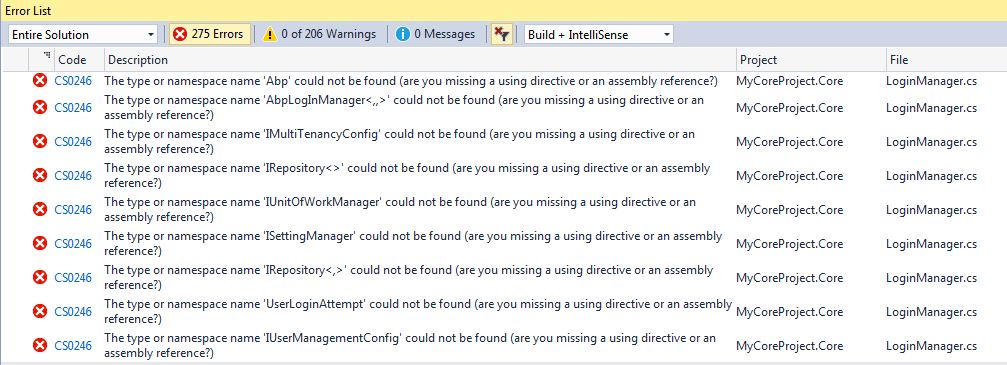
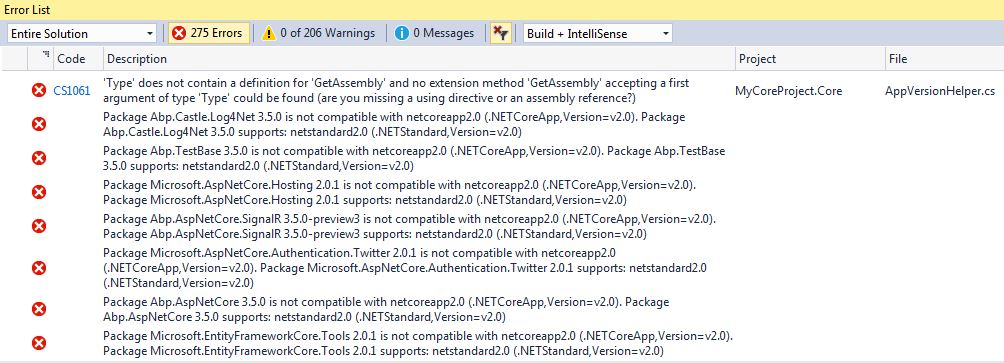
错误:
- 错误CS0234:命名空间'Microsoft‘中不存在类型或名称空间名称'AspNetCore’(您是否缺少程序集引用)- MyCoreProject.Core - LoginManager.cs
- 错误CS0246:找不到类型或名称空间名称'Abp‘(您缺少使用指令还是程序集引用?)- MyCoreProject.Core - LoginManager.cs
- 错误CS0308:非泛型类型'PermissionChecker‘不能与类型参数一起使用- MyCoreProject.Core - PermissionChecker.cs
- 错误CS1061:' type‘不包含'GetAssembly’的定义,也找不到接受'Type‘类型的第一个参数的扩展方法'GetAssembly’(您缺少使用指令还是程序集引用?)- MyCoreProject.Core - AppVersionHelper.cs。
- 包Microsoft.AspNetCore 2.0.1与netcoreapp2.0 (.NETCoreApp,Version=v2.0)不兼容。包Microsoft.AspNetCore 2.0.1支持: netstandard2.0 (.NETStandard,Version=v2.0)
- 包Microsoft.VisualStudio.Web.CodeGenerators.Mvc 2.0.2与netcoreapp2.0 (.NETCoreApp,Version=v2.0)不兼容。包Microsoft.VisualStudio.Web.CodeGenerators.Mvc 2.0.2支持: netstandard2.0 (.NETStandard,Version=v2.0)
- 包Microsoft.AspNetCore.Mvc 2.0.2与netcoreapp2.0 (.NETCoreApp,Version=v2.0)不兼容。包Microsoft.AspNetCore.Mvc 2.0.2支持: netstandard2.0 (.NETStandard,Version=v2.0)
- 一个或多个包与.NETCoreApp、Version=v2.0不兼容。
- 一个或多个包与.NETCoreApp、Version=v1.0不兼容。
- 包Microsoft.AspNetCore.Authentication.Cookies 2.0.1与netcoreapp2.0 (.NETCoreApp,Version=v2.0)不兼容。包Microsoft.AspNetCore.Authentication.Cookies 2.0.1支持: netstandard2.0 (.NETStandard,Version=v2.0)
- 包Abp.ZeroCore.EntityFrameworkCore 3.5.0与netcoreapp2.0 (.NETCoreApp,Version=v2.0)不兼容。包Abp.ZeroCore.EntityFrameworkCore 3.5.0支持: netstandard2.0 (.NETStandard,Version=v2.0)
回答 3
Stack Overflow用户
发布于 2018-04-03 07:04:11
我认为您有一个旧版本的Visual,需要以下工具才能使用解决方案:
- Visual 2017 v15.3.5+
- Visual扩展: Web和类型记录2.0+
- nodejs 6.9+和npm 3.10+
- gulp (必须在全球安装)
- 纱线
- SQL Server
请参阅预要求文档。
Stack Overflow用户
发布于 2018-04-04 02:21:30
ASP.NET样板模板项目生成错误
在创建和下载项目之后,仍然需要遵循以下步骤来运行应用程序:
- 在VisualStudio2017 v15.3.5+中打开解决方案并构建解决方案。
- 选择“Web.Host”项目作为启动项目。
- 检查appsettings.json -项目的连接字符串,如果需要,可以更改它。
- 打开Update-Database Package控制台并运行一个命令来创建数据库(确保在Package窗口中选择默认项目为.EntityFrameworkCore )。
- 运行应用程序。如果它成功的话,它将显示swagger。
注意:如果您在运行应用程序时遇到问题,请关闭并重新打开Visual。它有时在第一个包恢复时失败。
在运行这个应用程序之前,还有一些需要准备的要求:
- nodejs 6.9+和npm 3.10+
- 打字本2.0+
然后还原npm包:
npm install有关更多详细信息,请查看启动模板角文档。
Stack Overflow用户
发布于 2018-04-04 05:09:26
1) Install-Package EntityFramework
2) Add the below line in cs Projects
<ItemGroup>
    <Reference Include="netstandard" />
  </ItemGroup>
3) install netstandard from Nuget.
4)install this using package manager console

Install-Package NETStandard.Library.NETFramework -Version 2.0.0-preview1-25305-02 -Pre
Install-Package NETStandard.Library.NETFramework -Version 2.0.0-preview2-25405-01 -Pre

5) Select the 'Web' project as the startup project.
6) Open the Package Manager Console, select the 'EntityFramework' project as the Default project and run EntityFramework's 'Update-Database' command. This will create the database. You can then change the connection string in the web.config.
7) Run the application. The default user name is 'admin' and the password is '123qwe'.页面原文内容由Stack Overflow提供。腾讯云小微IT领域专用引擎提供翻译支持
原文链接:
https://stackoverflow.com/questions/49623878
复制相关文章
相似问题
腾讯云开发者

Copyright © 2013 - 2026 Tencent Cloud. All Rights Reserved. 腾讯云 版权所有
深圳市腾讯计算机系统有限公司 ICP备案/许可证号:粤B2-20090059  粤公网安备44030502008569号
腾讯云计算(北京)有限责任公司 京ICP证150476号 | 京ICP备11018762号