
快速开发是否可能-(门户) Webapplication Is项目
我添加了一个WebApplication来将我们的web门户构建到现有的ServiceFabric集群和sln设置中。然而,我很快意识到,这对于快速开发/调试周期是行不通的。为了对CSHTML文件进行更改,然后在浏览器中快速地试用它们,我需要在VSTS中访问F5并让portal.exe快速运行并提供页面;因此,我切换到" Portal“项目作为启动项目(它是粗体的),并使用IISExpress或Portal配置文件(来自launchSettings.json)。
但是,除了一个例外,这是失败的:
System.Fabric.FabricException: 'An error occurred during this operation. Please check the trace logs for more details.'从这一行:
ServiceRuntime.RegisterServiceAsync("PortalApp",
     context => new APIGateway(context)).GetAwaiter().GetResult();
这是因为我没有在SF集群中运行。这很有道理。
那么,我如何使这个场景工作呢?是否有一种方法可以完成我的开发,而不必每次都将解决方案部署到集群中?这是非常缓慢的(高达30-45秒),即使在一个节点,本地集群和严重的生产力障碍。
我是否可以添加一个"RunLocal“代码页来绕过和创建一个不依赖于SF运行时的WebHost,但仍然使用我项目的其余部分并在集群之外运行?
回答 2
Stack Overflow用户
发布于 2018-04-02 02:46:40
好的,我(主要是)为我的场景解决了这个问题。
我就是这么做的。基本上,我没有使用服务FabricRuntime在program.cs中创建WebHost (基本上只能在SF集群中运行),而是检查我们是否在集群内运行(从这里借用),然后使用相同的启动类实例化我自己的WebHost实例,这样webHost (在我的例子中是Kestrel)配置有相同的设置。从那时起,所有的原始代码就接过了。
这对于承载ServiceFabric (http侦听器)的WebHost项目非常有效。但是,我有另一个SF项目没有,并且被其他人通过服务远程处理调用。不幸的是,我怀疑一个人可以像上面那样容易地工作。
完成这些更改后,您可以将解决方案的StartUp项目更改为包含1个或所有的webhost EXEs。然后点击F5,它将在集群外部本地启动(1..N) EXEs,您可以在那里调试它们。这样,我的工作流程就是让webhost EXEs运行,对我的CSHTML文件进行更改,保存,然后仅仅刷新网页。变化可以立即看到和测试!对其他编译代码的更改也是非常快速的。
(从以下线程获得了上述一些想法:如何查看服务架构下是否运行?)
下面是代码:
// program.cs

using Microsoft.AspNetCore.Hosting;
using Microsoft.Extensions.Configuration;
using Microsoft.ServiceFabric.Services.Runtime;
using System;
using System.Diagnostics;
using System.IO;
using System.Threading;
using System.Threading.Tasks;

namespace Web.Portal
{
    internal static class Program
    {
        /// <summary>
        /// This is the entry point of the service host process.
        /// </summary>
        private static void Main(string[] args)
        {
            if (Environment.GetEnvironmentVariable("Fabric_ApplicationName") == null)
            {
                ServiceEventSource.Current.Message("Detected as running locally OUTSIDE the Fabric Cluster");
                BuildWebHost(args).Run();
            }
            else
            {
                ServiceEventSource.Current.Message("Detected as running INSIDE the Fabric Cluster");
                try
                {
                    ServiceRuntime.RegisterServiceAsync("Web.PortalType",
                        context => new Portal(context)).GetAwaiter().GetResult();

                    // The ServiceManifest.XML file defines one or more service type names.
                    // Registering a service maps a service type name to a .NET type.
                    // When Service Fabric creates an instance of this service type,
                    // an instance of the class is created in this host process.

                    ServiceEventSource.Current.ServiceTypeRegistered(Process.GetCurrentProcess().Id, typeof(Portal).Name);

                    // Prevents this host process from terminating so services keeps running.
                    Thread.Sleep(Timeout.Infinite);
                }
                catch (Exception e)
                {
                    ServiceEventSource.Current.ServiceHostInitializationFailed(e.ToString());
                    throw;
                }
            }
        }

        public static IWebHost BuildWebHost(string[] args)
        {
            // for some reason, the appSetting.json values arent getting loaded by default config builder
            // even though, per MSDN, they should be in ASPNET Core 2.0. I am adding them in manually for now.
            IConfiguration config = new ConfigurationBuilder()
                .SetBasePath(Directory.GetCurrentDirectory())
                .AddJsonFile("appSettings.json", optional: false, reloadOnChange: true)
                .AddJsonFile($"appSettings.Development.json", optional: true, reloadOnChange: true)
                .AddEnvironmentVariables()
                .Build();

            return new WebHostBuilder()
                    .UseConfiguration(config)
                    .UseKestrel()
                    .UseContentRoot(Directory.GetCurrentDirectory())
                    .UseStartup<Startup>()
                    .Build();
        }
    }
}
Stack Overflow用户
发布于 2018-04-04 08:50:28
在service fabric SDK上,您有名为"刷新应用“的应用程序调试模式,部署此功能将创建一个从SF部署到您的开发路径的符号链接,您对您的文件所做的每一项更改都将反映SF运行中的应用程序上的变化。
要使用此部署模式,可以通过以下方式更改此设置:右键单击SF项目> Properties >属性窗口将显示设置(以下)>从“删除应用程序”切换到“刷新应用程序”
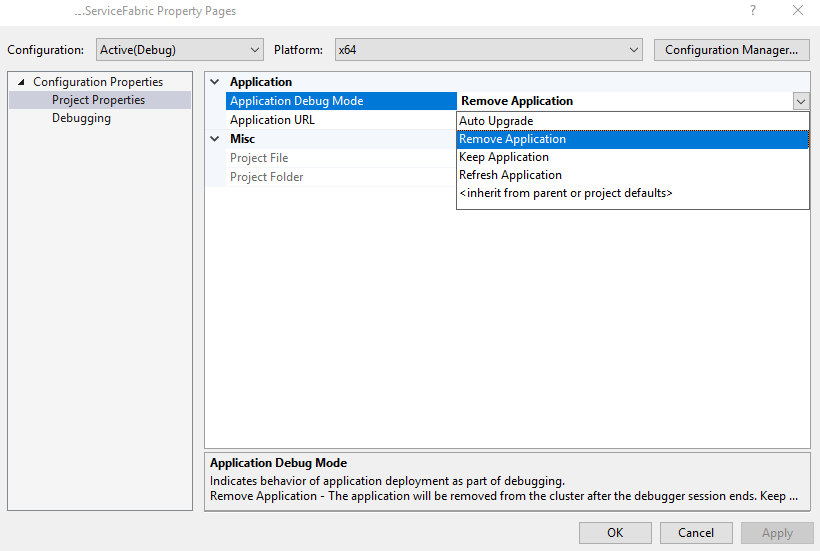
这种模式有一些限制:
- 它只在一个节点开发集群上工作。
- 对于ASP.NET核心项目,它只支持对代码、配置或数据包的内容以及项目目录内容的更改。不支持应用程序结构更改--比如对ServiceManifest.xml或ApplicationManifest.xml的更改--因为部署的应用程序的结构可能会随着不必要的结果而改变。在刷新应用程序调试模式时,仍然可以进行结构更改,但如果这样做,应用程序将被重新部署。
- 如果重新编译,有状态服务不会维护它们的状态。为了让新的二进制文件运行,必须删除服务以停止进程,这样就可以将新的二进制文件写入磁盘,这当然意味着所有的状态都被删除了。对于快速开发来说,这通常是可以的,但是要真正测试您的有状态服务,仍然需要在一个5节点集群中运行它们。
https://stackoverflow.com/questions/49601695
复制相似问题
腾讯云开发者

Copyright © 2013 - 2026 Tencent Cloud. All Rights Reserved. 腾讯云 版权所有
深圳市腾讯计算机系统有限公司 ICP备案/许可证号:粤B2-20090059  粤公网安备44030502008569号
腾讯云计算(北京)有限责任公司 京ICP证150476号 | 京ICP备11018762号