
IIS Express使用CLI信任自签名SSL证书。
IIS Express使用CLI信任自签名SSL证书。
提问于 2018-03-30 15:27:06
我们正在Visual中开发Web服务器。我们启用了SSL。这需要本地SSL证书。我们已经在我们的开发机器上设置了它,但是我们需要能够通过命令行在我们的CI构建机器上设置它,以便运行Selenium测试。在本地,Visual有助于解决这个问题。启动Web API web服务器时,将得到以下提示:
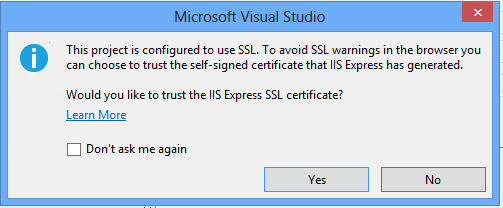
此项目配置为使用SSL。若要避免浏览器中的SSL警告,可以选择信任IIS Express生成的自签名证书。 要信任IIS Express SSL证书吗?
当我通过命令行在这个提示符中单击"Yes“时,我需要复制发生的情况。我该怎么做?
回答 1
Stack Overflow用户
发布于 2018-03-30 15:34:39
下面的C#代码与Visual完全相同(摘自Jexus,https://github.com/jexuswebserver/JexusManager/blob/master/JexusManager.Features.Certificates/CertificatesFeature.cs)
        private void Trust()
        {
            var cert = SelectedItem.Certificate;
            var store = new X509Store(StoreName.Root, StoreLocation.CurrentUser);
            store.Open(OpenFlags.ReadWrite);
            if (store.Certificates.Find(X509FindType.FindByThumbprint, cert.Thumbprint, false).Count == 0)
            {
                try
                {
                    store.Add(cert);
                }
                catch (CryptographicException ex)
                {
                    if (ex.HResult != NativeMethods.UserCancelled)
                    {
                        var dialog = (IManagementUIService)GetService(typeof(IManagementUIService));
                        dialog.ShowMessage($"An unexpected error happened. HResult is {ex.HResult}. Contact your system administrator.", Name,
                            MessageBoxButtons.OK, MessageBoxIcon.Error);
                    }

                    // add operation cancelled.
                }
            }

            store.Close();
        }
将其转换为PowerShell或任何类似的命令,然后您就可以实现目标了。
页面原文内容由Stack Overflow提供。腾讯云小微IT领域专用引擎提供翻译支持
原文链接:
https://stackoverflow.com/questions/49577068
复制相关文章
相似问题
腾讯云开发者

Copyright © 2013 - 2026 Tencent Cloud. All Rights Reserved. 腾讯云 版权所有
深圳市腾讯计算机系统有限公司 ICP备案/许可证号:粤B2-20090059  粤公网安备44030502008569号
腾讯云计算(北京)有限责任公司 京ICP证150476号 | 京ICP备11018762号