
在Vulkan进行深度测试失败的gltf 2.0模型载荷
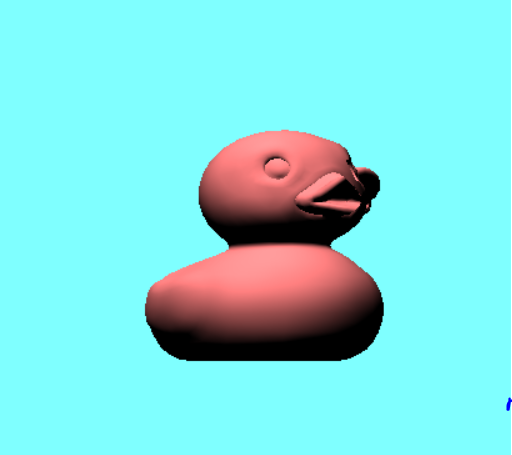
我使用自定义解析器将一个样例gltf2.0模型加载到我的Vulkan程序中,除了在这个特定的3d模型(这是在gltf2.0GitHub页面上发现的一个浴鸭模型)之外,所有东西都加载得很好,鸭子的喙似乎没有通过深度测试。
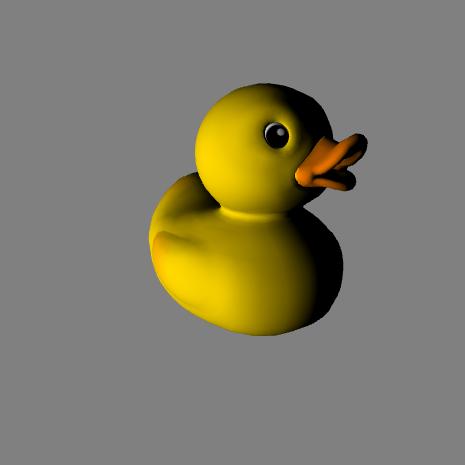
鸭子应该是这样的
然而,在我的程序中,它看起来是这样的
这是另一个角度的鸭子
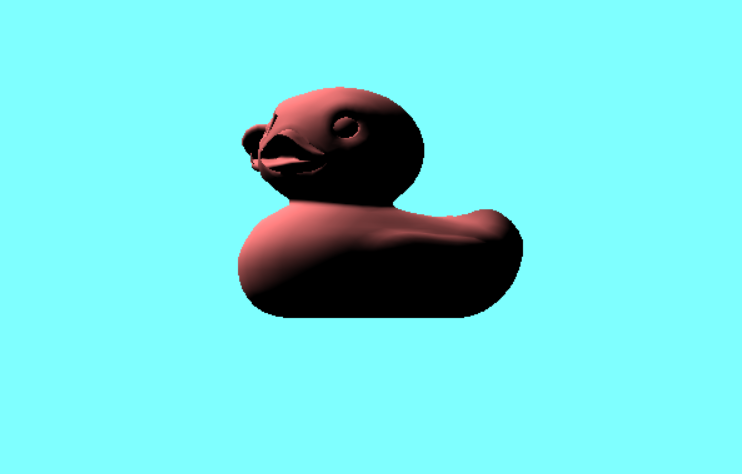
请注意,我还没有应用投影矩阵,我正在反演模型矩阵的y分量,并将我的正面设置为逆时针方向。
Vulkan管道初始化
  void phantom::createGraphicsPipeline()
  {
auto vertShaderCode = readFile("shaders/vert.spv");
auto fragShaderCode = readFile("shaders/frag.spv");

createShaderModule(vertShaderCode, vertShaderModule);
createShaderModule(fragShaderCode, fragShaderModule);

VkPipelineShaderStageCreateInfo vertShaderStageInfo = {};
vertShaderStageInfo.sType = VK_STRUCTURE_TYPE_PIPELINE_SHADER_STAGE_CREATE_INFO;
vertShaderStageInfo.stage = VK_SHADER_STAGE_VERTEX_BIT;
vertShaderStageInfo.module = vertShaderModule;
vertShaderStageInfo.pName = "main";

VkPipelineShaderStageCreateInfo fragShaderStageInfo = {};
fragShaderStageInfo.sType = VK_STRUCTURE_TYPE_PIPELINE_SHADER_STAGE_CREATE_INFO;
fragShaderStageInfo.stage = VK_SHADER_STAGE_FRAGMENT_BIT;
fragShaderStageInfo.module = fragShaderModule;
fragShaderStageInfo.pName = "main";

VkPipelineShaderStageCreateInfo shaderStages[] = { vertShaderStageInfo, fragShaderStageInfo };

//auto bindingDescription = getBindingDescription();
//auto attributeDescription = getAttributeDescription();

VkPipelineVertexInputStateCreateInfo vertexInputInfo = {};
vertexInputInfo.sType = VK_STRUCTURE_TYPE_PIPELINE_VERTEX_INPUT_STATE_CREATE_INFO;
vertexInputInfo.vertexBindingDescriptionCount = static_cast<uint32_t> (vertexBinding.size());
vertexInputInfo.pVertexBindingDescriptions = vertexBinding.data();
vertexInputInfo.vertexAttributeDescriptionCount = static_cast<uint32_t>(vertexAttributes.size());
vertexInputInfo.pVertexAttributeDescriptions = vertexAttributes.data();

VkPipelineInputAssemblyStateCreateInfo inputAssembly = {};
inputAssembly.sType = VK_STRUCTURE_TYPE_PIPELINE_INPUT_ASSEMBLY_STATE_CREATE_INFO;
inputAssembly.topology = VK_PRIMITIVE_TOPOLOGY_TRIANGLE_LIST;
inputAssembly.primitiveRestartEnable = VK_FALSE;

VkViewport viewport = {};
viewport.x = 0.0f;
viewport.y = 0.0f;
viewport.width = (float)swapChainExtend.width;
viewport.height = (float)swapChainExtend.height;
viewport.minDepth = 0.0f;
viewport.maxDepth = 1.0f;

VkRect2D scissor = {};
scissor.offset = { 0,0 };
scissor.extent = swapChainExtend;

VkPipelineViewportStateCreateInfo viewportState = {};
viewportState.sType = VK_STRUCTURE_TYPE_PIPELINE_VIEWPORT_STATE_CREATE_INFO;
viewportState.viewportCount = 1;
viewportState.pViewports = &viewport;
viewportState.scissorCount = 1;
viewportState.pScissors = &scissor;

VkPipelineRasterizationStateCreateInfo rasterizer = {};
rasterizer.sType = VK_STRUCTURE_TYPE_PIPELINE_RASTERIZATION_STATE_CREATE_INFO;
rasterizer.depthClampEnable = VK_FALSE;
rasterizer.rasterizerDiscardEnable = VK_FALSE;
rasterizer.polygonMode = VK_POLYGON_MODE_FILL;
rasterizer.lineWidth = 1.0f;
rasterizer.cullMode = VK_CULL_MODE_BACK_BIT;
rasterizer.frontFace = VK_FRONT_FACE_COUNTER_CLOCKWISE;
rasterizer.depthBiasEnable = VK_FALSE;
rasterizer.depthBiasConstantFactor = 0.0f;
rasterizer.depthBiasClamp = 0.0f;
rasterizer.depthBiasSlopeFactor = 0.0f;

VkPipelineMultisampleStateCreateInfo multisampling = {};
multisampling.sType = VK_STRUCTURE_TYPE_PIPELINE_MULTISAMPLE_STATE_CREATE_INFO;
multisampling.sampleShadingEnable = VK_FALSE;
multisampling.rasterizationSamples = VK_SAMPLE_COUNT_1_BIT;
multisampling.minSampleShading = 1.0f;
multisampling.pSampleMask = nullptr;
multisampling.alphaToCoverageEnable = VK_FALSE;
multisampling.alphaToOneEnable = VK_FALSE;

VkPipelineDepthStencilStateCreateInfo depthStencil = {};
depthStencil.sType = VK_STRUCTURE_TYPE_PIPELINE_DEPTH_STENCIL_STATE_CREATE_INFO;
depthStencil.depthTestEnable = VK_TRUE;
depthStencil.depthWriteEnable = VK_TRUE;
depthStencil.depthCompareOp = VK_COMPARE_OP_LESS;
depthStencil.depthBoundsTestEnable = VK_FALSE;
depthStencil.minDepthBounds = 0.0f;
depthStencil.maxDepthBounds = 1.0f;
depthStencil.stencilTestEnable = VK_FALSE;
depthStencil.front = {};
depthStencil.back = {};

VkPipelineColorBlendAttachmentState colorBlendAttachment = {};
colorBlendAttachment.colorWriteMask = VK_COLOR_COMPONENT_R_BIT | VK_COLOR_COMPONENT_G_BIT | VK_COLOR_COMPONENT_B_BIT | VK_COLOR_COMPONENT_A_BIT;
colorBlendAttachment.blendEnable = VK_FALSE;
colorBlendAttachment.srcColorBlendFactor = VK_BLEND_FACTOR_ONE;
colorBlendAttachment.dstColorBlendFactor = VK_BLEND_FACTOR_ZERO;
colorBlendAttachment.colorBlendOp = VK_BLEND_OP_ADD;
colorBlendAttachment.srcAlphaBlendFactor = VK_BLEND_FACTOR_ONE;
colorBlendAttachment.dstAlphaBlendFactor = VK_BLEND_FACTOR_ZERO;
colorBlendAttachment.alphaBlendOp = VK_BLEND_OP_ADD;

VkPipelineColorBlendStateCreateInfo colorBlending = {};
colorBlending.sType = VK_STRUCTURE_TYPE_PIPELINE_COLOR_BLEND_STATE_CREATE_INFO;
colorBlending.logicOpEnable = VK_FALSE;
colorBlending.logicOp = VK_LOGIC_OP_COPY;
colorBlending.attachmentCount = 1;
colorBlending.pAttachments = &colorBlendAttachment;
colorBlending.blendConstants[0] = 0.0f;
colorBlending.blendConstants[1] = 0.0f;
colorBlending.blendConstants[2] = 0.0f;
colorBlending.blendConstants[3] = 0.0f;

VkDynamicState dynamicStates[] = {
    VK_DYNAMIC_STATE_VIEWPORT,
    VK_DYNAMIC_STATE_LINE_WIDTH
};

VkPipelineDynamicStateCreateInfo dynamicState = {};
dynamicState.sType = VK_STRUCTURE_TYPE_PIPELINE_DYNAMIC_STATE_CREATE_INFO;
dynamicState.dynamicStateCount = 2;
dynamicState.pDynamicStates = dynamicStates;

VkDescriptorSetLayout setLayouts[] = { descriptorSetLayout };

VkPipelineLayoutCreateInfo pipelineLayoutInfo = {};
pipelineLayoutInfo.sType = VK_STRUCTURE_TYPE_PIPELINE_LAYOUT_CREATE_INFO;
pipelineLayoutInfo.setLayoutCount = 1;
pipelineLayoutInfo.pSetLayouts = setLayouts;
pipelineLayoutInfo.pushConstantRangeCount = 0;
pipelineLayoutInfo.pPushConstantRanges = 0;

if (vkCreatePipelineLayout(device, &pipelineLayoutInfo, nullptr, &pipelineLayout) != VK_SUCCESS)
{
    throw std::runtime_error("failed to create pipeline layout !");
}

VkGraphicsPipelineCreateInfo pipelineInfo = {};
pipelineInfo.sType = VK_STRUCTURE_TYPE_GRAPHICS_PIPELINE_CREATE_INFO;
pipelineInfo.stageCount = 2;
pipelineInfo.pStages = shaderStages;
pipelineInfo.pVertexInputState = &vertexInputInfo;
pipelineInfo.pInputAssemblyState = &inputAssembly;
pipelineInfo.pViewportState = &viewportState;
pipelineInfo.pRasterizationState = &rasterizer;
pipelineInfo.pMultisampleState = &multisampling;
pipelineInfo.pDepthStencilState = &depthStencil;
pipelineInfo.pColorBlendState = &colorBlending;
pipelineInfo.pDynamicState = nullptr;
pipelineInfo.layout = pipelineLayout;
pipelineInfo.renderPass = renderPass;
pipelineInfo.subpass = 0;
pipelineInfo.basePipelineHandle = VK_NULL_HANDLE;
pipelineInfo.basePipelineIndex = -1;

if (vkCreateGraphicsPipelines(device, VK_NULL_HANDLE, 1, &pipelineInfo, nullptr, &graphicsPipeline) != VK_SUCCESS)
{
    throw std::runtime_error("failed to create graphics pipeline! ");
}
}
输入命令缓冲区的转换矩阵
glm::mat4 rotationMat = glm::rotate(10.f,glm::vec3(0,1,0));
glm::mat4 translateMat = glm::translate(glm::vec3(0, 0, 0));
glm::mat4 scaleMat = glm::scale(glm::vec3(30, 30, 30));
glm::mat4 modelMat = v.model.transformation[0] * scaleMat * rotationMat;
//v.model.transformation[0] = rotationMat * v.model.transformation[0];
modelMat[1][1] = modelMat[1][1] * -1;
v.updateUniformBuffer(modelMat);
深度资源和呈现传递创建调试消息
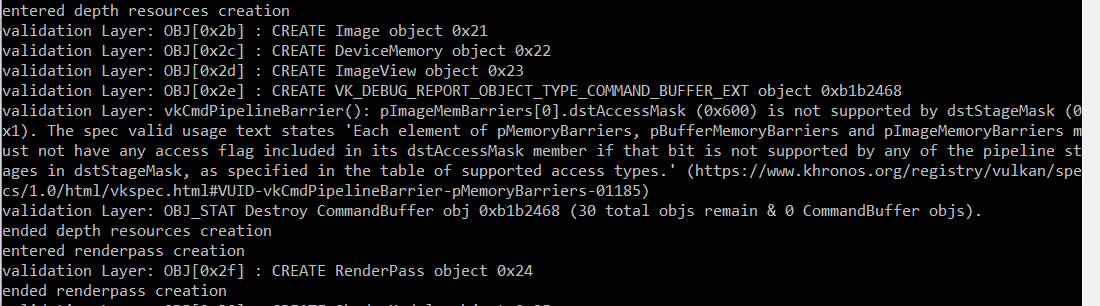
渲染孔型创建方法
void phantom::createRenderPass()
{
std::cout << "entered renderpass creation" << std::endl;

VkAttachmentDescription colorAttachment = {};
colorAttachment.format = swapChainImageFormat;
colorAttachment.samples = VK_SAMPLE_COUNT_1_BIT;
colorAttachment.loadOp = VK_ATTACHMENT_LOAD_OP_CLEAR;
colorAttachment.storeOp = VK_ATTACHMENT_STORE_OP_STORE;
colorAttachment.stencilLoadOp = VK_ATTACHMENT_LOAD_OP_DONT_CARE;
colorAttachment.stencilStoreOp = VK_ATTACHMENT_STORE_OP_DONT_CARE;
colorAttachment.initialLayout = VK_IMAGE_LAYOUT_UNDEFINED;
colorAttachment.finalLayout = VK_IMAGE_LAYOUT_PRESENT_SRC_KHR;

VkAttachmentReference colorAttachmentRef = {};
colorAttachmentRef.attachment = 0;
colorAttachmentRef.layout = VK_IMAGE_LAYOUT_COLOR_ATTACHMENT_OPTIMAL;

VkAttachmentDescription depthAttachment = {};
depthAttachment.format = findDepthFormat();
depthAttachment.samples = VK_SAMPLE_COUNT_1_BIT;
depthAttachment.loadOp = VK_ATTACHMENT_LOAD_OP_CLEAR;
depthAttachment.storeOp = VK_ATTACHMENT_STORE_OP_DONT_CARE;
depthAttachment.stencilLoadOp = VK_ATTACHMENT_LOAD_OP_DONT_CARE;
depthAttachment.stencilStoreOp = VK_ATTACHMENT_STORE_OP_DONT_CARE;
depthAttachment.initialLayout = VK_IMAGE_LAYOUT_DEPTH_STENCIL_ATTACHMENT_OPTIMAL;
depthAttachment.finalLayout = VK_IMAGE_LAYOUT_DEPTH_STENCIL_ATTACHMENT_OPTIMAL;

VkAttachmentReference depthAttachmentRef = {};
depthAttachmentRef.attachment = 1;
depthAttachmentRef.layout = VK_IMAGE_LAYOUT_DEPTH_STENCIL_ATTACHMENT_OPTIMAL;


VkSubpassDescription subPass = {};
subPass.pipelineBindPoint = VK_PIPELINE_BIND_POINT_GRAPHICS;
subPass.colorAttachmentCount = 1;
subPass.pColorAttachments = &colorAttachmentRef;
subPass.pDepthStencilAttachment = &depthAttachmentRef;

std::vector <VkAttachmentDescription> attachments = { colorAttachment, depthAttachment };

VkRenderPassCreateInfo renderPassInfo = {};
renderPassInfo.sType = VK_STRUCTURE_TYPE_RENDER_PASS_CREATE_INFO;
renderPassInfo.attachmentCount = attachments.size();
renderPassInfo.pAttachments = attachments.data();
renderPassInfo.subpassCount = 1;
renderPassInfo.pSubpasses = &subPass;

VkSubpassDependency dependency = {};
dependency.srcSubpass = VK_SUBPASS_EXTERNAL;
dependency.dstSubpass = 0;
dependency.srcStageMask = VK_PIPELINE_STAGE_BOTTOM_OF_PIPE_BIT;
dependency.srcAccessMask = VK_ACCESS_MEMORY_READ_BIT;
dependency.dstStageMask = VK_PIPELINE_STAGE_COLOR_ATTACHMENT_OUTPUT_BIT;
dependency.dstAccessMask = VK_ACCESS_COLOR_ATTACHMENT_READ_BIT | VK_ACCESS_COLOR_ATTACHMENT_WRITE_BIT;

renderPassInfo.dependencyCount = 1;
renderPassInfo.pDependencies = &dependency;

if (vkCreateRenderPass(device, &renderPassInfo, nullptr, &renderPass) != VK_SUCCESS)
{
    throw std::runtime_error("failed to create render pass ! ");
}


}
FrameBuffer创建方法
void phantom::createFrameBuffer()
{
swapChainFramebuffers.resize(swapChainImageViews.size());
for (size_t i = 0; i < swapChainImageViews.size(); i++)
{
    std::vector<VkImageView> attachments = { swapChainImageViews[i], depthImageView };

    VkFramebufferCreateInfo framebufferInfo = {};
    framebufferInfo.sType = VK_STRUCTURE_TYPE_FRAMEBUFFER_CREATE_INFO;
    framebufferInfo.renderPass = renderPass;
    framebufferInfo.attachmentCount = attachments.size();
    framebufferInfo.pAttachments = attachments.data();
    framebufferInfo.width = swapChainExtend.width;
    framebufferInfo.height = swapChainExtend.height;
    framebufferInfo.layers = 1;

    if (vkCreateFramebuffer(device, &framebufferInfo, nullptr, &swapChainFramebuffers[i]) != VK_SUCCESS)
    {
        throw std::runtime_error("failed to create framebuffer!");
    }
}
}回答 2
Stack Overflow用户
发布于 2018-04-07 17:12:03
gltf的设计考虑到了OpenGl,因此它接受(深度值)为(-1到1),所以无论何时您想在Vulkan中使用gltf,您都必须对此进行补偿,因为Vulkan期望深度范围为(0到1)。
在我的示例中,我以原始二进制格式将顶点数据发送给着色器,所以从技术上讲,我不是将z值映射到Vulkan所要求的范围,而是将所需的范围映射到深度值,问题就解决了。
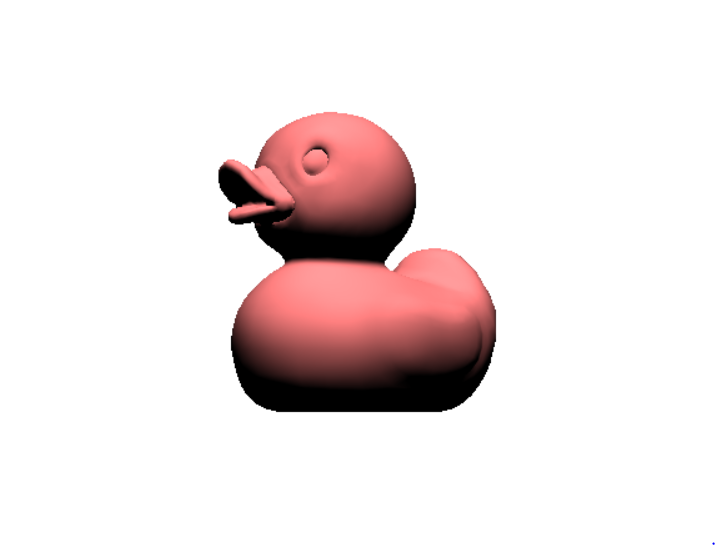
这是我的节目的结果
Stack Overflow用户
发布于 2018-03-30 01:11:58
网眼的其他部分似乎也不见了(可能是尾巴?或者仅仅是被排除了?)。我的猜测是面对淘汰而不是深度测试。试试rasterizer.cullMode == VK_CULL_MODE_NONE
https://stackoverflow.com/questions/49566433
复制相似问题
腾讯云开发者

Copyright © 2013 - 2026 Tencent Cloud. All Rights Reserved. 腾讯云 版权所有
深圳市腾讯计算机系统有限公司 ICP备案/许可证号:粤B2-20090059  粤公网安备44030502008569号
腾讯云计算(北京)有限责任公司 京ICP证150476号 | 京ICP备11018762号